

The quickest way to order an Axis Bank cheque book is through SMS Banking. No app login, internet banking, or branch visit required.
⚡ Quick SMS Steps
Step 1: Open your phone’s SMS app
Step 2: Type this message:
Example:
Replace 456789 with your own account’s last 6 digits.
Step 3: Send the SMS to:
| Feature | Details |
|---|---|
| Login Required | ❌ No login needed |
| App Download | ❌ Not required |
| Delivery Address | Delivered only to your registered address |
| Charges | Usually around ₹45–₹50 after free limit |
| Free Cheque Book | Many accounts get 1 free cheque book yearly |
| Daily Limit | 1 cheque book request per day |
⚠️ Important: Send the SMS only from your registered mobile number. Requests from unregistered numbers usually fail automatically.
💡 Need more control while requesting? Use the Axis Mobile App method (steps written below)
Step-by-Step: Request Axis Cheque Book via Mobile App
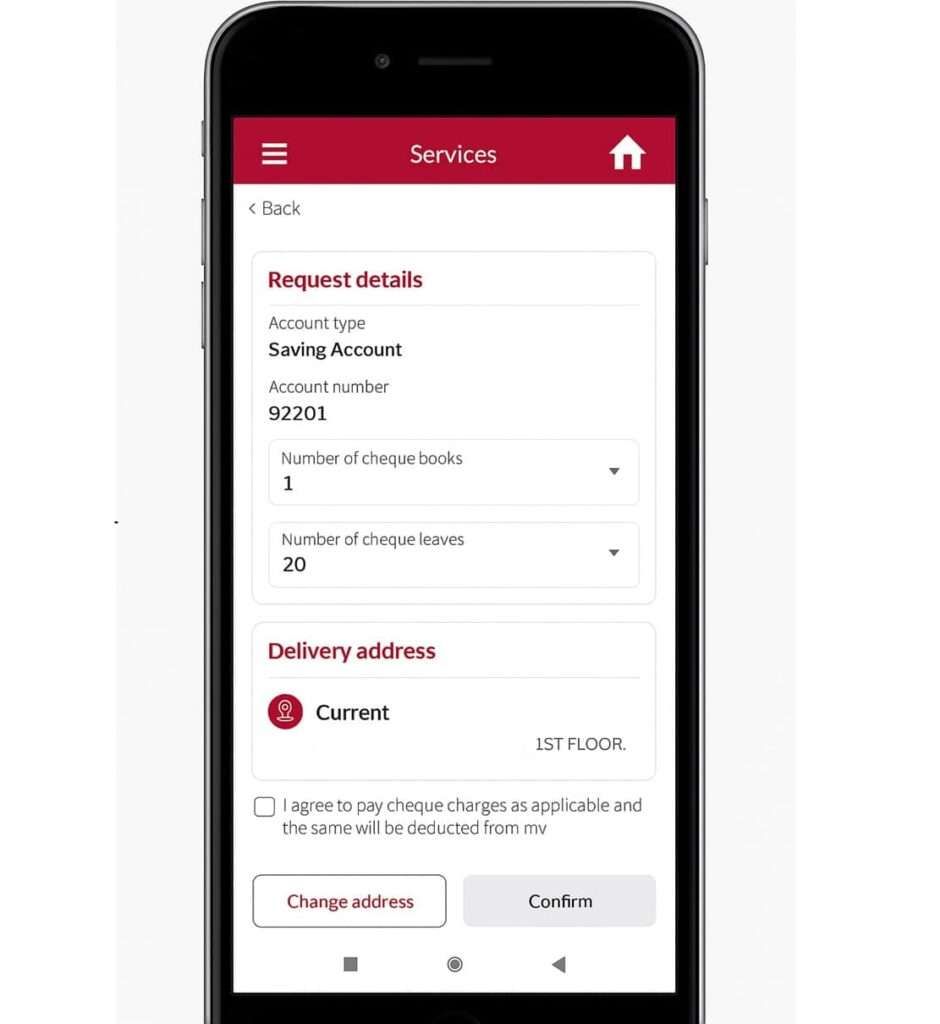
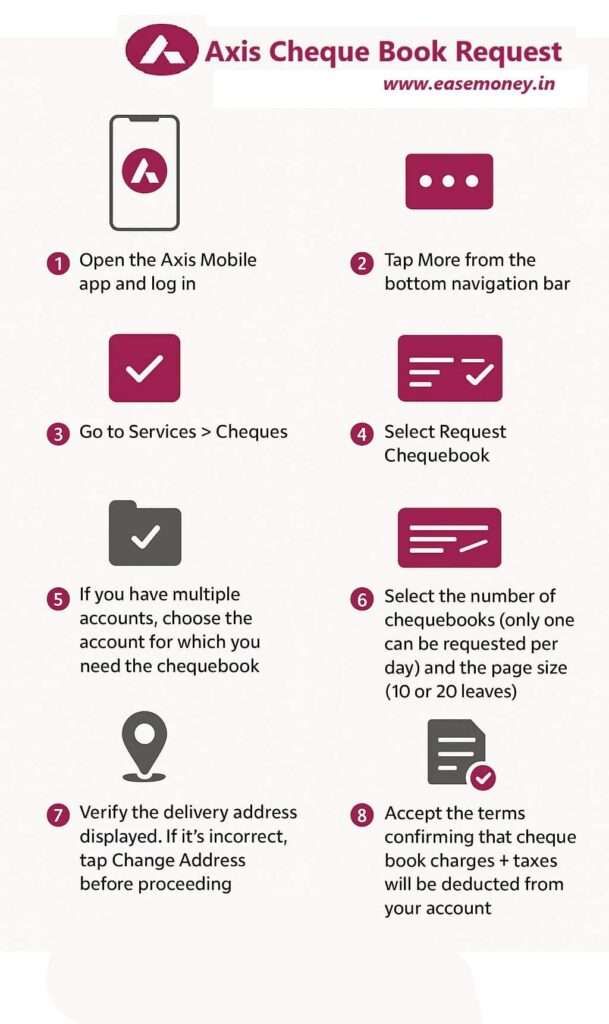
- First, log in to your Axis Bank Mobile Banking using your 6-digit mpin or your fingerprint biometric.
- On the footer navigation bar, tap on the “more” button.
- Now, the Products and Services section is open. In the services, tap on cheques.
- Select Request Chequebook from the available options, such as Track/stop cheque, and positive pay.
- If you have multiple accounts, choose the account for which you need the cheque book.
- Choose the number of cheque books and page count (10 or 20 leaves).
- Confirm your delivery address. (If incorrect, tap Change Address to update. You can change via an aadhaar OTP.)
- Tick the box “I agree to pay cheque book charges + taxes” (deducted from your account).
- Tap on Confirm to submit the request.
- You will get an Tracking Number (SR code) on your phone and the Reference ID to track your delivery status anytime.
Important: Make sure your registered mobile number and address are updated before placing the request, otherwise delivery may fail or get delayed.
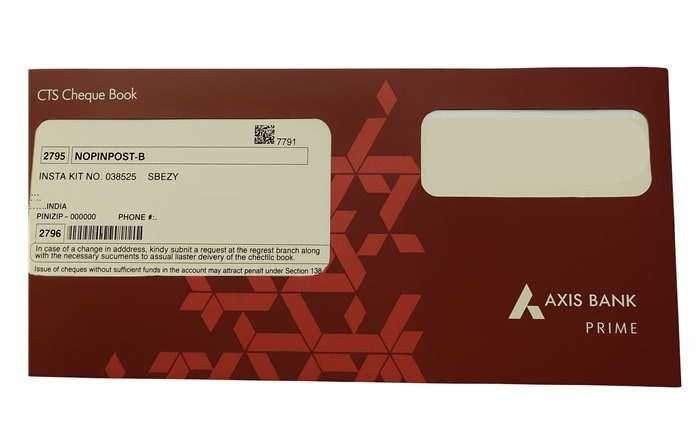
Note: Axis Bank issues chequebooks with 10 or 20 leaves, depending on your account type and eligibility and bank-defined limits. Once requested, the chequebook is printed centrally and delivered to your registered address via courier services like Bluedart, Delhivery, or India Post.
Apply Axis Cheque Book Without Login (3 Fast Methods)
1. Insta Services on Axis Website
- Visit the official page – https://www.axisbank.com/support
- On the menu, select Insta services. Here, you have to tap on “Account details”
- In options, select “Request Chequebook”.
- Enter your customer ID or account and 6-digit OTP to order directly using Chrome.
2. Using Axis Bank ATM
Your Axis Bank ATMs also support this feature; all you have to do is visit your nearest Axis Bank ATM of Axis or you can use the Axis Locator tool to find nearby.
- Put your debit card, tap on Other services.
- Select Cheques and order directly.
- Enter your ATM pin and mobile OTP.
- Confirm account details and select book leaves.
- Submit the request.
3. Cheque book request form PDF and submit to the branch
At the branch, Axis Bank customers can order a new chequebook, but you have to fill up the Customer Request Form (CRF). Here are the steps on how to fill it out easily –
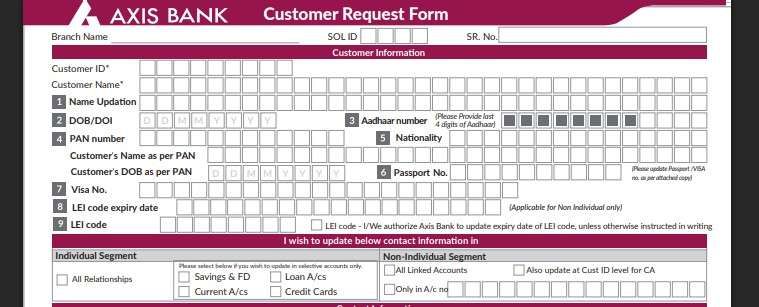
- Download the Customer Request Form from the official Axis Bank website or collect it from the branch counter.
- Fill in your details like Customer ID, Name, DOB, PAN, nationality, branch name, last 4 digits of Aadhaar, and branch SOL ID.
- If you do not know the SOL ID, check the Axis Bank branch list PDF.
- Under the Individual Segment, tick Savings Account (or Current Account for business use).
- On Page 2, go to Banking Requests → Point No. 15 (Chequebook Request).
- Tick the chequebook request option and mention how many cheque books you need.
- Sign the form and submit it at the service counter.
- After verification, the cheque book will be sent to your registered address or made available for branch pickup.
When Will the Chequebook Be Delivered After Ordering?
As per Axis Bank process, cheque book delivery usually takes 3–7 working days, but delivery time can vary by location. You can track the status using the Reference ID or Axis Mobile App.
| Region Type | Expected Delivery Time |
|---|---|
| Metro Cities | 3–4 Working Days |
| Small Cities | 4–6 Working Days |
| Rural/Village Areas | 5–7+ Working Days |
How to Track Your Chequebook Delivery Real-time
Your Axis Mobile app lets you check live status:
- Open the app, on the dashboard, quick links section, tap on services.
- On the top header, you will get “My requests”.
- Here, select the Requested Chequebook.
- Tap on delivery status to find – delivery status (Printed, Dispatched, In Transit, Delivered).
- It also tells you delivery timings based on your location.
Axis Bank Cheque Book Charges & Limits
Axis Bank provides free chequebooks annually based on your account tier, with a standard charge of ₹50 + GST per additional book (or ₹2 to ₹4 per leaf) once the free limit is exceeded.
| Account Category | Free Annual Limit | Additional Charges |
|---|---|---|
| Wealth & Salary | Unlimited | Nil |
| Priority & Prime | 2 Books per Quarter | ₹50 + GST per book |
| Digital Savings | 1 Book (25 leaves) | ₹50 per book |
| Regular Savings | 1 Book (20 leaves) | ₹50 + GST per book |
| Current / Business | 100 Leaves (Initial) | ₹2 per leaf |
| Sahaj Savings | 1 Book (10 leaves) | ₹4 per leaf |
Frequently Asked Questions
How can I get a chequebook from Axis Bank immediately?
You can’t get a cheque book immediately, due to it is printed as per your information and mailed registered address only. As per the time frame, you will have to wait at least 3 working days.
Why is Axis Bank not offering me a chequebook?
Chequebook requests may be denied in most cases, such as when your KYC is still pending, your address is mismatched, or your account doesn’t have the facility for chequebooks, mostly student accounts.
How do I know if my Axis Bank chequebook request was successful?
Just after ordering, you will receive an SMS or Email confirmation linked mobile number and Email ID. You can also check the confirmation details under “My Requests” in the Axis support.
Is signature update mandatory before ordering Axis Bank chequebook?
Yes, especially for digitally opened accounts. If your signature isn’t updated in the system, Axis Bank may block first-time chequebook issuance.
How many cheque leaves does Axis Bank issue in one chequebook?
Axis Bank usually issues chequebooks with 10 or 20 leaves. Availability depends on your account type, eligibility, and bank-defined limits for that category.
How long does Axis Bank take to deliver a chequebook?
Delivery usually takes 3 to 7 working days after successful request. Delays can happen due to address verification, courier workload, or incomplete KYC.
Can I track Axis Bank chequebook delivery status online?
Yes. You can track it in the Axis Mobile app under “My Requests” using the reference number to see printing, dispatch, and delivery status in real time.
Is Axis Bank chequebook free or chargeable?
It’s free up to a limit based on account type. After free quota is used, charges usually start from ₹50 plus GST per chequebook or per leaf.
Why is my Axis Bank chequebook request getting rejected?
Common reasons include pending KYC, address mismatch, signature not updated, insufficient balance for charges, or account types that don’t support cheque facilities.
Can I get an Axis Bank chequebook instantly from the branch?
No. Axis Bank chequebooks are centrally printed and couriered to your registered address. Branches cannot issue chequebooks instantly under any circumstances.
Read – General Methods to Apply Cheque
Hope you liked the content. Explore smart options below 👇
🔥 Recommended