

To close a Kotak Mahindra Bank account, you must submit a physical account closure form at your Home OR nearest branch.
Carry unused items like cheque book, debit card, or passbook if issued with the account.
Most Kotak account closures are completed within 2–3 working days, although some branches may take slightly longer depending on verification.
📌 Kotak Bank Account Closure Steps
💡 Branch Tip: Visit during non-peak hours instead of lunch time or evening rush for faster processing and less waiting.
📌 What Happens After Closure?
📞 Status Check & Support
Customer Care: 1860 266 2666
Email: service.bank@kotak.com
📖 Read below: How to fill the Kotak closure form correctly, Special cases for Closure, and charges.
Can You Close a Kotak Bank Account Online?
No, Kotak Mahindra Bank does not allow full online account closure, even for a digital Kotak 811 account. There is no permanent closure option inside the Kotak app, internet banking, chatbot, or customer care.
Customer care can only help with things like:
- Negative balance issue
- Closure request token
- Basic account guidance
For final closure, you still need to visit a branch.
If you have a Kotak 811 account, you can usually close it from any Kotak branch, not only the home branch. This helps when your original branch is in another city.
Required Documents & Checklist
Before visiting the Kotak branch, keep these things ready to avoid another trip. Here is the list –
| Item | Why it matters |
|---|---|
| Your Original ID proof (Aadhaar/PAN/Driving License/Passport) | Final identity verification (original or photocopy) |
| Closure form | You can take it from the branch or download it official site. |
| Debit card linked to the account | Surrender or cut it. If available, carry it to the branch. |
| Chequebook (if issued) | Unused leaves must be cancelled |
| Passbook (if you received one) | Bank may collect or stamp the passbook during closure. |
| Printed closure form filled properly | Saves time at the branch |
| Account number noted clearly | Keep handy for the form |
| A black pen | For matching signature (bank prefers black) |
Real tip: Keep your signature style exactly as used when opening the account or as you do on your cheque. Kotak takes signature mismatch seriously.
Special cases: Kotak Account Closure
Normal account closure steps can change based on your account type. Check these special cases first to avoid branch rejection or delay.
| Account Situation | What You Need for Closure |
|---|---|
| Joint Account | All account holders must sign the closure form together. |
| Minor Account | Guardian signature + ID proof of both minor and guardian required. |
| Senior Citizen Account | Normal ID proof needed. Doorstep banking pickup may be available. |
| Deceased Account Holder | Nominee or legal heir must submit original death certificate. |
| Locker Linked | Locker must be emptied and surrendered first. |
| Dormant or Frozen Account | KYC update documents required before closure process starts. |
The Bottom Line: If an account involves multiple parties or linked services, expect a slightly more detailed documentation process.
How to fill the Kotak Account Closure Application Form
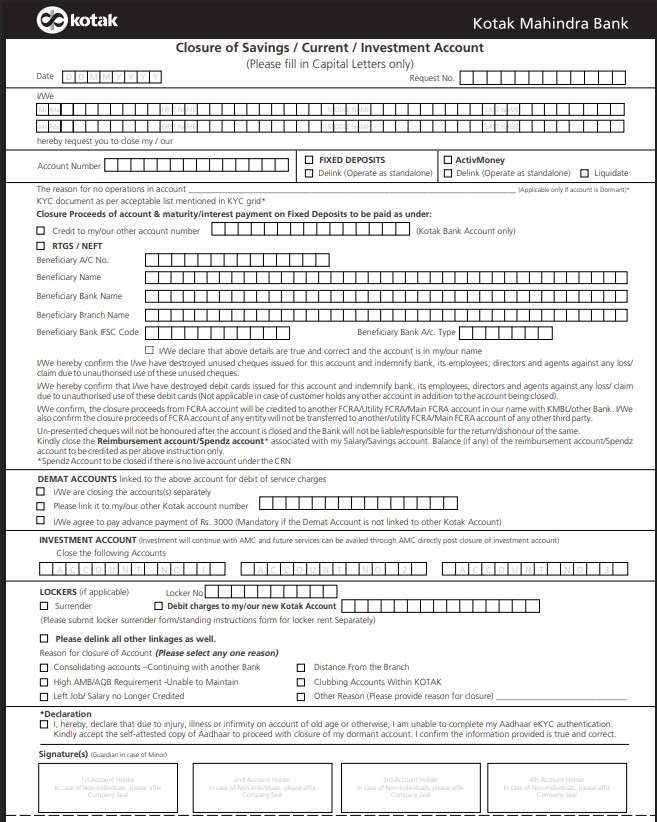
The closure form has 2 pages, but only Page 1 is for you. Page 2 is for bank staff and acknowledgement purposes.
Page-1: Account Information
| Form Field | What to enter |
|---|---|
| Date | Date of submission (when you visit the branch and submit it) |
| Full Name | As per account records (if joint account, enter both holder names in boxes) |
| Account Number | Carefully write 10 to 14 digits |
| Linked products | Ignore FD/locker/investment if not applicable, if have, tick and enter account number |
| Proceeds of Closure | Choose Kotak transfer or NEFT/RTGS — enter any bank account in your name. |
| Beneficiary details | Name, account number, IFSC, bank name, branch |
| Reason for closure | Select or mention a short reason – such as High AMB or Left job |
| Declaration | Tick confirming surrender of cards/cheques |
| Signature | Same signature as bank records – for joint account, sign all holders. |
Important: If a joint account → all holders must sign together.
Page 2: Acknowledgement Slip
You do not fill this. The bank tears it off and gives you a receipt. Store it safely until final closure confirmation arrives.
How to track status afterwards
- Log in to the app — the account should disappear after closure
- Check SMS/email updates
- If no update after 10 days → visit the same branch with the acknowledgement slip
Important Rules Before Closing Kotak Account
- First clear all dues, penalties, or negative balance first. If balance is negative, check the reason through customer care.
- If FD, locker, demat, or investment accounts are linked, inform the bank what you want to do with them.
- Shift all auto-pay services before closure like Netflix, LIC, phone bills, WiFi, SIPs, etc.
- Kotak credit card will stay active even after savings account closure.
- Remove or update linked EMI, SIP, or credit card payment mandates using NetBanking or mobile banking.
- Account closure charges depend on account age.
- Kotak 811 and digital account users can usually visit any Kotak branch for closure.
Official Closure Charges & Fees
Kotak typically charges a fee of ₹600 in a specific window of time –
| Account Age | Closure Charge |
|---|---|
| Closed within the first 30 days | Free |
| Closed between 31–181 days (1–6 months) | ₹600 |
| Closed after 181+ days | Free |
| Salary Accounts | Usually NIL closure charges |
| 811 Accounts | Charges applies. |
Pro-Tip: Avoid the ₹600 Closure Fee
Most Kotak accounts attract closure fee if closed between 31 and 181 days of opening. If your account is around 4 months old and it’s not an emergency, wait until the 6-month mark to close it for FREE.
The “Real World” Math:
- Example: If you opened your account on 5 April, it hits the 6-month mark on 6 October.
- The Win: Closing it on 20 July costs you ₹600. Waiting until October saves you that money completely.
Resolving Negative Balance Issues
A negative balance means unpaid dues are pending in your Kotak Mahindra Bank account. The bank usually will not process closure until the balance becomes zero.
1. First, ask the branch staff for:
- Exact negative balance amount
- Full breakup of charges
- Reason behind the dues
2. In many cases, the negative balance comes from:
- Debit card annual charges
- Non-maintenance charges
- SMS banking fees
- GST on penalties
Example: if your account has ₹50 and total charges become ₹500 + GST, then the remaining amount becomes your negative balance.
Sometimes Kotak also activates add-on insurance or bundled products during account opening. If an insurance policy is linked, ask for the policy number and close that service separately.
3. To fix the issue smoothly:
- Pay the pending amount at the branch
- Bring the account balance to zero
- Submit the closure form immediately
- Remove auto-debits or standing instructions
- Do not delay after clearing dues
If you feel the charges are unfair or wrongly applied, talk to the branch manager first. You can also raise a complaint with Kotak nodal officers.
Sometimes the smartest decision is simply closing the account properly instead of leaving it negative for months and letting charges keep increasing.
Frequently Asked Questions
How long does Kotak account closure take?
The branch submission takes only 20 minutes, but usually takes 7–10 days after you submit the form at the branch. If signature mismatch or pending charges, it may stretch longer. Keep the acknowledgement slip safe.
Can I close my Kotak account through SMS?
No. SMS is only for alerts. No closure allowed by SMS or email. Avoid relying on shortcuts — the bank won’t cancel your account without paperwork.
Do I need to visit the same branch where I opened the account?
For 811 accounts, any branch should accept. If they refuse, change your home branch online first, then resubmit easily at your nearby branch.
What if my Kotak account has a negative balance?
First, clear the dues at the branch. Kotak won’t close until the balance becomes zero. Delay increases penalties. Fix it early, then close the account.
What if my chequebook or debit card is lost?
Tell the bank in the form. They will mark items as lost. You may need to sign a small declaration so that no fraud complaint arises later.
What if my Kotak account is dormant or frozen?
When you stop using the account for 6 to 12 or more months, the bank puts that account in dormate. Update KYC first to reactivate. Only then closure request accepted. Frozen accounts don’t close directly due to compliance rules.
Does Kotak Bank send any final confirmation after account closure?
Yes. Kotak Mahindra Bank sends an SMS and sometimes an email once the account is permanently closed. If no update comes within 10 days, revisit the branch with an acknowledgement.
How can I confirm my Kotak account is permanently closed, not inactive?
Try logging into the Kotak app after 7–10 days. A closed account disappears completely. Inactive accounts still appear but show restricted access — that’s the clear difference.
Can Kotak delay closure due to a signature mismatch?
Yes. Signature mismatch is a common delay reason. The branch will ask you to re-sign in front of an officer with ID proof, after which closure usually resumes within 2–3 working days.
Will Kotak refund the remaining balance automatically after closure?
Yes! balance is refunded via NEFT or internal transfer, as chosen in the form. Cash payout is rare. NEFT credits usually reflect within 24–48 working hours after approval.
Read – How to Close a Bank Account in India
Hope you liked the content. Explore smart options below 👇
🔥 Recommended