In 2026, a Kotak credit card limit increase (limit enhancement) means the bank raises the maximum amount you can spend on your existing card during one billing cycle. Your card stays the same — only the allowed spending capacity becomes higher. Unlike the Upgrade Credit Card offer, where Kotak sends a new card to your doorstep, but here, the same card got higher limit and the same features.
It can happen in two ways:
- Kotak may give a pre-approved offer automatically.
- You can request it yourself by contacting the bank and providing documents.
But it’s not only about spending more. When the bank increases your limit, it basically means they observed your payments and usage and now feel your repayment behaviour is safe and reliable.
Real example: Mahesh Gupta got his first Kotak IndianOil credit card with only a ₹15,000 limit. He used it mostly for petrol and small groceries and always paid the full bill before his card’s due date. After around 7–8 months, the bank reviewed his record and sent a pre-approved offer, increasing his limit to ₹45,000 without any documents.
How to Become Eligible for Kotak Pre-Approved Limit Increase Offer
Kotak’s pre-approved increase is automatic. You don’t apply; the system watches your behaviour. If your pattern looks safe, the bank prepares a higher limit and then asks you to accept it. No salary slips needed.
How the process actually runs
- Around every 6 months, the system quietly reviews your card account.
- It checks the payment record, usage, and credit profile
- If you match their safety rules, you get selected automatically
- You receive an SMS, email, or app notification
- You open the Kotak app → Service Requests → Accept and confirm with OTP
As per RBI rules, the limit will not change until you approve it. If you ignore the message, your old limit continues only.
What makes you eligible
- Wait the 6-month gap — if your limit was recently revised, you must wait about 6 months from the last revision date before placing a new request.
- Full payment habit — you can pay early or late in the cycle, but it should be the full bill. Minimum due breaks trust
- Use about 20–30% of the limit — like a ₹50,000 limit, try ₹10k–₹15k usage NOT ₹45k.
- Keep the card active — small normal spends (fuel, groceries, bills) work better than rare big swipes
Unlike maxing out every month, balanced usage shows control. But if you never use the card, the bank feels you don’t need a higher limit.
The main factors that trigger the offer
- CIBIL score is usually around 750+
- Savings or salary account with Kotak
- Regular or increasing salary credits
- Low other loan burden (few EMIs or card balances)
Fact: Many users actually miss the offer because Kotak sometimes places it inside app notifications instead of calling you. The bank rarely phones for a limit increase.
Real Easemoney Tip
If you want the review faster, pay your bill a few days before the statement date once or twice, and keep utilisation low for two billing cycles. The system often detects lower outstanding and triggers reassessment sooner.
How to Activate Kotak Pre-Approved Credit Limit Increase OFFER
If you already have the offer, you don’t really “apply”. The bank has finished checking in the background — you only need to activate it. The whole process usually takes about a minute.
Method 1: Using the Kotak Mobile Banking App (Fastest)
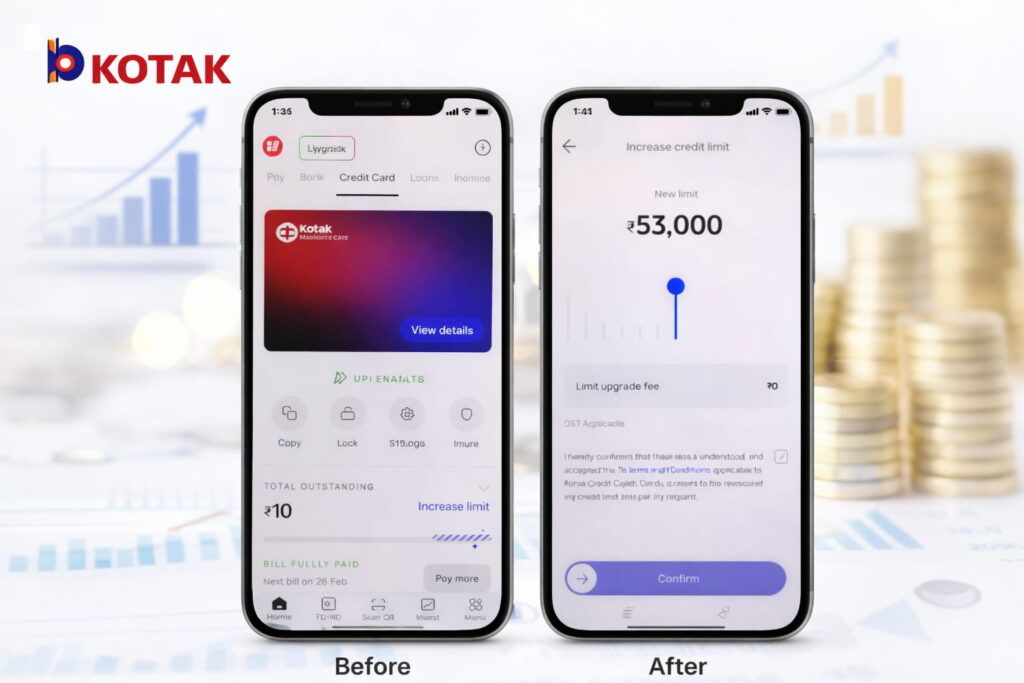
- First, Open new Kotak Mobile Banking App. As per Reddit, Kotak recently stopped the old Kotak app and switched to the new, upgraded one. Here, these steps work only new app.
- Now, log in using your 6-digit app PIN OR biometric.
- Tap the Credit Card section on the dashboard menu.
- Open your card details – You will find the mosaic design layout for the offer (near the total outstanding area)
- You will see a highlighted Increase Limit / Limit Enhancement bar
- Tap it once
- A slider appears (minimum → maximum range)
- Select the limit you are comfortable with
- Enter MPIN and OTP to confirm
After confirmation, the screen shows your new credit limit, and it normally updates instantly.
Important: the bank already approved internally, but the limit changes only after you confirm. If you don’t press confirm, the old limit stays.
2. WhatsApp Banking Method (Alternative)
You can also activate through WhatsApp.
- Save 811 Cares WhatsApp: 8928913333
- Send Hi
- Select Credit Card services
- Choose Limit Enhancement
- Verify using OTP and approve
- This is useful if you don’t want to search inside the app menus.
Tip: You don’t have to select the maximum amount. You can choose a smaller increase if you prefer control — the approval remains valid as long as you accept within the offer period.
What if No Pre-Approved Offer is Showing?
If You Have Not Received Any Increase in the Last 6 Months and if you open the app and no Limit Enhancement banner appears, it doesn’t mean rejection. It usually means the system has not auto-reviewed you yet. You can still push the bank to check your profile manually.
1. Manual Limit Increase Request Route (Income-Based Review)
- Net Banking: Simply, first Login → Select Credit Cards in the menu → Service Requests → Limit Enhancement → choose Request with Documents. and provide your new salary slip OR ITR document.
- Email: You can send a request to service.cards@kotak.com
- Just Attach last 3 salary slips or the latest ITR
- Also, mention your last 4 digits of the card and the expected limit
Processing time: usually about 5–7 working days because a real officer verifies documents. Unlike pre-approved offers, here the bank actually checks repayment capacity, not just usage pattern.
2. Practical Triggers (How you can make the system notice you)
If you don’t have fresh documents, you can still improve your chances.
- Update profile details = Change company/designation in the app profile after a promotion. The system often runs a fresh risk review.
- Controlled usage spike = For one billing cycle, you can use around 60–70% of your limit, but repay fully before the statement date. This shows you needed a higher limit, but you were still financially comfortable.
Do not repeat every month. One controlled cycle is enough; doing it continuously looks risky.
Expert Advice: If you recently got a salary hike letter, apply immediately with documents instead of waiting. But if income is the same, focus on clean repayment and moderate usage for two billing cycles — the system usually reviews you naturally after that.
3. If You Have a Kotak Salary Account
This is actually the easiest situation. Because your salary is already coming into Kotak, the bank can see your monthly income directly. So unlike other customers, you usually don’t need to “prove” earnings again — they already have the record.
- Email Request = Open the Kotak customer service page (Email Us section). Select a credit card-related query, then put your salary account details. Just submit the request. Since the bank can see your salary credits, approvals are normally faster than manual document cases.
- Call Customer Care = You can also call Kotak support and ask for a credit limit enhancement review. The agent will register your request immediately. You receive a service reference number. The bank checks your salary inflow and credit bureau report, and approve or reject it.
How to Increase Kotak Secured Credit Card Limit (FD-Linked Cards)
For secured cards (like Kotak 811 #DreamDifferent), the limit is not based on salary. It depends on your Fixed Deposit (FD) kept as security. So unlike normal cards, the bank cannot raise the limit unless your FD value increases or you graduate to a regular card.
1. Main Method — Increase the FD Amount
| What you do | What happens |
|---|---|
| Add money to existing FD or open a new FD | Your card limit becomes higher automatically |
| Link FD to the credit card | Bank recalculates credit limit |
| Submit limit modification request | Limit updated after processing |
Typical rule: card limit ≈ 80–90% of FD value
Example:
| FD Amount | Expected Card Limit |
|---|---|
| ₹20,000 | ~₹16k–₹18k |
| ₹50,000 | ~₹40k–₹45k |
| ₹1,00,000 | ~₹80k–₹90k |
Steps (quick): simply Login Kotak app, create/add funds to the FD and inform the bank or submit a request at the branch/app
2. Upgrade to an Unsecured Card (Best Upgrade)
After 6–12 months of proper usage, you can request conversion. The Conditions work here –
- On-time payments
- CIBIL around 750+
- No penalties
When approved:
- FD lien removed
- You get a normal credit card
- Limit now depends on income (not FD)
3. Practical Tips (Very Important)
- Don’t spend the full limit — keep usage under 30%
- Pay your full bill every month
- Use the card regularly (small transactions work best)
- You can request the bank to link multiple FDs to one card
Simple understanding: Secured card limit grows with FD. But the real jump happens when you convert to a regular card — that’s when limits increase significantly.
FAQs
Can the Kotak UPI credit limit be increased?
Yes, but UPI spending uses your credit card limit only. Increase the card limit first; UPI cap automatically rises. Example: ₹40k limit becomes ₹80k, your UPI available amount also increases accordingly.
Why is my Kotak starting limit very low?
New cards start conservative. Bank first watches 3–6 months behaviour—usage, full payment and penalties. If you repay properly, they normally increase after review cycle without needing documents or branch visit.
Does limit increase improve CIBIL score?
Yes, if spending stays same. Example: ₹20k spend on ₹50k limit equals 40% utilisation; on ₹1 lakh limit it drops 20%. Lower utilisation gradually helps score over next reporting cycles.
Is there any fee for Kotak limit enhancement?
No charge for accepting higher limit in 2026. Bank earns from transactions and interest, not enhancement. Charges apply only if you cross limit, delay payment, or take cash withdrawal from ATM.
Can I get ₹2–5 lakh limit in Kotak card?
Possible but gradual. Maintain 750+ CIBIL, steady income above ₹50k monthly and clean repayments for about 12–18 months. Bank slowly upgrades from League to Zen/Mojo with higher approved limits.
Hope you liked the content. Explore smart options below 👇
🔥 Recommended