SBI increases your credit card limit only when your usage looks safe — not just because you request it.
In most cases, you either get a pre-approved limit increase inside the SBI Card app or you can request it manually by submitting income proof.
SBI gives two clear paths for limit increase:
- Pre-approved offer → Accept instantly (no documents) = If your card usage and payment record are proper, the system itself generates an offer. No documents required. You only have to open the SBI Card app or website and accept it. After confirmation, limit updates.
- Manual request → Submit salary slip/ITR for review = If no offer appears, you can apply manually. In this case, SBI will ask for income proof like salary slips or the latest ITR to verify repayment capacity. After verification, the bank may approve a higher limit.
So overall, your card limit increase improves your purchasing power and gives more financial flexibility — either already approved internally by the bank or approved after you submit income proof.
Small real-life example
Suppose Ramesh, a salaried employee, is using an SBI SimplyClick credit card with a ₹40,000 limit. Every month, he spends around ₹12,000–₹15,000 and always pays the full bill on time.
After some months, when he opens the SBI Card app and taps his card details, a message shows “Credit Limit Increase Available.” He only clicks the option and confirms with OTP. That’s all — new limit ₹75,000 shows immediately.
Important thing: As per RBI rules, the bank does not increase the credit limit automatically without your consent. Even if pre-approved, you must accept it yourself. Until you give permission (OTP confirmation), the old limit continues only.
Method 1 — Increase SBI Credit Card Limit Using the SBI Card App
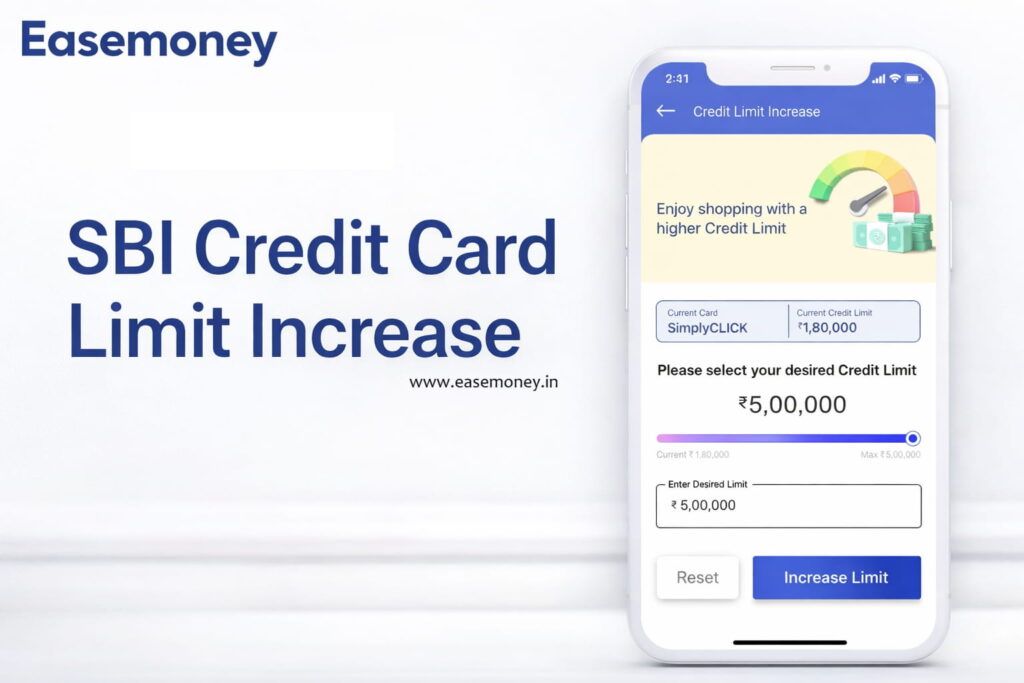
You can increase your SBI card limit directly from the mobile app. But many customers open the app and still don’t see anything, because the offer is not on the home screen. It is inside one specific section only. If you don’t open that menu, you will feel bank didn’t give.
Step 1 — Install and open the SBI Card App
You can download the official SBI Card app from the Play Store or App Store and open it. If first time user, you have to register:
- Enter card number
- expiry date
- CVV
- OTP will come on registered mobile.
Step 2 — Create MPIN and login
After verification, you create a 4-digit MPIN. Next time you can simply login using MPIN OR you can set a FACE ID or Fingerprint. But make sure you login with the number linked to the credit card, otherwise the card section may not load properly.
Step 3 — Open the “More” option (important)
After login you will see the bottom menu bar.
You have to tap More. Many users stop on the dashboard only, and because of that, they never see the offer.
Step 4 — Go to Benefits
Inside More, you will find the Benefits section. Open it slowly and wait a second. Sometimes the app takes a moment to load.
Step 5 — Tap “Credit Limit Increase Offer”
Here you can see the Credit Limit Increase Offer if the system has generated one.
If it is not showing, it doesn’t mean rejection — it means your bank system is still evaluating your usage and checking your CIBIL time to time.
Step 6 — Understanding the Limit Slider (This decides approval)
When eligible, SBI does not show a fixed amount. It shows a range meter.
Quick Example:
- Your Current limit: ₹50,000
- Offered range: ₹70,000 → ₹1,80,000
You can move the slider and choose the limit yourself. But here, many customers make mistakes. You may feel that selecting the maximum is best. But if you choose the highest amount, SBI may:
- Ask salary slips
- Request income proof
- Do manual verification
Then instant approval will not happen.
Step 7 — Better way (higher approval chance)
You should choose a practical increase. A good rule: Choose around 25–35% more than the current limit.
Example: ₹50,000 card → select around ₹1,00,000 – ₹1,10,000. This way system usually approves internally. Because your new limit amount falls in the bank’s safe range:
- Only OTP confirmation required
- No documents asked
- approval often immediate
Step 8 — Final confirmation
After selecting amount, you press confirm. OTP comes → you enter OTP.
Then:
- Mostly limit updates instantly
- sometimes within a few minutes
- rarely next working day
As per the RBI rule, a bank cannot increase the limit automatically. Even a pre-approved offer works only after you accept it.
Simple advice: You can check the app once in a while. If you are using the card properly, the offer often appears quietly — you just have to open the correct screen.
Alternative Ways to Request an SBI Card Limit Upgrade
You don’t always have to search inside the app menus. There are two simple shortcuts, also. But remember — unlike HDFC, SBI does not provide a full public “no-login” webpage for limit increase. Mostly, the bank keeps approval inside its own systems only. Still, these two options work well if an offer already exists.
1. SMS Method (Fastest check)
- From your registered mobile number, send: INCR XXXX (last 4 digits of your card) to 5676791
- The system checks instantly whether a pre-approved increase is available
- If eligible, you will receive a confirmation or guided reply and the limit may apply immediately
- If you get a “not available” message, it only means the bank has not yet generated an offer
2. SBI Chatbot ILA (Smart guided option)
- Open the SBI Card website or app and start Chatbot ILA
- Type: Credit limit increase
- Follow the guided steps shown by the chatbot
- If an offer exists, you can approve it there itself without searching menus
Note: HDFC has one direct OTP webpage where you can increase the limit without logging in. SBI normally does not give that type of public page, but Chatbot ILA works almost like a shortcut and directly takes you to the approval screen if you are eligible.
Method 2: Credit Limit Increase with Income Documents (Manual Method)
This option is used when no pre-approved offer is showing, or the offer amount is too small for your needs.
Important to understand first: You can request, but manual cases are never instant. App/SMS offers take seconds, but a manual request goes to a real credit officer for review. Normally, the decision comes in 2–5 working days after documents are checked.
Step 1 — Contact SBI Card
First, you inform the bank that you want limit increase based on income.
- You can call at 1860-180-1290
- Tell the executive: “I want credit limit enhancement based on my updated income.”
They will confirm eligibility and tell you to submit documents.
Step 2 — Prepare the Required Documents
You must show proof that you can handle a higher credit limit.
- For salaried persons = Last 2 months’ salary slips (account number visible)
- For self-employed = Latest ITR acknowledgement OR Last 3 months bank statement
Step 3 — Send the Documents (Fastest Way)
You can submit digitally or by post. Fast method for you is – Upload/Email at: sbicard.com/email.
Alternatively, you can apply via the offline method, simply, send to:
- Correspondence Department
- DLF Infinity Towers, Tower C, 10–12 Floor
- Block 2, Building 3
- DLF Cyber City, Gurgaon – 122002
Digital submission is faster because it reaches the card department.
Step 4 — Send a Request Email (Important)
After uploading documents, also send a simple email request. This helps an officer pick your case faster. Include:
- current credit limit
- requested limit
- reason (salary hike/travel/purchase)
Subject line: Credit Limit Enhancement – Card ending XXXX
Step 5 — Verification & Decision
After submission:
- Bank checks repayment history
- Bank verifies income documents
- They may call you once for confirmation
Then one of three things happens:
- limit increased
- smaller limit approved
- card upgrade offered
The decision normally comes within a few working days.
Simple Understanding
| Situation | What you should do |
|---|---|
| Offer available in app | Accept directly (instant) |
| No offer but salary increased | Apply with documents |
| Need higher than offered | Manual request |
| Urgent purchase | Call helpline and check pending offer |
If no offer was showing, then Ramesh would have to upload salary slips and request it manually.
Top 7 Eligibility Rules for SBI Card Limit Enhancement
In simple words, SBI is checking one thing only: can this customer handle more credit safely or not?. The system does risk checking in the background. If behaviour looks comfortable, an offer comes. If not, it waits.
Here are the main conditions banks usually look at:
1) Credit Score (around 750 or more) = This is the biggest factor. If your CIBIL is good, pre-approved offers come faster. If below ~700, the system becomes strict and mostly asks for documents.
2) Card Age (minimum 6–12 months) = New cards normally don’t get an increase quickly. The bank wants to see your pattern first. After some months of proper usage, review starts happening.
3) Low utilisation (keep below ~30%) = Example: ₹50,000 limit → try to use around ₹15,000–₹18,000 only. If every month you are using ₹45,000, the system reads that you are depending on credit.
4) Clean payment history = Paying the total amount due on time is very important. Regular minimum-due payments or one late payment can delay offer for many months.
5) Income update (for manual request) = If salary increased but bank record still old, SBI cannot justify higher limit. Providing you with the latest salary slips or ITR often triggers manual approval.
6) Debt burden (EMIs and loans) = If already many EMIs running, system assumes repayment pressure. Less loan load = higher approval chances.
7) Consistent card usage = Very important point, many people don’t know. Not using the card also blocks the increase. Bank prefers customers who: use regularly but pay comfortably
Using for groceries, fuel, bills etc. builds internal behaviour score.
Easy understanding
| Your behaviour | Bank thinking | Result |
|---|---|---|
| High usage every month | Customer needs credit urgently | Risky |
| Very low usage | Customer doesn’t need limit | No increase |
| Regular use + full payment | Safe customer | Offer comes |
Does the Festive Season Trigger Higher Limit Offers?
Officially, SBI never announces: “Festival = guaranteed limit increase.” But in the practical branch experience — yes, offers increase during festive time. Why does it happen:
- Shopping season preparation = Around Diwali, Dussehra and big sale periods, customers purchase: electronics, jewellery, OR appliances. For this, a higher credit limit is required. So the bank pushes more pre-approved offers to eligible customers.
- Campaign promotions = SBI Card runs shopping campaigns (cashback/EMI festivals). To allow bigger EMI transactions, the system releases more limited enhancement offers to good users.
- Previous spending analysis = If last festive season you used card heavily and repaid properly, system remembers it. Next season, chances of pre-approved increase become higher.
- EMI approvals = Large EMI purchases get easier when the limit is high. So the bank increases the limit for reliable customers to encourage transactions.
How to Check Your Current SBI Credit Card Limit
To check your present limit — or sometimes even trigger a review, you can use SBI Card digital services. No branch visit needed. Even customer care usually guides to these same options only.
- SBI Card Mobile App = Firstly, Login to the SBI Card app → your card appears on the home screen. Here you can directly see:
- Total Limit
- Available Limit
- Outstanding balance
- If any limit increase offer is available, it normally shows in this section only, so check properly once.
- SMS Method = From your registered mobile number, send: AVAIL XXXX (last 4 digits of your card) to 5676791.
- Within a few seconds, you receive an SMS showing available credit and balance. Useful when the internet is slow.
- Missed Call Service = Simply: Give a missed call from your registered number to 8422845513. After that, SBI automatically sends an SMS with your limit and outstanding details.
- WhatsApp Banking = One of the easiest one, Save number 9004022022 (SBI Card WhatsApp Banking) → send Hi on WhatsApp.
- Menu will open → select Account Summary. The system will show card details, including the current limit.
Small tip: Open the app once in a while and check. Many times pre-approved limit increase is already sitting there, but customer never opened the card section, so they think the bank didn’t give.
How to Speed Up the SBI “Pre-approved” Limit Trigger
There is no direct button called “increase fast”. But you can adjust your usage pattern so the SBI system itself marks you as a safe customer. When that happens, the pre-approved offer appears — and that is always the fastest approval. SBI follows its internal risk policy and also RBI guidelines, which say banks must give higher credit only when repayment capacity looks comfortable.
- Keep usage below 30% — try not to exhaust the full limit. If ₹50,000 card and every month you spend ₹40k+, system feels you depend on credit. Around ₹10k–₹15k usage looks comfortable, then pre-approved chances improve.
- Pay full bill, not minimum due — the minimum due means interest and risk. Full payment before due date builds trust. Even one late payment can delay increase for many months.
- Do one bigger purchase sometimes — once in 3–4 months you can do a higher transaction (like appliance or travel) and clear it fully. Bank understands you can handle higher spending safely.
- Add regular bill payments — electricity, mobile, OTT, broadband on the card. Consistent auto-payments improve internal behaviour score.
- Update income details yearly — salary increased but bank still has old record. Update employment/income in SBI Card profile so system can justify higher limit.
- Avoid many loan or card applications — too many CIBIL enquiries show you are searching for credit, then SBI becomes cautious.
- Don’t keep the card inactive — small regular usage + full repayment + low balance is the pattern SBI actually prefers for limit enhancement.
Question Answers: FAQs
How can I check SBI credit card limit increase status?
You can check the status in the SBI Card app under Benefits section, on sbicard.com login dashboard, or via confirmation SMS sent to your registered mobile number.
How can I increase my SBI credit card limit quickly?
Open SBI Card app → More → Benefits → Limit Increase. If pre-approved, confirm by OTP and done within minutes. Otherwise email income proof and wait 2–5 working days. Keep payments clean.
What credit card limit can I get with ₹40,000 monthly salary?
Usually SBI gives 2x–3x monthly income. With ₹40,000 salary, starting limit often ₹70,000–₹1.20 lakh, depending CIBIL (750+), existing loans, and spending behaviour. Some rural branches start slightly conservative first.
What is the highest credit limit SBI provides?
Premium cards like Elite or Aurum can cross ₹5–10 lakh limits. But not instantly. Bank gradually increases after usage history, stable income and strong repayment record over 12–24 months relationship.
How much overlimit is allowed on SBI credit card?
SBI sometimes allows around 5–10% overlimit on emergency transactions, but overlimit fee applies. Better avoid. Repeated overlimit makes system mark risk profile and future limit enhancement slows significantly.
Is there any charge for SBI credit card limit increase?
No charge for normal limit enhancement. Pre-approved and manual both free. Only cost happens if you cross limit or delay payment. Bank earns from usage, not from increasing your limit.
How long does SBI take to increase credit card limit?
Pre-approved offers activate immediately after OTP confirmation, mostly under five minutes. Manual request with salary slips or ITR normally completes within 2–5 working days after verification call and document approval.
Can I increase SBI limit by SMS or call?
Yes. Send INCR XXXX to 5676791 from registered mobile to check offer. You can also call 1860-180-1290 and ask agent to check pending enhancement flag on your account profile.
Hope you liked the content. Explore smart options below 👇
🔥 Recommended