

In India, every electricity consumer has a mobile number linked to their account. It is just not for basic bill reminders, but it works as a communication channel between you and your Bijli Board (DISCOM). It is required for OTP for login, registering on the portal, outage alerts, or subsidy messages.
If your number has changed, is inactive, or was never registered, let how you can update it and how it works –
Who Can Apply to Update Mobile Number?
In General, all Electricity boards are very restrictive of this service, only to the genuine account holders or authorised persons. Typically, these categories are allowed to apply:
- Registered Consumer: The account holder whose name appears on the bill.
- Family Members: Your Spouse, children, or parents with an authorisation letter or signature, and ID proof.
- Tenants: Only with a No Objection Certificate (NOC) from the house owner.
- Business Users: Authorised representative of a company with a signed letter on company letterhead.
- Legal Heirs: If the consumer has passed away or is not available, a succession certificate or legal heir affidavit is required.
How the Process Works in Electricity Bill Mobile Number Change
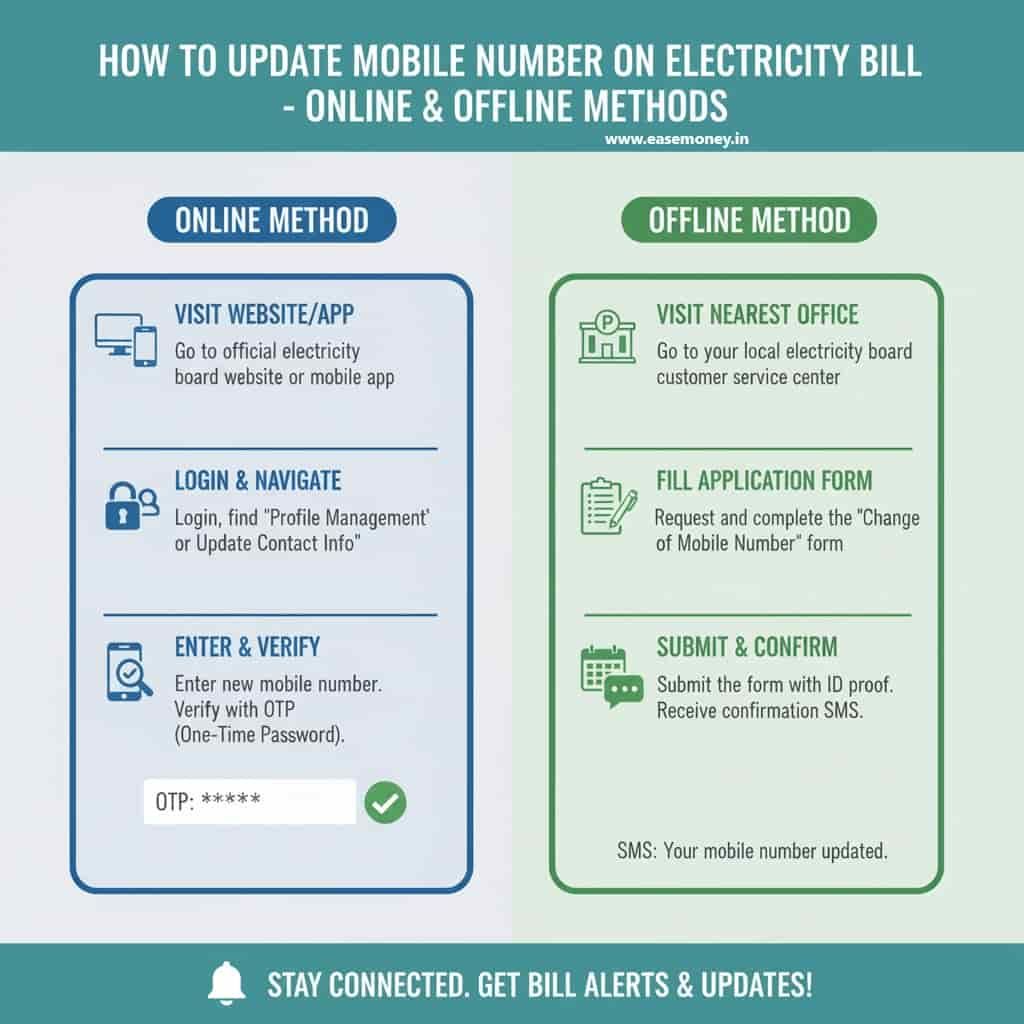
1. Online Web-Portal
How the Process Works in Electricity Bill Mobile Number ChangeMost people want a quick and method without visiting to office or subdivision. This is the most efficient and widely used option today. However, it varies due to your situation and depends on DISCOM facilities, which determine whether this option is available to you or not.
Follow these general steps that work on almost all Bijli Board Online Portals –
- First of all, visit your DISCOM’s official website or just use the App Store to find and download its mobile app.
- Example: UPPCL Consumer Portal, Delhi BSES, Bijlimitra, TNEB Portal.
- Now, log in using your Consumer Number or Account ID or Mobile Number or K Number. If not registered, sign up using your bill details. (Take an old bill receipt to find details)
- After login, go to Service Requests or My Profile / Contact Update.
- Select Update Contact Number.
- Enter your Consumer Number, Old Number (if available), and New Mobile Number.
- You will receive 2 OTP, first on your old number and second on your new number.
- Submit the request, and you will get confirmation by Text SMS or a display update on your Discom consumer portal.
Examples in 2025:
- UPPCL (Uttar Pradesh) – “Mobile Number and Email Updation” option available under service requests after login.
- JVVNL (Rajasthan) – Dedicated “Change Mobile Number” option under Consumer Services.
- BSES (Delhi) – You will “Update consumer details” after logging in to the consumer portal.
- APCPDCL (Andhra Pradesh) – Update directly in the “My Profile” section of the portal.
2. Your Discom Mobile App Method
Many large DISCOMs provide mobile apps where consumers can manage their accounts directly on phones. As per the Government Press release on electric meter installation in December 2023, All States and UTs are focusing on Prepaid smart meters to launch. They are focusing on managing your meter account via the mobile app only –
- Simply, on your phone, download and install the official app (e.g., UPPCL Consumer App, MyBijulee, TNEB App, Mahavitaran App).
- Log in with your consumer number and registered details. You will need an OTP to access.
- Navigate to My Account Settings.
- Remove the old number and add the new.
- Tap on Submit.
- Verify using the OTP on your new number as well as your older SIM.
- Save changes and check confirmation via re-login to the app.
3. Offline Method (Visit Required)
Used when the old number is inactive or unknown, when OTP is not available for updating it, you have to select this option –
- Visit your nearest Sub-Division Office or Discom office, or Customer Care Centre.
- Collect a Mobile Number Update Form or use a handwritten application if no printed form is available.
- Fill in details using a pen:
- Consumer Number / Account ID / K number.
- Old mobile number (if available; otherwise mention “Not Available”)
- New mobile number
- bill number (if asked)
- Consumer name and address (as per bill)
- Your signature.
- Attach a self-attested ID proof and a latest bill copy.
- Submit to the helpdesk staff.
- Collect the acknowledgement slip.
- Wait for a few days to change it.
How long does it take to update my mobile number on the electricity bill?
- Most DISCOM portals and mobile apps update within 1–2 hours after entering your mobile OTP. Offline requests usually take 24 hours, but in some cases, processing can extend to 2–3 working days.
State-Wise DISCOM Variations (2025)
| State / Board | Available Method | Application Form | Processing Time |
|---|---|---|---|
| APDCL (Assam) | Online via MyBijulee App, Offline at office | PDF form on the APDCL website | 24 hrs – 7 days |
| UPPCL (Uttar Pradesh) | Direct Service Request Online | Online form also accepts handwritten | 1 – 2 days |
| PSPCL (Punjab) | Online portal (contactregistration.pspcl.in) | Online-only | Immediate |
| TANGEDCO (Tamil Nadu) | Online portal & mobile app, | Direct Web Portal Application | 24 hrs – 3 days |
| MSEB / Mahavitaran (Maharashtra) | Online (portal & app), Offline | Handwritten accepted | 2 – 5 days |
| BESCOM (Karnataka) | Online portal/app, Offline option | Handwritten accepted | 3 – 7 days |
| BSES (Delhi) | Online (app + WhatsApp service) | Online-only | 1 – 2 days |
| CESC (West Bengal) | App + counter submission | Handwritten accepted | 2 – 4 days |
| Torrent Power (Gujarat) | Online portal/app | Online-only | Immediate |
| JVVNL (Rajasthan) | Mostly offline, limited online | Handwritten application | 3 – 7 days |
| APCPDCL (Andhra Pradesh) | Online via profile update | Online form | 1 – 2 days |
Documents Required
- Your Old Mobile Number is generally required for most discom online portals.
- Copy of the latest electricity bill (for Consumer Number / Account ID).
- Any of Your Proper ID proof (self-attested copy). Accepted IDs names are – Aadhaar, Voter ID, Driving License, Passport, PAN, Ration Card, Bank Passbook. (anyone)
- Application Form – Some DISCOMs provide downloadable PDF forms; others accept handwritten applications. You can directly contact your discom to clear the real-time working method.
- Authorisation Letter/ signed quick letter – Needed if a family member applies on behalf of the registered consumer. (optional)
- NOC from the House Owner – Required for tenants.
General Rules and Best Practices
- Verification – For Basic KYC, you have to provide OTP-based for online changes, and a scanned copy of ID through the office. This is mandatory across all boards.
- No Charges – Generally free of cost all over the states.
- Details Required – Consumer number, account ID, latest bill details, and proof of identity.
- Importance of Update – Ensures uninterrupted SMS alerts for bills, due dates, payments, outages, and government subsidy updates.
- DISCOM-Specific Rules – The procedure depends on the electricity board in your state; no single central government rule applies.
Requested Question and Answers
Can tenants update the mobile number on the bill?
Generally, a tenant can update the mobile number on an electricity bill, but tenants must need to fill out the form on behalf of the account holder. The account holder’s signature may be required.
Can I change both email and mobile number at the same time?
Yes, most big boards like UPPCL and TNEB let consumers update mobile and email in a single request via direct sign-up through the online portal using a web browser.
Is it mandatory to update my mobile number on the electricity bill?
Not legally mandatory, but practically essential. Without a registered number, you may miss bill alerts, OTPs, subsidy messages, and outage updates, leading to late fees or service issues.
Can I change my mobile number online without visiting the DISCOM office?
Yes, in most states. Portals and apps allow OTP-based updates. Tip: Online updates usually reflect within 1–2 hours, while offline requests take longer.
What if my old mobile number is inactive and the OTP cannot be received?
In that case, the online update won’t work. You must visit the sub-division office with ID proof and the latest bill. Processing typically takes 1–3 working days.
Do DISCOMs charge any fee for mobile number update?
No. Almost all electricity boards provide this service free of cost. If anyone asks for money, it’s unofficial—report it to the DISCOM helpdesk.
Can a tenant update the mobile number on an electricity bill?
Yes, but only with the owner’s consent. Tip: Carry an NOC or a signed letter from the owner to avoid rejection at the counter or service desk.
How many times can I change my mobile number in a year?
There’s no fixed limit, but frequent changes may trigger manual verification. Tip: Update only when necessary and keep the number active long-term.
How can I confirm my new mobile number has been successfully updated?
Check confirmation SMS, re-login to the DISCOM portal, or wait for the next bill alert. If no update shows after 48 hours, contact customer care.