

About ICICI FASTag
Before we find the ID, let’s understand what it is—and why it’s so important.
ICICI Bank, one of India’s leading private banks, was among the first to roll out the FASTag service in partnership with NPCI and NHAI. FASTag is a simple, reloadable tag that enables automatic toll deduction when you cross toll plazas.
According to the press release of Business Standard, ICICI Bank became one of India’s highest issuers of FASTags, with over 2 million (20 lacs) tags issued in 2019. By December 2021, ICICI processed more than 62.99 million FASTag transactions in just only in one month. With such a massive customer base, ICICI needed a unique system to manage each user.
That’s where the Customer ID comes in.
ICICI FASTag Customer ID: Meaning and Definition
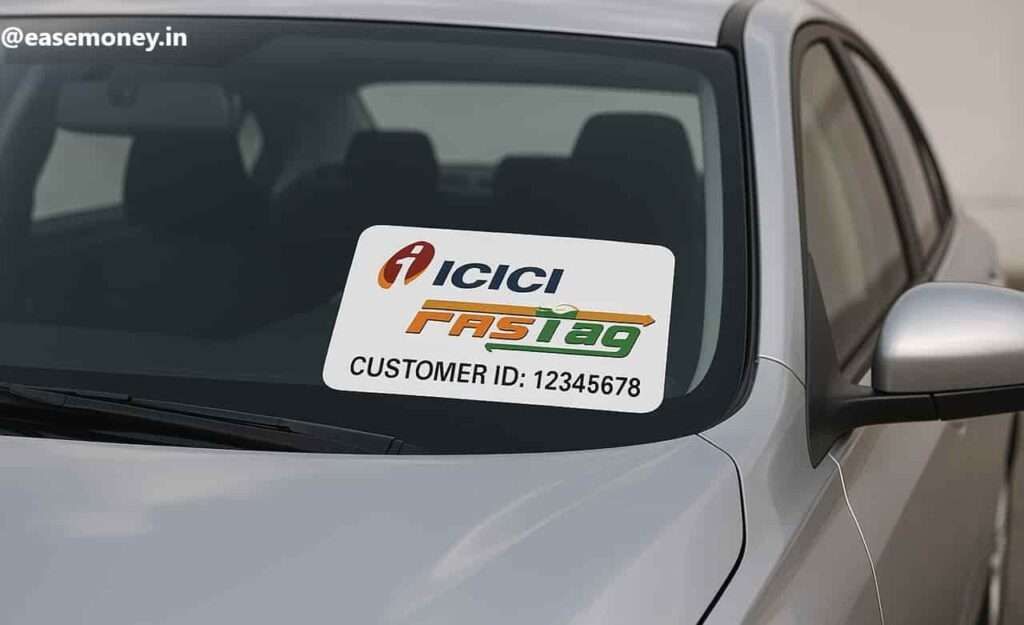
The Customer ID is an 8-digit special number allocated to every new individual or corporate user who purchases an ICICI FASTag online or at a POS. Think of it as your username or account number in the FASTag system.
How is Customer ID Different from Tag Number?
Many people confuse with Tag Number (printed on your FASTag sticker) and the Customer ID. But they’re different:
| Customer ID | Tag Number |
|---|---|
| 8-digit number | 14-16 digit alphanumeric code |
| Assigned to your profile | Assigned to each FASTag device |
| Used for login and wallet | Used to identify the tag per vehicle |
So if you’re stuck at login or trying to manage your account, you need the Customer ID, not the tag number.
ICICI FASTag ID: Key Uses & Importance
Your ICICI FASTag Customer ID is required in several cases:
- Log in to the ICICI FASTag portal
- Add or remove vehicles
- Apply for multiple FASTags under one wallet
- Update KYC documents
- Request closure or a refund
- Track and download toll transactions
- Add money to your wallet
- Talk to customer care
Now that you understand it matters for you while using the fastag, let’s explore how to retrieve it quickly if you have misplaced or forgotten it. Here is one of the easiest methods for you –
1. Know your customer ID via the ICICI Fastag online Portal
This is the fastest official way to find your FASTag Customer ID offered by ICICI. If you can access your registered mobile number. Here are the steps you have to follow –
1. Step – Visit the official portal of ICICI Fastag
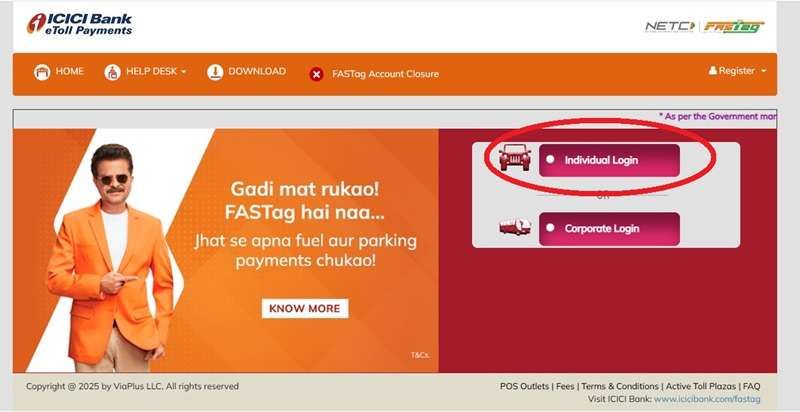
Firstly, you have to visit https://fastaglogin.icicibank.com official website designed by the bank, where you have to tap on Tap on ‘Individual User Login’.
2. Step – Choose login via Mobile Number
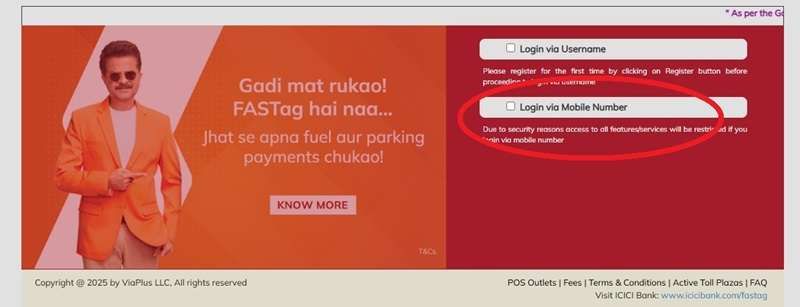
The ICICI Fastag allow two options to log in, first login via Username and second login via mobile number. The username is your 8-digit customer ID, so you have to go with login via mobile number to process.
3. Step – Enter details here
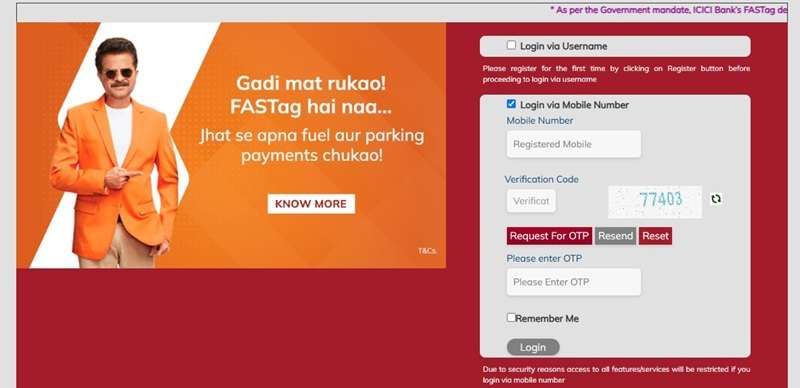
- Now, enter your FASTag-linked mobile number, captcha code, and tap on “Request for OTP”.
- You will receive a 6 to 8-digit OTP on your registered mobile number, enter it and tap on the Login Button.
4. View your customer ID
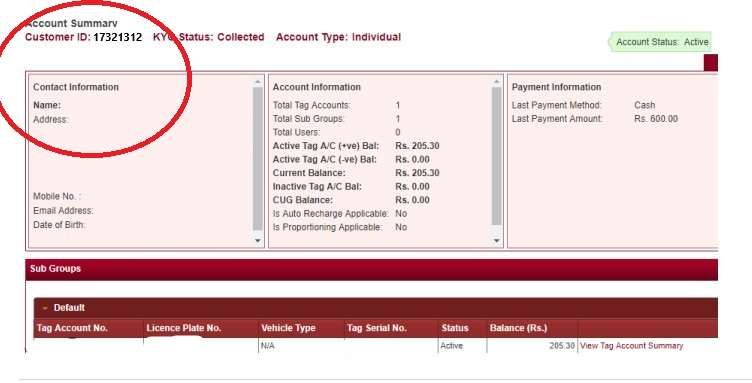
Once logged in, you will see your Customer ID on the Account Summary Dashboard on the homepage.
Note: There are two types of login for users:
- Individual Login – for personal users (works with mobile number)
- Corporate Login – for companies or fleet owners
This method works only for individual users. Corporate users should try the next methods.
What Are the Alternative Options available
1. Welcome SMS or Email
When you first purchase a FASTag from ICICI Bank (whether online, branch, or POS), you receive a welcome SMS and email on your registered mobile number and email ID.
Look for:
- A message with “Dear Customer, your FASTag account has been created. Your Customer ID is XXXXXXXX.”
- Search your inbox with keywords: “ICICI FASTag Welcome”
Tip: If you’ve deleted the email or SMS, try checking your email Trash or spam folder. Many people find it there!
3. Welcome Kit or Delivery Package
If you received your FASTag via courier, it came with a physical welcome kit. This includes a printed sheet with your:
- Registered vehicle details and number
- Tag Number
- Customer ID
- Wallet instructions
Pro Tip – Look at the top centre section of the welcome letter—it usually mentions the 8-digit Customer ID just below your vehicle number plate.
Real-life issue: Where to get the Customer ID after registering for a new Fastag ICICI?
1. Contact ICICI Fastag Customer Care
If you can’t find the ID using the above methods, don’t worry, you can directly call to their customer service support team.
The 24/7 working customer care numbers are here –
- Toll-Free: 1800 2100 104
- Chargeable: 1860 2670 104
The support team may ask you –
- Your registered mobile number
- Your vehicle registration number
- Possibly your email ID or Aadhaar (for KYC)
Once verified, they will send your Customer ID via SMS or email.
Note: For corporate users or fleet owners, this is the recommended method.
2. Visit an ICICI FASTag POS Point
If your FASTag was purchased at a toll plaza or ICICI branch (POS), you can revisit the same location and:
- Provide your vehicle number and mobile number
- Request the staff to retrieve your Customer ID
- Carry a valid ID proof if needed
Many users who bought FASTags offline find this to be the most reliable solution.
FAQs
Can I retrieve the ICICI Fastag Customer ID without the mobile number?
Yes, you have to call their 24/7 Toll-Free number 1800-2100-104 to confirm your identity and KYC, The team will help you to retrieve your ID. Also, update your new mobile number in the system.
Is the ICICI FASTag login available on the mobile app?
Yes, if you have the iMobile ICICI App, you can log in and use your fastag account directly.
Is the ICICI FASTag Customer ID the same as the ICICI Bank Customer ID?
No. ICICI FASTag Customer ID is separate from your banking Customer ID. Even if both are issued by ICICI Bank, they work on different systems.
Can one ICICI FASTag Customer ID be used for multiple vehicles?
Yes. One Customer ID can manage multiple FASTags if all vehicles are added under the same wallet and linked mobile number.
What happens if I enter the wrong Customer ID during FASTag recharge?
Recharge may fail or go to another account. Always verify the Customer ID from the official portal before adding money to avoid loss.
Does the ICICI FASTag Customer ID change if I replace my FASTag sticker?
No. Replacing a damaged or lost FASTag does not change your Customer ID. Only the tag number changes, not the account identity.
Is Customer ID required to close an ICICI FASTag account?
Yes. Customer ID is mandatory for FASTag closure, refunds, and wallet settlement. Customer care will not process closure without it.
Can corporate FASTag users retrieve their Customer ID online like individuals?
Usually no. Corporate FASTag accounts require login via corporate credentials or customer care assistance due to fleet-level controls.
Is the ICICI FASTag Customer ID required at toll plazas?
No. Toll deduction happens via RFID tag scanning. Customer ID is only needed for account management, recharge, complaints, and tracking.
Why does ICICI FASTag login sometimes fail even with the correct mobile number?
Login may fail due to inactive tags, incomplete KYC, or server maintenance. Customer ID still exists but access may be temporarily blocked.