

Sometimes we open a bank account that we no longer use. Perhaps charges increased, perhaps services did not meet expectations, or perhaps we already have too many accounts. If you are planning to close your ICICI Bank account, this guide saves you time and confusion.
We tested both online and offline closure methods. Let’s start with the first question –
What are the Charges for Closing an ICICI Account?
However, there are no charges for closing an account, but it depends on when you close it. The account age is the condition –
| Account Age | Closure Fee | Tip |
|---|---|---|
| Within 30 days of opening | ₹0 | You will get a free closure window for 30 days. |
| Between 31 days to 1 year | Up to ₹500 + GST (varies by type/branch) | This is the ICICI customer holding period. |
| After 1 year | ₹0 | |
| If a negative balance exists | You must clear dues first |
Why this matters: If you opened an account recently and see charges → wait until 1 year, close for free.
Penalty does not apply to:
- Salary accounts
- Pension accounts
- BSBDA zero balance accounts
- Pradhan Mantri Jan Dhan Yojana Accounts (PMJDY)
What Terms & Conditions Does ICICI Set
Before closure, ICICI checks these:
- The account should have no pending transactions, such as lien, freeze, and more.
- Zero balance or enough funds to recover dues
- All auto-debits/NACH/ECS must be cancelled
- Deactivate your live Subscriptions such as NETFLIX, YouTube, and more.
- Any linked credit card or personal loan EMIs. must be changed or removed.
- Return debit card + unused cheque leaves (if asked)
- Correct signatures of all holders for joint accounts
- If a Salary Account is closed, employee Reimbursement Account (ERA), if any, will also be closed
- For dormant accounts, → the bank will reactivate then close
- Provide valid ID + Address proof
In short, keep your account clean before going for closure. Any negative marking and pending KYC may hold or delay your closure application.
What are the options ICICI offer for deactivating an Account?
- Online Option: ICICI iMobile Banking App
- Offline Option: ICICI Account Closure Form (Branch-based)
1. ICICI Account Online (iMobile Pay App)
In 2024, ICICI Bank rolled out the account closure option directly inside the iMobile Pay app, but it is not available for all account types yet. Still, for many customers, it works smoothly. Most users report, this is not active for them, but most of them say it is still working, so we can say this is under development.
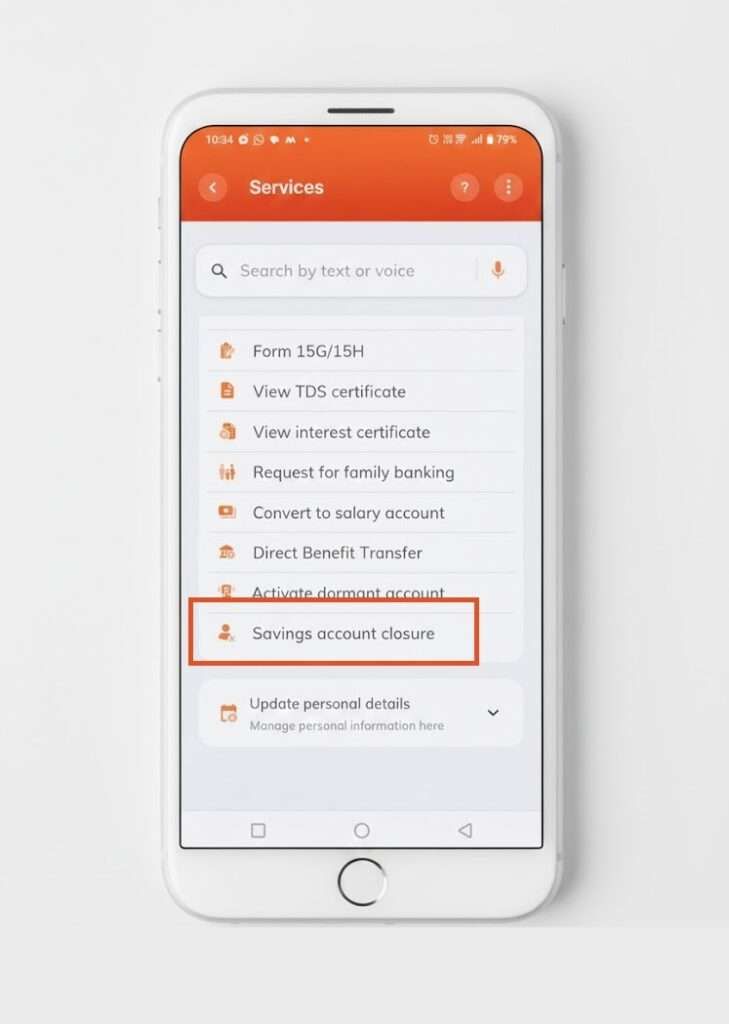
- Open the iMobile app like you normally do → unlock with fingerprint or MPIN
- On the home screen, tap Services
- Go to Account Services
- Scroll a bit — you should see Savings Account Closure
- Tap it, and the app will check if you can close online. You can
- If yes, it will show your account number along with any auto-debits linked
- The app will cancel auto-debits and ECS for you — that’s a big relief
- Choose where your remaining balance should go: your other ICICI account, or a different bank account (example: your SBI salary account — just enter IFSC + account name)
- Select a reason like “charges too high” or “not using account” → submit
What Happens Next?
- A Service Request Number (SRN) gets generated
- The bank may call you to confirm or solve your issue.
- In most cases, no branch visit is required
- In rare cases branch visit is still required (example: negative balance cases)
In the Account Services section, you will get two possible results –
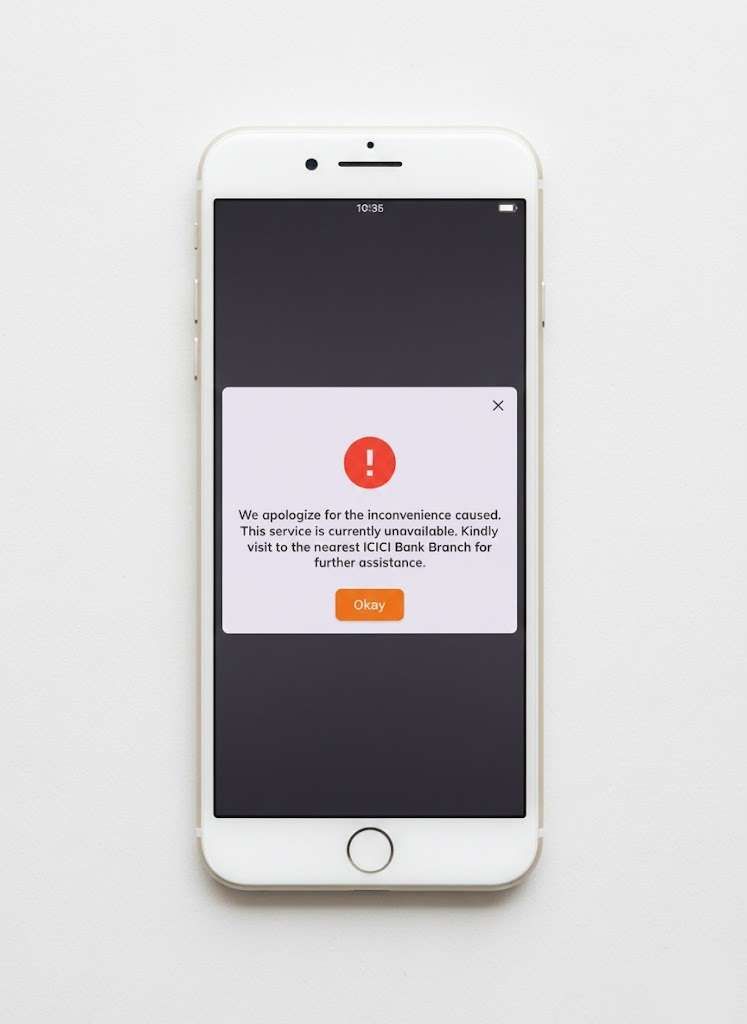
| Result | Meaning | What to do |
|---|---|---|
| You are eligible | The App allows you to continue | Follow the next steps and complete online |
| “We apologise for the inconvenience…” | Service has not rolled out for your account type or branch yet | Visit your nearest ICICI branch for closure |
Option 2: Close ICICI Account Offline (Branch Method)
This is the old-school way — and it works for every single customer. If your online process failed, you can try this. This full process works via an application form.
- Go to your home branch: Walk into the branch where your account is mapped. Take your scanned copy proof for address and identity. Take your debit card, cheque book (if you have)
- Ask for “Savings Account Closure Form: Just say, ‘I want to close my account with an actual reason.” They know the drill. You can ask for a form, or you can download it below and take a printout.
- Fill the form slowly: Add account number, mobile, email and how you want the remaining money back (another ICICI account or NEFT to your main bank). Attach a self-attested Aadhaar/PAN copy.
- Return ATM card & cheque leaves: Some branches insist, some don’t — but handing them over keeps argument level = zero.
- Make balance clean: Clear any negative balance or charges; target is ₹0. But if you are closing after 30 days and before closing, you may have to pay the charges. Confirm with the home branch or customer care first.
- Sign & take an acknowledgement: Ask for a stamped copy or a small slip with the request number. That’s your proof if anything goes wrong later.
Download ICICI Closure Application Forms You May Need
ICICI does not provide only one universal form. So we collected all versions to help you.
| Form Name | Purpose | Download Link |
|---|---|---|
| ICICI Account Closure Form | Reference version for filling practice + Original | ICICI Closure PDF with Original logo |
| Saving Account Closure Form (GIFT City) | Branch-specific official format | ICICI Account closure form (GIFT CITY only) |
| ICICI Closure Format | Works in most branches | https://www.icicibank.com/account-closure-format.pdf |
| NRI Combined Account Closure Form | For NRI or out-of-India customers | https://www.icici.bank.in/content/dam/icicibank/icici-assets/nri-banking/ac_closure_forms_annexure_1_Edited.pdf |
Best choice for most people: Generic ICICI No-logo ICICI format
How to Fill the ICICI Account Closure Form
This is an official form by ICICI Bank, it is English and bilingual languages available any branch of ICICI Bank, you have to write in CAPITAL WORDS and write slowly, here are the filling process with tips –
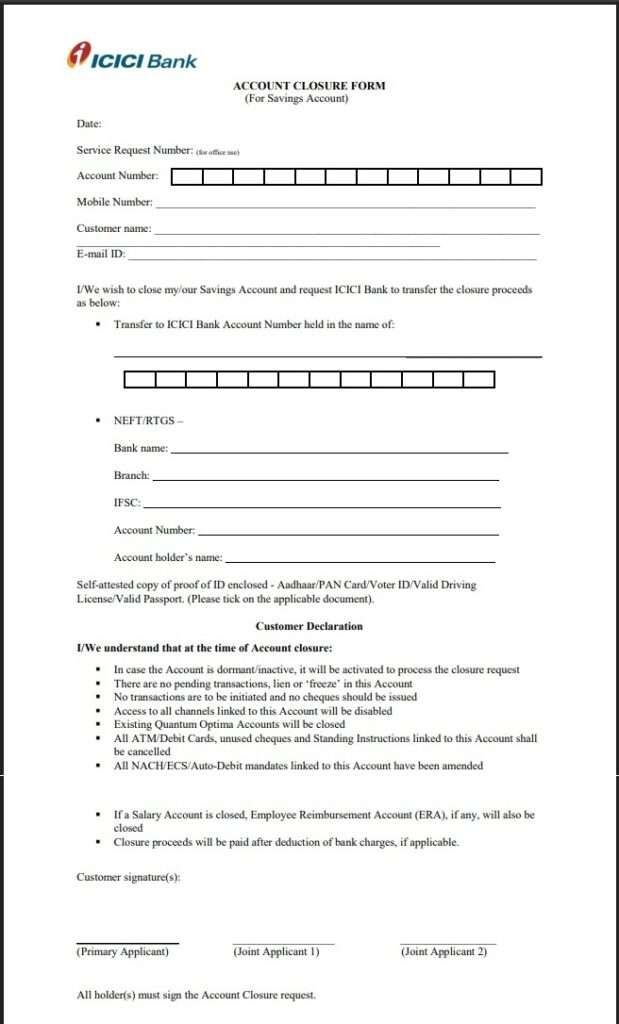
| Form Field (as shown in form) | What You Should Write | Friendly Tips (Human Tone) |
|---|---|---|
| Date | Today’s date (DD/MM/YYYY) | Just check the calendar — don’t overthink |
| Service Request Number | Leave blank | Bank staff will fill this section for you |
| Account Number | Your full ICICI savings A/c number | Double check digits — one mistake = delay |
| Mobile Number | Registered mobile number | So you get OTP/calls for confirmation |
| Customer Name | Full name as per bank records | If joint account, all names must match bank spelling |
| E-mail ID | Registered email | Helpful for closure confirmation emails |
| Transfer of balance (Option 1) | Write your other ICICI account number | Best option if you have another ICICI account |
| Transfer of balance (Option 2 — NEFT/RTGS) | Fill Bank Name, Branch, IFSC, Account No., Account holder | Must be your own account only — not family/friends |
| ID Proof Tick Box | Tick Aadhaar / PAN / etc. | Write Self-attested & sign on photocopy |
| Customer Declaration | No writing needed — just read | All cards, cheques & mandates will be cancelled automatically |
| Signatures | Signature of all account holders | Match your bank signature — no fancy new signs |
Documents Required
| Document | Mandatory? |
|---|---|
| Aadhaar / PAN copy | ✔ Yes |
| Passbook return | ✔ If issued |
| Debit/ATM card return | ✔ Usually |
| Cheque book return | Not mandatory as per RBI but if active cheque payment than yes. |
| Form filled + signed | ✔ Required |
| For NRI — passport/visa copy | ✔ Required |
Pro tip: Always retain the acknowledgement receipt.
What If Your ICICI Account Has a Negative Balance?
A negative balance mostly happens when minimum balance charges hit your account or an auto-debit goes through with a low balance. ICICI won’t close the account until the dues are cleared.
Why Negative Balance Happens
| Reason | What It Means |
|---|---|
| MAB not maintained | Monthly penalty deducted → balance drops |
| Auto-debits or ECS | Payment attempted without funds |
| Card/cheque charges | Fees are applied after a failed transaction |
What You Should Do Before Closure
- Deposit enough to make the balance ₹0 or above
- Cancel ECS/auto-debits/mandates
- Ask the branch for the dues printout
- Recheck balance after 1–2 days
- Then apply for closure (app or branch)
- If you find your negative balance is wrong, you can complain at helpline 18001080, they can help to remove any negative.
Once the account is clean → closure is quick and stress-free.
How Long Does Closure Take?
| Mode | Time |
|---|---|
| iMobile App | 2–7 days |
| Branch Request | Mostly same day or 3–5 working days |
If a verification call comes → attend, they tell you, if the request is accepted, the process will be much faster. However, if any lien or technical error. The process may take 15 working days or more.
Additional FAQs
Can I keep a zero balance before closing my ICICI account?
Yes, that’s the best situation. Bring balance to ₹0 and cancel auto-debits. It avoids last-minute penalties, and your closure gets approved smoothly.
Can ICICI close my account if it shows a negative balance?
Not immediately. First, you must pay penalties/charges to make the balance zero or positive. Only then bank will allow closure. If your negative balance charges are unusual, such as 10k for 6 Months, you have to visit the branch for closure.
How to close an NRI ICICI account?
Fill the NRI Account Closure Form, attach your passport/visa/KYC, and courier it to your home branch in India. Keep a scan of everything for proof. You can check the terms and conditions on the application form.
Can a closed ICICI account be reopened?
Usually no. Once permanently closed, that account number is gone. You must open a brand-new account if needed again.
Will ICICI refund my remaining balance automatically?
Yes, but only after dues are cleared. Money goes either to your other ICICI account or the NEFT account you wrote in the form.
What if my ICICI iMobile app doesn’t show the account closure option online?
It’s still rolling out. Some accounts and locations don’t have it yet. Just do closure offline — it works for everyone.
What if my signature doesn’t match bank records?
They will request a fresh signature in front of them with ID verification. Easy fix — no panic needed. However, you can generate a new signature by e-kyc.
Does ICICI confirm account closure through SMS or email?
Yes. ICICI Bank usually sends an SMS and/or email confirmation once the account status changes to “Closed.” If you don’t receive it within 7 days, follow up using the SRN.
Can ICICI close an account if only one joint holder applies online?
No. Online or offline, all joint holders must approve. For app-based closure, eligibility fails automatically if the signatures of all holders aren’t digitally mapped.
Will ICICI waive closure charges if I complain politely?
Sometimes. If charges are recent or purely penalty-based, branches may partially or fully waive fees after review. It works best for salary, pension, or long-unused accounts.
Can I close my ICICI account from a non-home branch?
Usually no. Most ICICI branches insist on home-branch processing. Non-home branches may accept forms but still forward them internally, adding 3–4 extra working days.
Hope you liked the content. Explore smart options below 👇
