

As of late 2024 and early 2025, Jammu and Kashmir Bank had over 10 million customers in India and NRI accounts as well. The bank reported that more than 90% of transactions were happening digitally, showing strong adoption of internet and mobile banking.
While J&K Bank does not have any official data for the exact number of active net banking users but the scale of digital transactions is massive after COVID., As per the Easemoney News, RBI-mandated cyber security upgrades, and migration to the .bank.in domain by October 31, 2025. It clearly shows that net banking is now a core banking channel, not just an optional service.
What is JK Net Banking – behind the scenes
Jammu and Kashmir Internet Banking is an online banking platform that allows customers to access their bank account anytime, anywhere, without visiting a branch. It supports fund transfers, bill payments, deposits, tax payments, and account management.
Behind the scenes, as per the Finacle Press release in 2003, J&K Bank’s digital banking runs on core banking and e-commerce platforms developed through long-term technology partnerships, including Infosys, which supported early internet banking and online transaction systems.
The bank started its serious digital push around 2000, after the IT Act of 2000 was announced. even though the bank itself was founded in 1938. Since then, services expanded from basic internet banking to:
- Mobile banking (mPay)
- WhatsApp Banking
- API Banking
- Online account opening (from around 2022-2023)
Net banking today works together with mobile apps and backend systems, not as a standalone product. J&K offer both Retail Net Banking is meant for individual savings account holders. Corporate Net Banking is only for business and institutional users.
Key milestones in JK Bank’s digital banking
- 1938 – J&K Bank established
- Around 2000 – Internet banking and technology tie-ups began
- 2015–2020 – Expansion of online transfers, bill payments
- 2023 – Online account opening, WhatsApp Banking launched
- 2024–2025 – Migration to secure
.bank.indomain as per RBI cybersecurity rules
Features that make JK Net Banking useful (real usage)
Your daily required basic features, JK netbanking, are easily provided. A major benefit: you can access it via any web browser on your smartphone, or you can download the JK Mobile Banking App (JKB mPay Delight+).
Account access and viewing
- You can check savings, current, FD, and RD accounts
- View balances in real time
Fund transfer options
- Between self-linked accounts
- To other J&K Bank accounts
- To other bank accounts using NEFT / RTGS
Utility and government payments
Like other commercial and PSU banks, they also offer direct Bharat Connect for –
- Electricity bills (PDD – J&K UT)
- Direct tax payments (Income Tax)
- Indirect tax payments (GST)
The Additional features for all individual customers are –
- Retail users can verify PAN
- View ITR-related details through the e-Filing option
Statements and records
- Download account statements. The online portal allows you to get upto 7-year-old statements for free.
- Mini and full statements available
Deposits and savings
- Open Fixed Deposits
- Monthly Income schemes
- Cash Certificates (online)
Quick Tip For You: J&K Bank sends all OTPs and transaction alerts only to your registered mobile number. If your mobile number or email is outdated, You have to visit your branch and update it. Many login and reset problems start here.
What documents and details are required (Retail user only)
To use JK Net Banking smoothly, must have your bank statement or passbook for these details – you should have:
- Active savings account
- Your mobile number is linked with your account (active and OTP must work)
- ATM / Debit card (important for online registration and resetting password.)
- Account number (16-digit)
- Date of Birth (as per bank record) or PAN
- After login, there is a login password, transaction password, security questions, image verification, and User ID, you need to remember. So noted it down safely.
Without an ATM card or mobile linkage, a branch visit becomes compulsory. If you have an ATM Card but do not remember the ATM PIN, first set the PIN via the nearest ATM or the Mobile Banking App, then apply NetBanking.
How to register for JK Net Banking (first time)
There are two methods for registering, depending on two scenarios: Debit card or non-debit card –
Method 1: With ATM/Debit Card
If you have an ATM Card with an ATM PIN and a mobile number linked to the account, the process is smooth and does not require visiting a branch. What are the 5 steps for first-time registration? – first visit official website – https://jkb.bank.in/internet-banking and tap on register first time as a retail. No user ID yet.
Step 1: Your Account verification
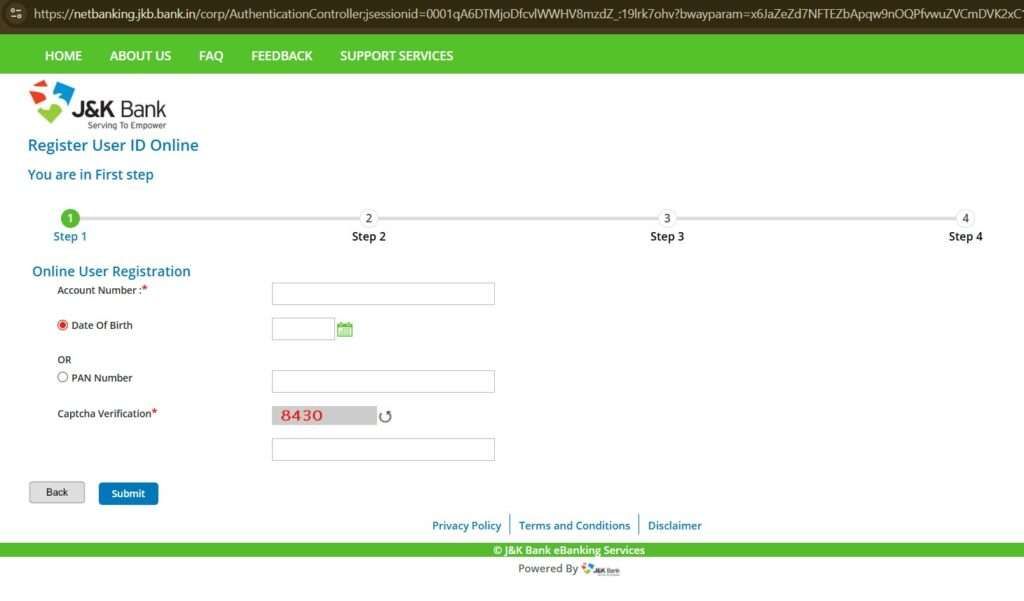
- Enter your full 16-digit account number (check your passbook for accuracy).
- Enter DOB (bank record) or your full 10-digit PAN.
- Now, fill in a captcha on the screen and tap on submit.
Tip for you: If DOB does not match your bank record, you can use PAN instead.
Step 2: OTP verification
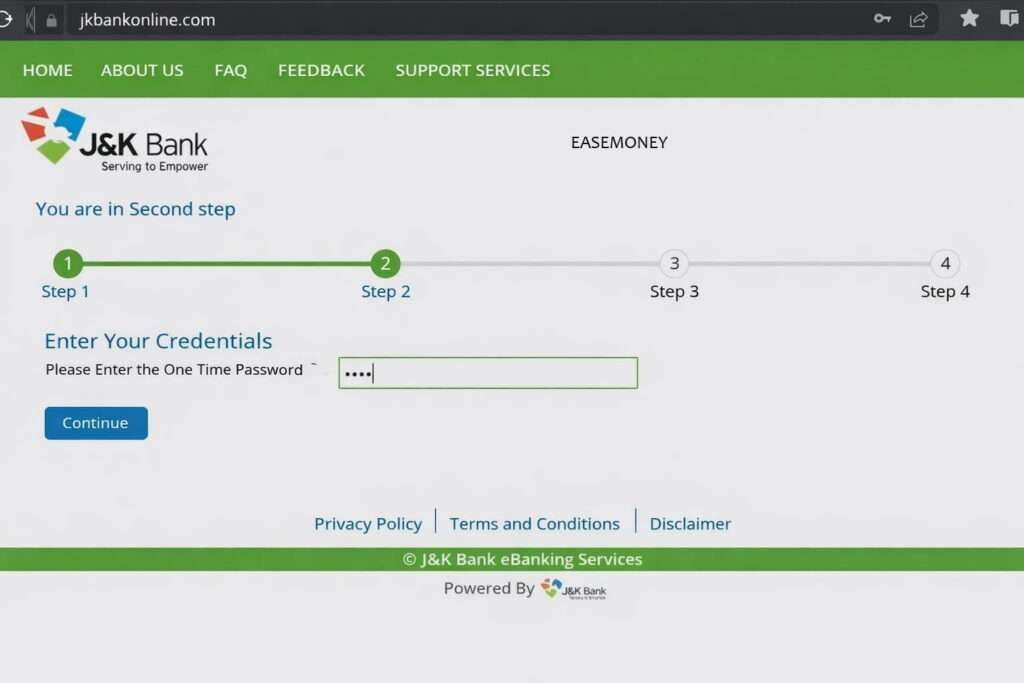
- Now you will get a 6-digit OTP on your mobile or Email ID.
- Enter OTP and tap on the continue button
No OTP = mobile not linked = branch visit required. You have to link your mobile first, then.
Step 3: ATM card verification
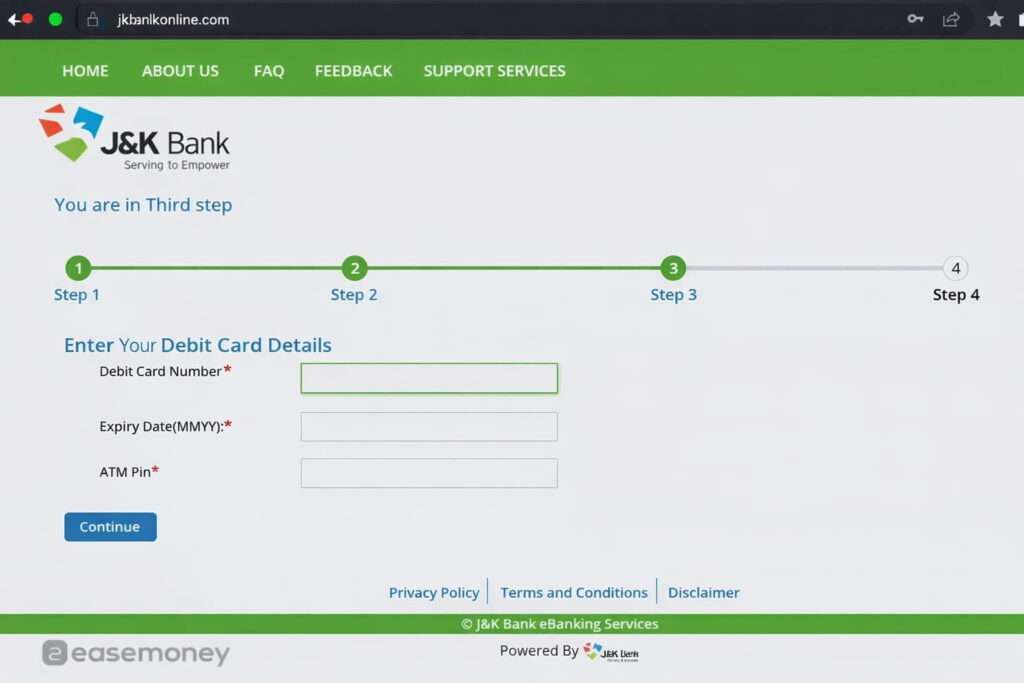
This is an important part because, without an ATM, you will not get the branch token option. So, you have to visit the branch if it does not work for you.
- ATM or Debit card number
- Expiry month & year
- ATM PIN (mandatory)
Insight: ATM PIN works as ownership proof. This is why online registration is blocked without an ATM card.
Step 4: Set passwords
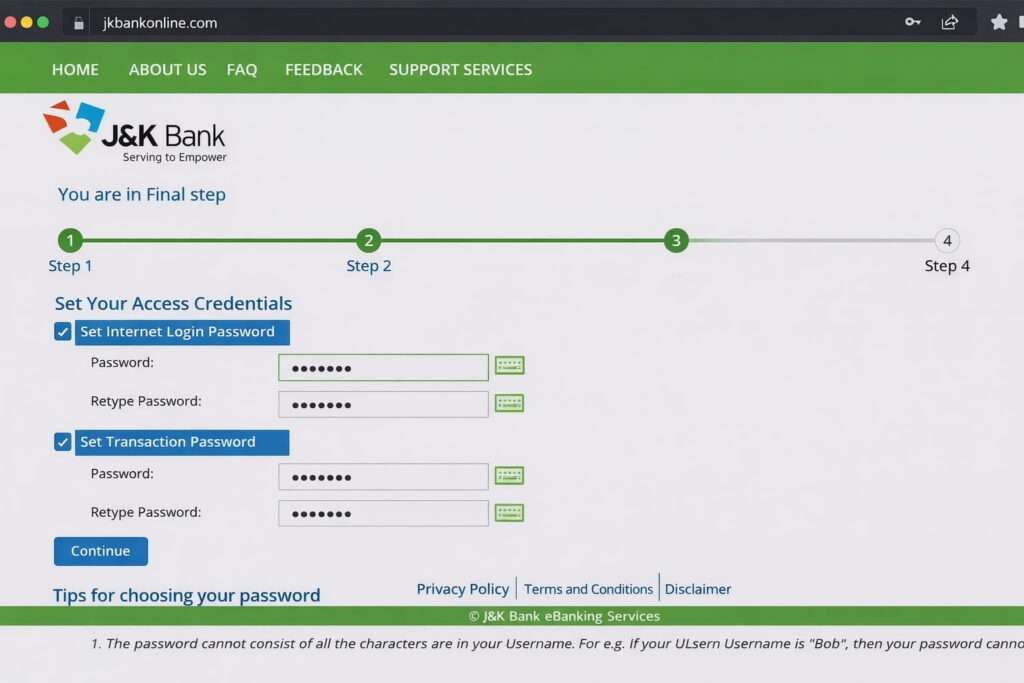
- Set a Login password (This is always required when you log in)
- Transaction password (As per it name, when you do IMPS, NEFT, RTGS or something, you will need this). Most important, forget this faster.
Both must be strong and different.
Step 5: User ID generation
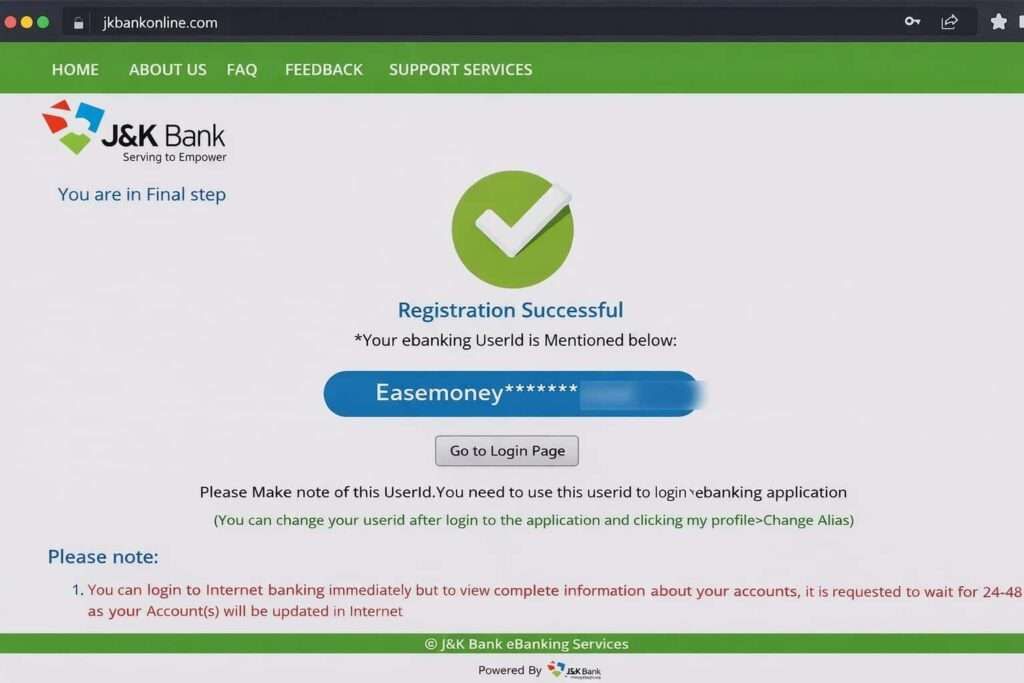
- System generates your User ID – it mixes with your name, dob and mobile number or something (Take a screenshot and write it down)
- After logging in, you can also change it.
- Login access starts immediately
Full backend activation may take 24–48 hours. So, you have to wait for it. Most user says it starts within 5 hours.
Method 2: Without ATM Card (branch visit required)
If you do not have an ATM card or a registered mobile –
Then:
- Visit your home branch
- Bank will provide you an application form
- enter basic details and your email ID
- You will receive the User ID on email or you can ask directly with branch (depending on account and branch operations)
- Bank staff generate User ID
- Net banking is activated from the backend
There is no branch token given to customers. You can request to start mobile banking as well.
How to Log in to J&K Bank Internet Banking
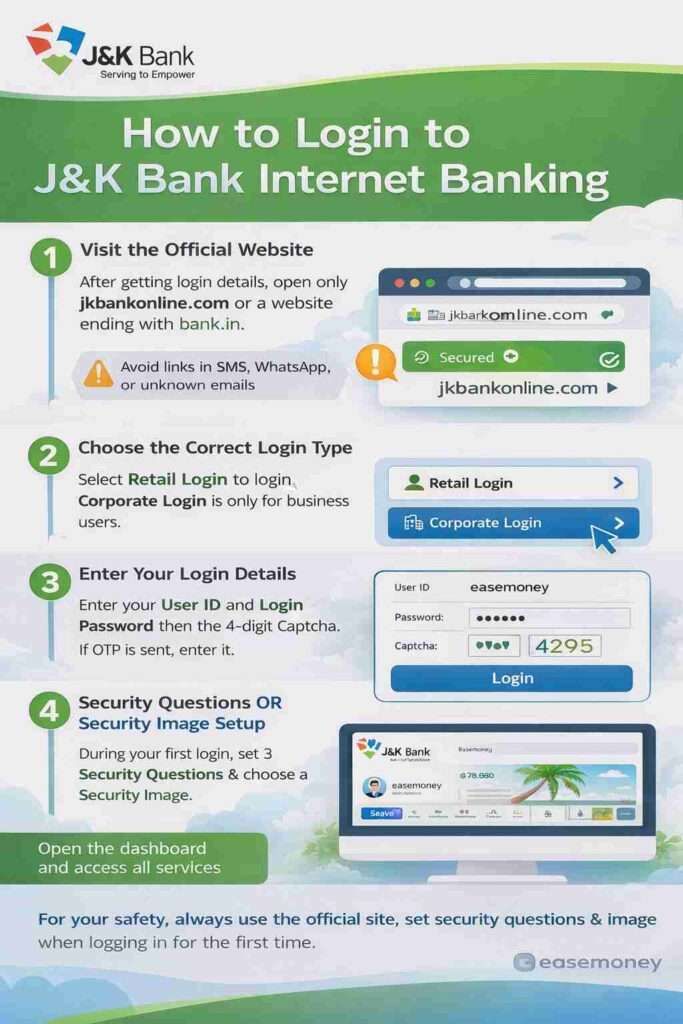
Step 1 – Visit the official website
After getting login details, open JK Bank Net Banking only on a domain that ends with bank.in. Never log in on Links from SMS, WhatsApp, or unknown emails or other domains.
Step 2: Choose the correct login type
- Tap or Click on Retail Login
- Retail = The simple meaning is individual or savings account users.
- Corporate Login is only for business users or Big teams
Step 3: Enter login details
On the login page:
- Put your system-generated User ID (you get recently)
- Enter the 4-digit captcha shown on screen
- Enter your Login Password
- Tap login
- If OTP recevied, enter it (not always OTP at this moment)
Step 4: Security Questions OR Security Image setup
during first time login, The system requires you to set 3 security questions. it is important because it required when you reset password or Sometimes after branch activation.
Tips:
- Choose simple answers
- Use answers you will always remember
- These questions are mandatory, even during online password reset
If you forget these answers, you may be forced to visit the branch.
Security Image setup
Many times the portal will ask you to:
- Select a security image, when you try to login or reset password, system can ask to confirm you instead of security question.
- This helps you confirm the site is genuine during future logins
Note – this both security system is new and work subjective, it is common.
What is User ID, how to change, how to reset?
Your login USER ID is not your customer ID here. In most cases, JK Bank does not require your customer ID for login, but your USER ID is your permanent net banking identity. This
- Generated by the system or the branch
- You can change it, not permanent
- You can create via NetBanking for an easy-to-remember
How to change Alias (User ID)
- Firstly, Login → My Profile → Settings
- Choose “Change Alias”
- Change it as you want, make it simple as yournameand123.
- But Subject to eligibility
How to Get User ID (Login ID)
In case you forget your USER ID for login or use an older User ID, User ID recovery is not possible online; you have to visit a branch to get your actual User ID using your 16-digit account number. You can download the J&K Bank Application Netbanking form and tick on “I have my NetBanking User ID but do not remember it and want it to be resent to me along with password” and fill in basic information and submit to the branch to receive your USER ID. Alternatively, you can talk first with your JK Bank Customer Care.
What is the Process to Password reset or Forget (login or transaction)
You can reset passwords without login, but User ID is mandatory.
- Go to login page
- Tap on “Regenerate Your Passwords”
- Enter User ID + captcha
- Verify via OTP or security question
- Enter ATM card details (PIN required)
- Set new password
How to transfer money using Jammu and Kashmir Bank Net Banking
Step 1: Login to JK Net Banking from the official bank.in website using your User ID and login password. After login, you will land on the dashboard.
Step 2: Click on Transactions, then open Manage Beneficiary. If you are sending money to this account for the first time, you must add the beneficiary.
Step 3: Tap on Add Beneficiary, choose NEFT/RTGS, and enter the beneficiary’s name, account number and IFSC code. Save the details.
Step 4: Wait for 15 minutes. This waiting time is compulsory as per RBI rules.
Step 5: Go back to Fund Transfer, select the beneficiary and enter the amount.
| Use this | When |
|---|---|
| NEFT | Up to ₹2 lakh (Any time no charges) |
| RTGS | Above ₹2 lakh |
Step 6: Enter your transaction password and confirm. Most transfers are completed within 2–3 hours and RTGS instant or within 30 mintues. Tap logout after use.
FAQs For You
Do I really need to visit the branch for JK Net Banking?
If your mobile number is linked and you have an active ATM card, no branch visit is needed. Otherwise, branch staff will generate your User ID and activate net banking.
I forgot my JK Net Banking User ID. Can I recover it online?
No, User ID recovery is not available online. You must visit the branch or submit the e-Banking form. Bank sends User ID via SMS, email, or sometimes post.
Why does JK Net Banking ask for ATM PIN during registration or reset?
ATM PIN works as ownership proof. JK Bank uses it to confirm you are the real account holder. Without ATM PIN, online registration or password reset won’t work.
How long does JK Net Banking take to fully activate?
Login usually works immediately, but full services like fund transfer may take 24–48 hours. This backend delay is normal and seen in many real customer cases.
How do I login to the JK Bank mobile app for the first time?
Download the official JK Bank app, open it, enter your net banking User ID, login password, verify OTP, then set MPIN. App works only after net banking activation or you have ACTIVE ATM Card.
My beneficiary is added but transfer option is disabled. Why?
This is normal. As per RBI rule, every new beneficiary has a 15-minute cooling period. After that time, logout once, login again, and retry transfer.
Net banking works on browser but not on mobile app. What to do?
First login on desktop browser once, then try mobile app. Many users face this. App syncs only after successful web login and full backend activation.
Why does the system ask security questions and image again?
JK Bank triggers extra security after password reset, new device, or long gap login. Always proceed only if your chosen image or phrase is visible on screen.