

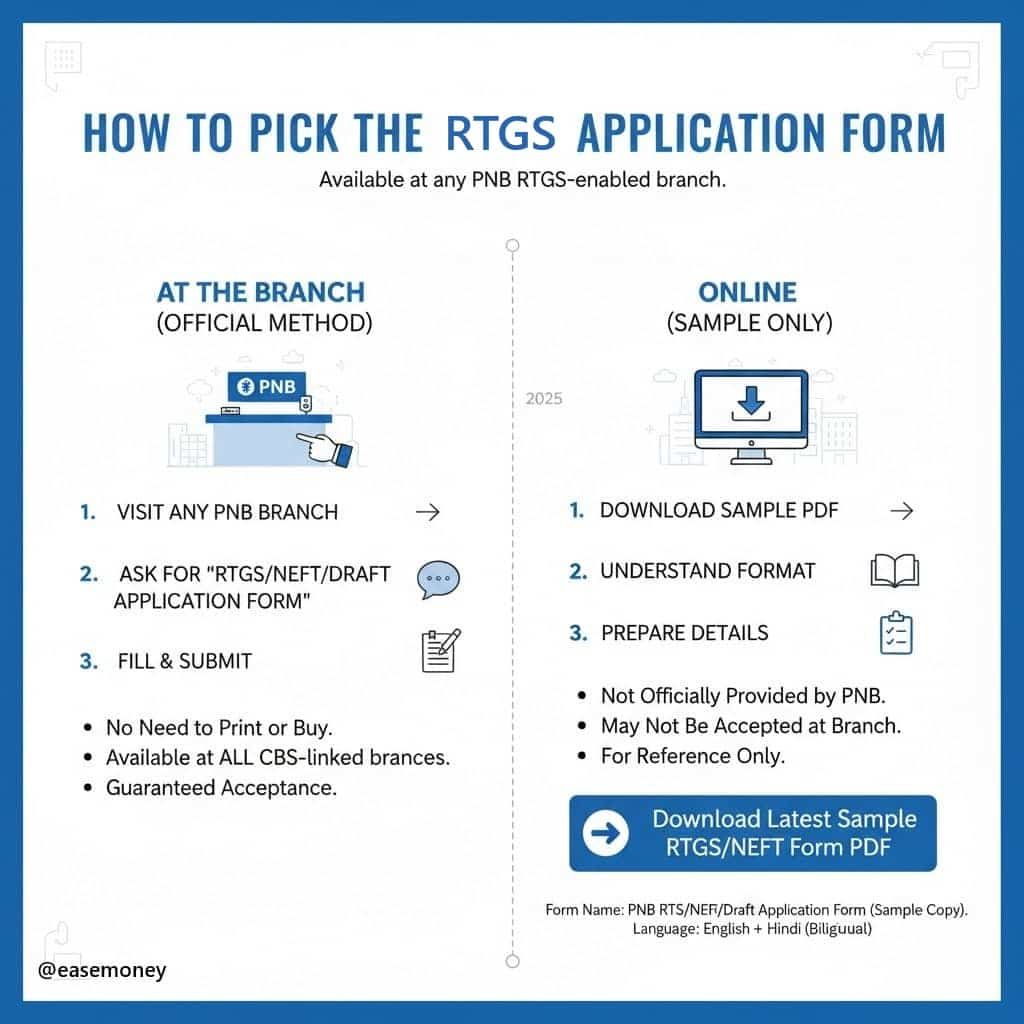
PNB uses a branch-issued RTGS/NEFT form instead of a standard downloadable version, so it’s best to collect it from the branch or use the sample PDF here, fill both sides correctly and submit it at the counter.
Where to Download PNB RTGS Application Form
| Form Name | Language | Download Link |
|---|---|---|
| PNB RTGS/NEFT/Draft Form | English + Hindi (Bilingual) | Download Sample RTGS/NEFT Form PDF |
You don’t need to print it or buy the form from anywhere; it is available on your PNB RTGS-enabled branch or any branch near you. When you visit the branch, simply ask for an “RTGS/NEFT/Draft Application Form.”
PNB uses Core Banking Solutions (CBS), which connects all branches, so you can submit the RTGS form at any branch.
Note — Still in 2026, PNB does not provide its RTGS/NEFT form on there official website. This PDF is for reference, the actual form will be provided at the branch
How to Fill the Punjab National Bank RTGS Form
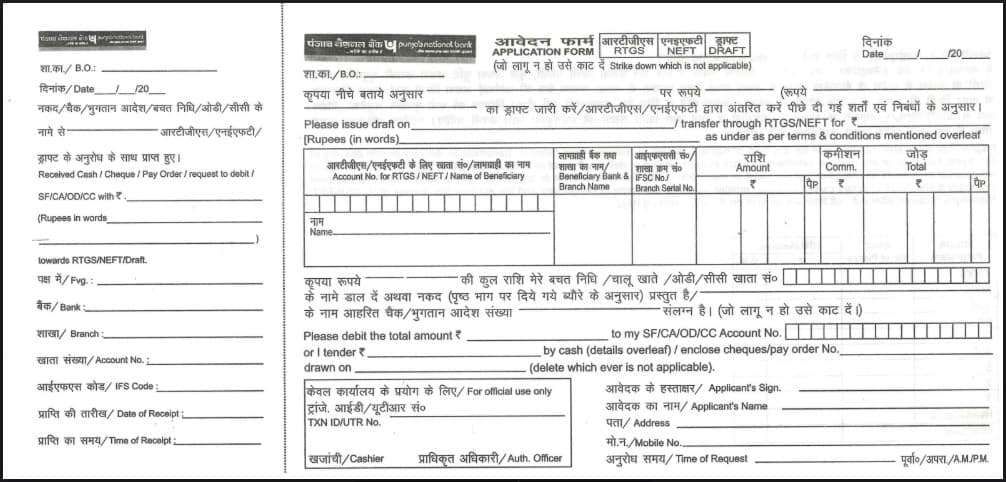
The form both sides are identical, but you must fill in the bank copy first; on the left side customer copy just repeats the same info for your records and proof.
1. RIGHT SIDE (Bank Copy)
| Section (on form) | What to Fill (RTGS Only) | Notes / Tips |
|---|---|---|
| Branch (B.O.) | Write your PNB branch name (Example – Connaught Place, New Delhi) | Mostly, the branch form writes the branch details; you can check the top of the form and fill it. |
| Date | Simply enter the same date when you make a transfer | Same on the cheque as well if you choose via cheque |
| Please issue a draft on / transfer through RTGS/NEFT for Rs. | In the transfer through RTGS, write down your amount in both -in digits + in words | – Example – ₹3,50,000/- – Three Lakh Fifty Thousand then put Only |
| Beneficiary Section | A big box section in the form for Beneficiary details | Beneficiary means the receiver to whom your money will go. |
| Name of Beneficiary | Write the full name of the beneficiary | same as bank record – RAM KUMAR SINGH |
| Beneficiary account Number | It is important – write the account number for confirmation in the box | You may need to write account number twice in the box |
| Beneficiary IFSC Code | Write 11-digit IFSC (SBIN0001254) | The IFSC code is also important to correct |
| Amount / Commission / Total | Fill Amount only. Leave the Commission blank (ask the branch if they want you to write it). The bank will fill the Total. | It is just to notify you about the charges |
| Please debit the total amount to my SF/CA/OD/CC Account No. | In this section, write down your PNB account number (from which funds will be sent). | 12 to 16 digits, same as the passbook |
| Enclose Cheque / Pay Order No. | If using a cheque, write your 6-digit cheque number. | Prepare a self-cheque, and find the 6-digit in the bottom. |
| Drawn on section | nil | |
| Applicant’s Signature | Sign clearly (same as in bank records) | same as on your self-cheque |
| Applicant’s Name | Your full name | |
| Address | Write down your quick address | No need for full postal details. |
| Mobile Number | Write your active account-linked mobile number | |
| Time of Request | You can write the current time (such as 11:45 A.M.) or just leave it blank. | optional section |
| Transaction ID / UTR / Officer Signature | Bank staff will handle it | Leave blank |
2. Now Fill the LEFT SIDE (Customer Copy)
Repeat the same information from the right side in short form.
| Field | What to Fill (same as Bank Copy) |
|---|---|
| Branch Name | Your branch |
| Date | Same date |
| Write “RTGS” clearly | Strike out “NEFT” and “Draft” |
| Favour (Beneficiary Name) | same details as right |
| Bank Name & Branch | – |
| Account Number | – |
| IFSC Code | – |
| Amount | – |
| Applicant Name & Signature | Same as right side |
Note – This left side (Customer Copy) stays with you — the bank will keep the right side. bank seal it and back to you.
3. What to Ignore Completely
| Section | Reason |
|---|---|
| “Please issue draft on (Bank)” | Used only for Demand Draft |
| “Drawn on” line | Used only for cheque or DD |
| “Denomination / Particulars” table on back side | Used only for cash deposits (RTGS doesn’t allow cash) |
| “Conditions for RTGS/NEFT” (back side text) | Read if you want, but don’t write anything there |
| “Coins / Notes table” | Not applicable |
A UTR (Unique Transaction Reference) number is generated. You can use the UTR number to track your RTGS transaction or raise a complaint if there is any delay, visit at PNB lodge Complaint portal.
Documents and Information to Carry
When visiting the branch for RTGS:
- Your bank account details or passbook
- Beneficiary’s bank details (Account, IFSC, Bank Name)
- ID proof (sometimes required for verification)
- Cheque leaf – You have to make a self cheque
- Write your name or write yourself for RTGS in the pay section.
- Enter the amount and do your signature
- On the back side, write the beneficiary account number, name, & your signature.
- done. You have to give to branch along with the form.
Pro Tip: If you are sending a large amount (₹10 lakh or more), you have to carry your PAN card as it may be requested for compliance.
PNB RTGS Charges and Basic Details (as of 2026)
Before you fill out the form, it is important to know the basic fees and timings for RTGS transfer through your branch. You can verify the latest details anytime in the official “Service Charges” PDF available on the Punjab National Bank website.
| Transaction Mode | Transaction Amount | Charges | GST (18%) | Total – after GST |
|---|---|---|---|---|
| Branch RTGS | if amount between -₹2 lakh to ₹5 lakh | ₹24.50 | ₹4.41 | ₹28.91 |
| Branch RTGS | Any amount above ₹5 lakh – ₹10 lakh, ₹20 lakh, or higher | ₹49.50 | ₹8.91 | ₹58.41 |
| Inward RTGS (Receiving money) | Any amount | Free | — | Free |
Note – If your branch requests, the Total charges after GST may have to be written on the application form.
1. PNB RTGS Timings
RTGS have a cut-off time in the PNB branch. Timing can make a big difference in your experience. The branch basically works Monday to Friday in the regular hours 10:00 AM – 4:00 PM, but on 2nd & 4th Saturdays, Sundays, and public holidays, your RTGS via the branch is closed.
Most transactions in RTGS, if you do them after 3:30 PM, are processed on the next working day. You can confirm with PNB customer care. so,
2. Best Time to Visit
| Time Period | Recommendation | Reason |
|---|---|---|
| 10:00 AM – 12:00 PM | (✔) Best time to visit | Morning hours are less crowded; staff are quick to process RTGS requests. |
| 1:30 PM – 2:30 PM | Avoid (Lunch Break) | Many branches operate staggered lunch breaks; counter services may be delayed. |
| After 3:30 PM | Not advised | Transactions may get queued for the next working day if near the cut-off time. |
| Mondays / After Holidays | Peak hours | Expect a longer time and slower processing. Try mid-week visits for faster service. |
Why the Form Is Bilingual and Dual-Sided
When you request a PNB RTGS Form, you will notice two things immediately: the form is bilingual and double-sided. Maybe first-time users find little a bit confusing, because the same section is repeated twice.
Punjab National Bank operates across India — in metros, small towns, and rural areas. To serve all customers equally, the RTGS form is printed in multiple languages, depending on the location. In the north, you will get Hindi & English.
The form is also dual-sided and horizontally divided into two halves:
- Right Side – This is the main section that you submit to the bank. (Bank Copy)
- Left Side – This remains with you as proof of the transaction. (Customer Copy)
Because the same form supports RTGS, NEFT, and Demand Drafts, it can look busy — but for RTGS, you only need to focus on a few fields. Simply strike out “NEFT” and “Draft” and keep “RTGS” as the selected option.
What Makes RTGS Different from NEFT and Demand Drafts & Limits
RTGS simply means – Real Time Gross Settlement, as per its name, it means money moves directly from one bank account to another in real time without waiting for days.
It is designed only for higher transfer upto Rs 2 lakh. As per the PNB official website, there is no upper limit you can do RTGS at your branch. However, your account type may have restrictions.
Here’s how RTGS compares to other modes:
| Feature | RTGS | NEFT | Demand Draft (DD) |
|---|---|---|---|
| Transfer Type | Electronic, real-time | Electronic, batch-wise | Physical paper instrument |
| Minimum Amount | ₹2,00,000 | No minimum | No limit |
| Maximum Amount | No limit | ₹5 crores (RBI limitations) | Based on the branch |
| Processing Time | Instant (real-time) | Hourly batches | Manual |
| Availability | 24/7 (online) and Limited hours (branch) | same as RTGS if you choose branch or online | Branch working hours |
| Mode | Account-to-account only | Account-to-account | Can be encashed physically |
| Model For | Large or urgent transfers around the country | Regular payments | Offline payments/deposits |
So if you need to transfer ₹3 lakh to your builder, supplier, or family member, RTGS is your best option.
Quick FAQs
How much time does RTGS take in the PNB Branch?
At a PNB branch, RTGS is processed in real time once verified, but in practical terms, it usually takes anywhere from 20 to 30 minutes for the amount to show in the beneficiary’s account. However, it always depends on network load and the cut-off timing of the bank.
What happens if RTGS money is debited but not credited?
If your account is debited but the beneficiary doesn’t receive funds, PNB use UTR to verify the transaction. Usually, funds are credited within two hours or the next day if the cut-off timing happens.
What are the risks of using RTGS via form?
The main risk is your manual errors while writing the form, such as entering the wrong account number or IFSC. Since RTGS transfers are instant and irreversible, double-check all details before submitting the form.
If an RTGS transaction fails, will the money be refunded?
Yes. As per RBI rules, if a transaction cannot be credited for any reason, the beneficiary’s bank must return the amount to PNB within 2 hours or the same-day window (rare cases), and PNB will re-credit the sender’s account soon after.
Can RTGS be rejected if the handwriting on the PNB form is unclear?
Yes. Illegible account numbers or IFSC codes often cause rejection. Branch staff may return the form instantly. Tip: Write slowly in block letters to avoid same-day delays.
Is a self-cheque compulsory for RTGS at PNB branches?
In most cases, yes. The self-cheque works as a debit authorisation. For large transfers or new beneficiaries, branches almost always insist on a cheque for compliance and audit safety.
Why does PNB ask for PAN for high-value RTGS transactions?
For RTGS amounts above ₹10 lakh, PAN may be requested under RBI monitoring norms. It helps track large-value fund movements and prevents misuse of banking channels.
Is RTGS through the PNB branch safe for very large amounts?
Yes, when done carefully. Branch RTGS includes manual verification, cheque confirmation, and officer approval, making it one of the safest methods for property or business payments.
What should I do if RTGS is debited but not credited?
First, note the UTR number from your customer copy. Inform the branch immediately. Most cases resolve within 2 hours or are auto-reversed by the next working day.
Hope you liked the content. Explore smart options below 👇
🔥 Recommended