

Saraswat Bank is not a new bank trying to look digital overnight. It is a 1918-founded cooperative bank that has spent 100 years doing one hard job: protecting depositors. That time when Indian banking meant physical ledgers, passbooks, and branch visits only.
This background explains one important reality even today:
Saraswat Bank builds digital services slowly, securely, after full regulatory approval, not with speed-first pressure like new private banks or newly launched small finance banks.
From the early 2000s, Saraswat Bank focused on core banking stability, not flashy digital features or risky online portals. A major reason was responsibility. Since 2006, the bank has absorbed multiple weak cooperative banks and protected over 7.7 lakh (770,000+) depositors. Each acquisition brought legacy accounts, different IT records, and customers unfamiliar with online banking.
Digital banking could not be rushed.
Another hard constraint was regulation. According to the Reserve Bank of India policies, the cooperative banks, including Saraswat, were allowed only view-only internet banking around 2014, and full transactional internet banking was permitted only after November 5, 2015, subject to strict eligibility criteria. This single date explains why Saraswat’s net banking matured later than private banks.
Why Saraswat Bank’s Older Net Banking System Needed an Upgrade
Before 2025, Saraswat Bank’s internet banking worked and help customer using mobile or desktop, but it was branch-heavy and fragile. A lot of customers complain about errors. Here are a few reasons –
Common issues customers faced:
- You have to visit the branch for everything, forget your password, registering first time, and more.
- Username confusion after mergers
- OTP delays and server errors
- Session expiry errors
- Internet Banking working, mobile banking failing (or vice-versa)
Most importantly, the old system was not designed for today’s volume. By 2023–2024, Saraswat Bank had:
- millions of retail accounts
- Inherited customers from acquired banks
- Higher IMPS and bill payment load
This is why a full platform reset became necessary.
Saraswat GOMO NxT Becomes the New Digital Base
As per the Indiancooperative.com news, on 18 August 2025, Saraswat Bank officially launched GOMO NxT, its new Retail Internet Banking and Mobile Banking platform, developed with Tagit Pte Ltd.
This was not just a UI change. It was a platform-level replacement.
Tagit is used by banks across Asia and the Middle East, and its systems are designed to:
- handle high transaction concurrency
- separate digital layers from core banking load
- improve OTP, session, and authentication reliability
In simple words, the old system was patched and delayed your experience, but the new system is engineered with fewer errors. Let’s understand: How you can register for the first time, log in, use the dashboard, and all features.
New Saraswat Bank Internet Banking Features
After the new netbanking GOMO NXT, you can get multiple new and old features. Saraswat Bank provide a library of videos on YouTube to use each function, such as adding a new beneficiary account, Bill Payment, or Shopping Mall Payment. You can access the videos here – Retail Banking Videos Demo.
Daily Banking & Transfers
- You can use the transfer using your IMPS, NEFT, or RTGS, depending on the amount.
- Quick Fund Transfer to a non-registered payee – This is for sending a quick payment without adding a beneficiary.
- daily limit: ₹25,000
- The account holder can schedule or future-dated transfers
- Internal Saraswat Bank transfers (Basic but much better than before)
Deposits & Liquidity
- With your same customer ID, you can open Fixed Deposits using netbanking dashboard.
- Now, you can break FD digitally
- Open Overdraft Against Fixed Deposit
- Loan part-payment and pre-payment
Investments & Market Access
- Account holder can now invest in IPO / FPO / Rights Issue via ASBA
- The new access for Mutual Fund investments, but you will need a demat account
- Insurance products
- Online Demat account opening
Card & Account Control
- Your card Access Online – such as Block / unblock debit and credit cards
- The user can enable or disable international usage
- Set transaction limits
Documents & Compliance
- This is simple and quick – You can access your last 5-year account statements, download even Mini-Statements.
- Interest certificates
- Form 15G / 15H submission
- KYC, address, and email updates
For a cooperative bank, this feature depth places Saraswat Bank closer to public sector banks, not legacy UCBs. most RRB or Cooperative Banks still allow view-only facilities. Recently, saraswat add bill payment section, you can pay your utilities, LPG or Water bill directly using the mobile app or NetBanking.
What Details Do You Need to Log In Successfully
Before logging in, keep these ready:
- Username (permanent, cannot be changed)
- Login password
- Your Customer ID
- Registered mobile number or email ID
- A Updated Web browser on your Smartphone or PC. such as Google Chrome or SAFARI.
OTP rules:
- Validity: 180 seconds (3 minutes)
- Format:
ABCD – XXXXXX(enter only XXXXXX)
Security rules:
- Session timeout: 5 minutes of inactivity – so, put information correctly and do your work faster.
- Password expiry: 90 days
How to First-Time Online Registration At Saraswat Bank Netbanking
This process applies only if:
- You never used Saraswat Internet/Mobile Banking before
- OR your account was opened after 11 August 2025
- For existing customers who are using the old Netbanking portal, you don’t need to register again.
Step-by-Step Online Process
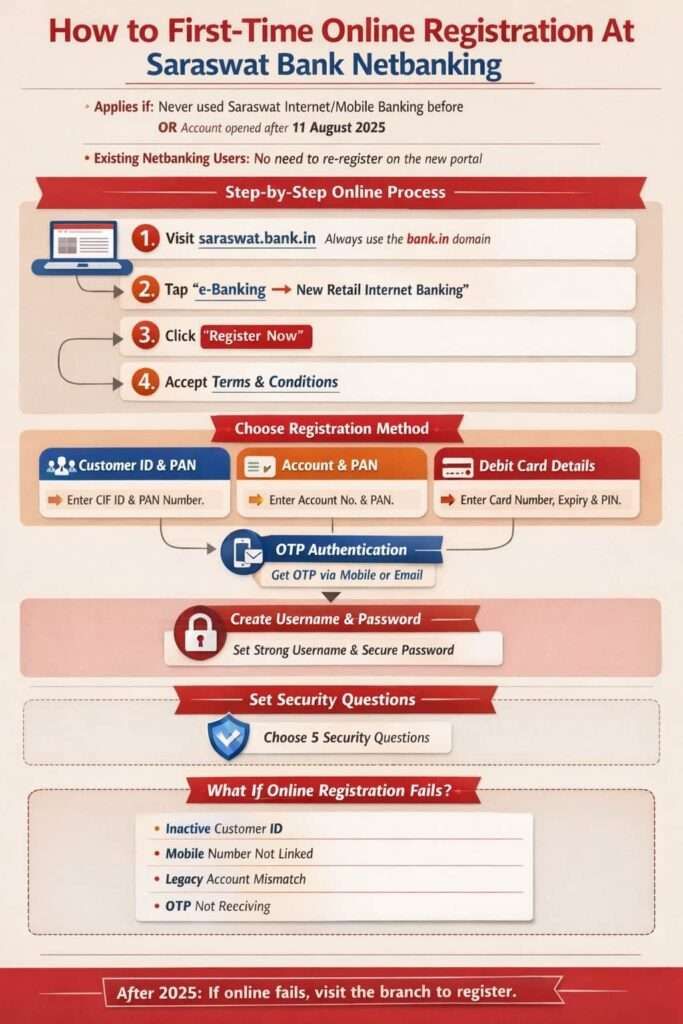
- First of all, visit saraswat.bank.In (always use bank.in domain and avoid any random link to login)
- Tap on e-Banking → New Retail Internet Banking (You can find this on header menu of the portal)
- Now, tap on Register Now
- First read and accept Terms & Conditions
- Choose Registration Method – The New portal allow to register using three methods –
- 1. Customer ID (CIF ID) – If you choose Customer ID, you have to enter your full ID and your PAN Card number
- 2. Account details – In Account details, enter your PAN card number and your account number
- 3. Your ATM or Debit Card Details – For the card, you have to enter your Full Card number, Expiry, and ATM Card PIN. (same pin you use for withdrawing cash)
- OTP Authentication – You have to choose the option to get the OTP and confirm.
- You can ask for Mobile number OTP, Email ID OTP, or both. This OTP works only for 3 mintues, if you choose email, it must be your email linked with your account.
- Create Username & Password – Rules are strict but simple
- First, set a strong username; it usually depend the availability. You can choose such as Alokwithdigits.
- Now, set your login password here, 8–20 characters, Uppercase + lowercase + number + special character
- And do not use name, DOB, email, or username in the password.
- Security Questions – The final step to complete it.
- You must set 5 security questions.
- These are used when you forget your password or during risk verification.
After this step, Registration completes, and you can use the same credentials work on Internet Banking + GOMO NxT Mobile Banking app
What If Online Registration Fails?
Online registration may fail if:
- Customer ID is inactive or not found when you try.
- Mobile number not linked
- Legacy merged account mismatch
- Technical validation error
- OTP is not received after 24 hours.
Rule after 2025: Online first try. Branch only if online fails. You have to visit the branch and process it here –
Offline Saraswat Bank Application Form: When It Is Actually Needed
Saraswat Bank still provides an Internet & Mobile Banking application form in its download centre. This does not mean a branch visit is compulsory. You can download here –
| File | Download Link |
|---|---|
| Saraswat Bank Application for Internet Banking and Mobile Banking (Retail) | Download PDF here |
| Corporate Internet Banking (For Corporate or Business Accounts Only) | Download English Version |
Use the form only if:
- The system shows your account not found, or your online account is not active.
- customer ID not activated,
- joint account mandate missing
- Any Technical or legacy issue persists
What the Form Allows
- Apply for Internet & Mobile Banking
- Link multiple accounts to one Login ID
- Apply for RTGS / NEFT facility
- Set custom RTGS/NEFT limits
- Apply for SMS Banking
How to fill out the form correctly
- Firstly, download the Form and open it.
- Enter your Full name as an applicant.
- Enter your Mailing address. same copy paste with your passbook.
- Put your mobile number and email ID that are linked to your account.
- Write down your DOB.
- Tick for account enable for netbanking
- If you do online payments mostly, enter your NEFT or RTGS required limits, such as 5 LAKH or 10 Lakh. It usually depends on the account type.
- Put your account details such as account number, Branch. Your Customer ID is not required.
- Enter your date and signature.
- All set. It takes 2 to 3 days to activate completely.
Note: Internet banking is allowed only if the mode of operation is:
- Single
- Either or Survivor
- Anyone or Survivor
Joint account holders require a Letter of Mandate signed by all holders.
Existing Customers: Do Not Register Again
If you used Saraswat Internet Banking or old GOMO on or after 1 December 2024, you are a migrated user. You can log in directly.
You must:
- Use SIGN IN, not Register
- reset password if prompted
All beneficiaries created up to 11 August 2025 were automatically migrated.
How Existing Users Get a Username (Two Digital Ways)
Option 1: Online Portal
- Click Forgot Username
- Authenticate using:
- Account details, or
- Debit card details
- OTP verification
- Username sent to registered email/mobile
Option 2: WhatsApp Banking
- Simply send Hi from the registered number to 8291409100
- Choose Option 12
- Username received as a password-protected PDF
- Open PDF using your CIF ID
Your old username will work here. After logging in, you can change it.
How to Log in to Saraswat Bank Internet Banking (Step-by-Step)
Step 1
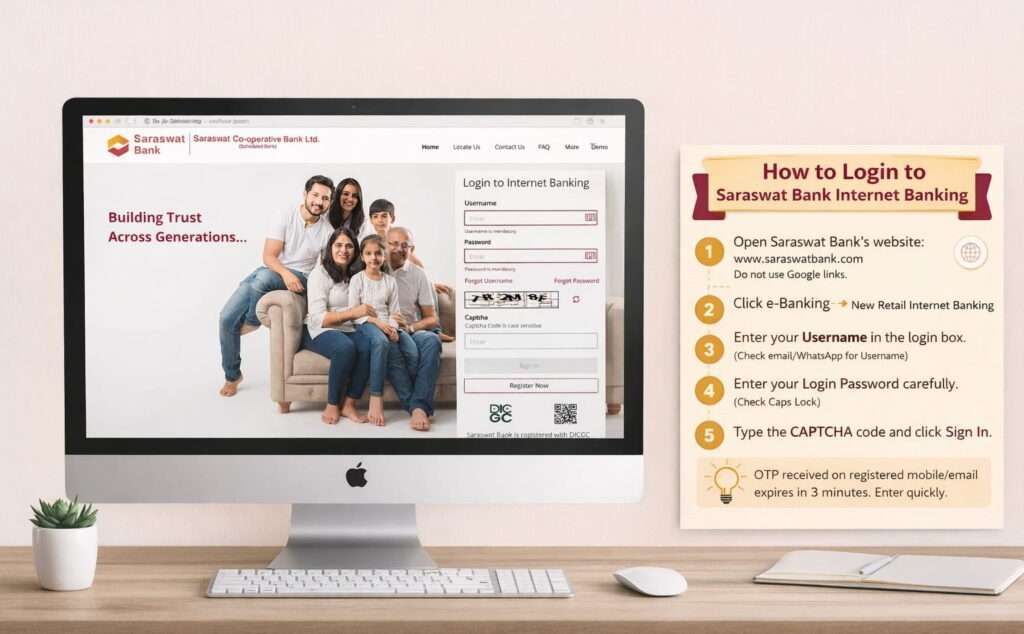
Open the official website https://www.saraswat.bank.in/. But remember, do not use Google links or old bookmarks. Always type the website name directly.
Step 2
Tap on e-Banking and select New Retail Internet Banking.
Step 3
Enter your Username in the login box. (This username is sent by the bank via email or WhatsApp. It cannot be changed.)
Step 4
Enter your Login Password carefully. Passwords are case-sensitive, so check Caps Lock.
Step 5
Type the CAPTCHA code shown on the screen and click Sign In.
Step 6
You will receive an OTP on your registered mobile number or email.
Enter the OTP the same as it is.
Step 7
After OTP verification, your Internet Banking dashboard will open.
Example
If your username is SB12345 and OTP is A9KD-458921, enter only 458921.
Important Note
If OTP does not come, check your mobile network or email spam folder. real life example, most of the time, most people use Truecaller on their phone, so a few OTP goes in SPAM.
How You Can Reset Your Password: What You Need
If your password is not working or has become old, it is good practice to change it. here quick process –
- Put your username
- You need to select for authentication using:
- Account number + PAN, or
- Debit card number + PIN
- OTP via registered mobile/email
Rules:
- New password must differ from the last 5 passwords
- No branch visit required if the mobile is active
Internet Banking Fund Transfer to Non-Registered Payee
This is called Quick Fund Transfer.
Steps:
- Login → Transfer → Quick Fund Transfer
- Choose:
- Account number method, or
- MMID method
- Enter payee name and account number
- Select bank & branch or IFSC
- Enter amount
Rules:
- Limit: ₹25,000 per day
- No beneficiary addition required
After transfer:
- Download receipt
- Save payee for future use
When a Branch Visit Is Still Required
A branch visit is needed only for:
- Access is blocked after 6 months of inactivity
- Digi-Block unblocking
- Legal name change
- Overdraft enhancement
- Corporate, trust, or complex joint accounts
For regular retail users, Saraswat Bank’s internet banking in 2026 is largely branch-free, but still regulation-first.
Questions: FAQs
Why was GOMO NxT launched on August 18, 2025?
The older system was branch-heavy and unstable during peak hours. On August 18, 2025, GOMO NxT was launched to handle higher IMPS load, OTP failures, and growing digital users safely.
What details should I keep ready before first login?
Keep username, login password, registered mobile or email, and stable internet ready. OTP expires in 180 seconds, so weak network is the most common reason first-time login fails.
Why does Saraswat Bank ask security questions during registration?
Security questions protect accounts when passwords are forgotten. Saraswat requires 5 questions so identity can be verified without branch visit, especially for senior citizens and customers from merged cooperative banks.
When is offline application form still useful today?
The offline form is useful only when online registration fails due to legacy accounts, joint mandates, or inactive CIF. It helps link accounts and set custom NEFT/RTGS limits.
Why did Saraswat Bank start strong net banking so late?
Because Saraswat Bank is a cooperative bank, RBI allowed full internet banking only after November 5, 2015, and the bank prioritised depositor safety for 7.7 lakh merged customers over fast digital rollout.