

Saraswat Bank now provides online banking through its new GOMO NxT Retail Internet Banking Portal for individual customers.
On 18 August 2025, the bank officially launched the upgraded platform with a new login system, You can login via here (buttons).
📌 Saraswat Bank Login Steps
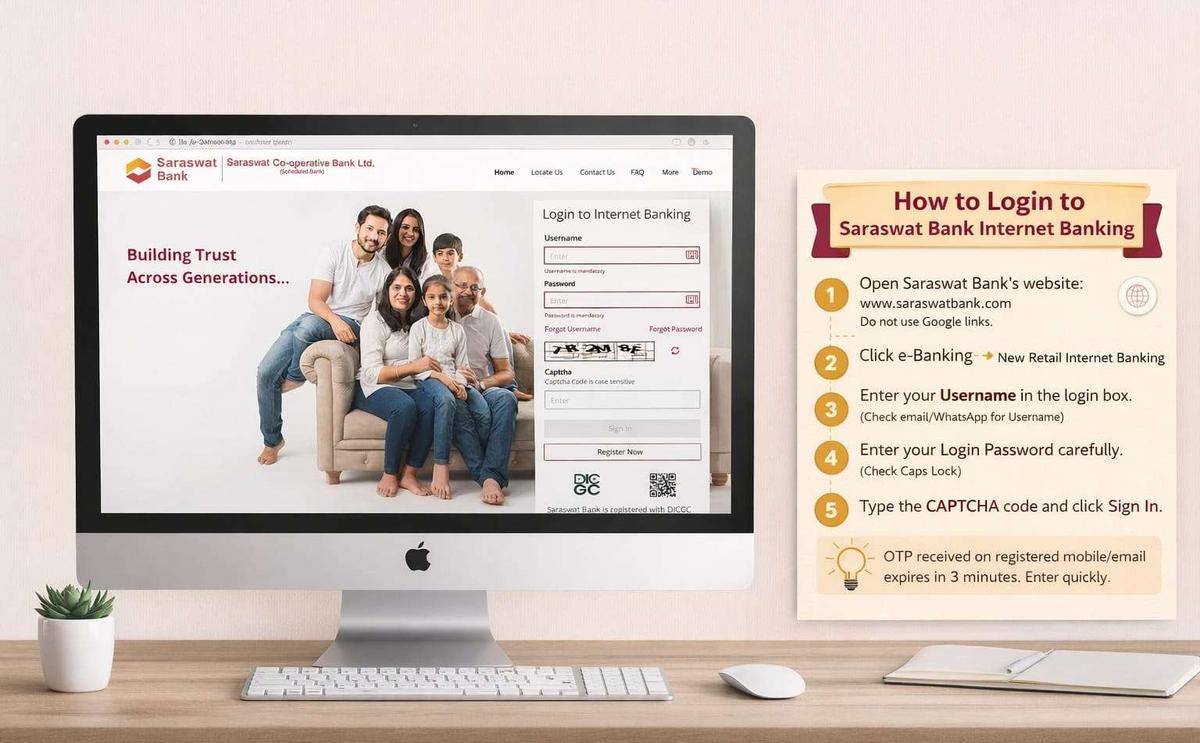
Saraswat Bank GOMO NxT Retail Internet Banking login page
📋 Keep These Ready Before Login
⚠️ Important: If OTP does not arrive, check your email spam folder or Truecaller SMS spam section. Many OTP messages are filtered there automatically.
📞 Technical Error Support:
💡 Login failed or using Internet Banking for the first time? Scroll below to check the first-time user registration process.
How to Register for Saraswat Netbanking (First-Time Users)
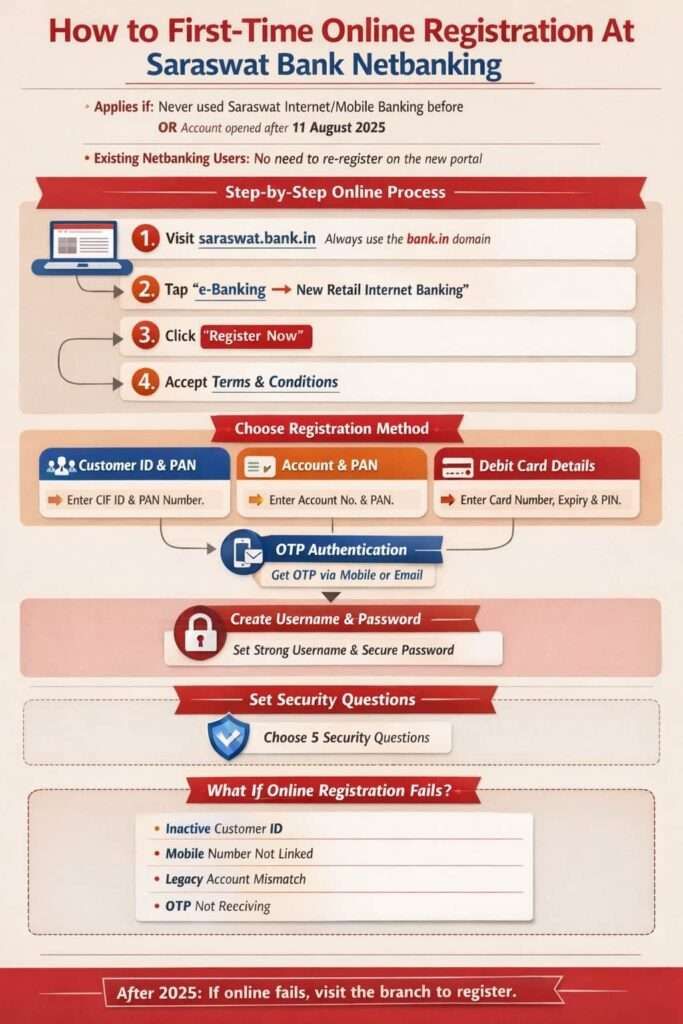
- First visit saraswat.bank.In (always use bank.in domain and avoid any random link to login)
- Tap on e-Banking → New Retail Internet Banking (You can find this on header menu of the portal)
- Now, tap on Register Now.
- Choose Registration Method – The New portal allow to register using three methods –
- 1. Customer ID (CIF ID) – If you choose Customer ID, you have to enter your full ID and your PAN Card number
- 2. Account details – In Account details, enter your PAN card number and your account number
- 3. Your ATM or Debit Card Details – For the card, you have to enter your Full Card number, Expiry, and ATM Card PIN. (same pin you use for withdrawing cash)
- OTP Authentication – You have to choose the option to get the OTP and confirm.
- You can ask for Mobile number OTP, Email ID OTP, or both. This OTP works only for 3 mintues, if you choose email, it must be your email linked with your account.
- Create Username & Password – Rules are strict but simple
- First, set a strong username; it usually depend the availability. You can choose such as Alokwithdigits.
- Now, set your login password here, 8–20 characters, Uppercase + lowercase + number + special character
- And do not use name, DOB, email, or username in the password.
- Security Questions – The final step to complete it.
- You must set 5 security questions.
- These are used when you forget your password or during risk verification.
After this step, Registration completes, and you can use the same credentials work on Internet Banking + GOMO NxT Mobile Banking app.
What If Your Online Registration Fails?
Online registration may fail if:
- Customer ID is inactive or not found when you try.
- Mobile number not linked
- Legacy merged account mismatch
- Technical validation error
- OTP is not received after 24 hours.
Rule after 2025: Online first try. Branch only if online fails. You have to visit the branch and activate the netbanking using activation form.
How Existing Users Get a Username (Two Digital Ways)
Option 1: Online Portal
- Click Forgot Username
- Authenticate using:
- Account details, or
- Debit card details
- OTP verification
- Username sent to registered email/mobile
Option 2: WhatsApp Banking
- Simply send Hi from the registered number to 8291409100
- Choose Option 12
- Username received as a password-protected PDF
- Open PDF using your CIF ID
Your old username will work here. After logging in, you can change it.
How to Reset Your Internet Banking Password Online
If your password is old or not working properly, you can reset it online in a few minutes without visiting the branch.
1. What You Need
- Your Internet Banking username
- Authentication using:
- Account Number + PAN, or
- Debit Card Number + PIN
- OTP sent to your registered mobile number or email ID
2. Important Rules
- Your new password must be different from the last 5 passwords.
- No branch visit is required if your registered mobile number is active.
When a Branch Visit is Still Required in 2026
A branch visit is needed only for:
- Access is blocked after 6 months of inactivity
- Digi-account unblocking
- Legal name change
- Overdraft enhancement
- Corporate, trust, or complex joint accounts
For regular retail users, Saraswat Bank’s internet banking in 2026 is largely branch-free, but still regulation-first.
New GOMO NxT Internet Banking Features & Video Demos
After launching GOMO NXT NetBanking, Saraswat Bank added several new digital banking features and also provides YouTube video tutorials for services like beneficiary addition, bill payments, and shopping mall payments through its Retail Banking Demo Videos section.
1. Daily Banking & Transfers
- You can use the transfer using your IMPS, NEFT, or RTGS, depending on the amount.
- Quick Fund Transfer to a non-registered payee – This is for sending a quick payment without adding a beneficiary.
- daily limit: ₹25,000
- The account holder can schedule or future-dated transfers
- Internal Saraswat Bank transfers (Basic but much better than before)
2. Deposits & Liquidity
- With your same customer ID, you can open Fixed Deposits using netbanking dashboard.
- Now, you can break FD digitally
- Open Overdraft Against Fixed Deposit
- Loan part-payment and pre-payment
3. Investments & Market Access
- Account holder can now invest in IPO / FPO / Rights Issue via ASBA
- The new access for Mutual Fund investments, but you will need a demat account
- Insurance products
- Online Demat account opening
4. Card & Account Control
- Your card Access Online – such as Block / unblock debit and credit cards
- The user can enable or disable international usage
- Set transaction limits
5. Documents & Compliance
- This is simple and quick – You can access your last 5-year account statements, download even Mini-Statements.
- Interest certificates
- Form 15G / 15H submission
- KYC, address, and email updates
Unlike many cooperative and RRB banks that still offer limited view-only services, Saraswat Bank now provides advanced features like utility, LPG, and water bill payments through its mobile app and NetBanking.
2026 Transfer Limits & Security Rules
To prevent fraud, Saraswat Bank enforces specific “cooling-off” periods and daily limits on the GOMO NxT portal. If you just added a beneficiary, you cannot send the full amount immediately.
| Transfer Type | Daily Limit | Processing Time |
|---|---|---|
| IMPS | Up to ₹5 Lakh | Instant (24×7) |
| NEFT | Up to ₹25 Lakh | 30-60 Mins (24×7) |
| RTGS | ₹50 Lakh+ | Real-time (24×7) |
- ⚠️ New Payee “Cooling-Off” Rule – After adding a new beneficiary, you can only transfer ₹25,000 in the first 3 hours. Full limits are only unlocked after 24 hours of adding the payee.
- 💡 Pro Tip for Mobile Users – If your GOMO NxT app shows a “Device is Rooted” error, it will block your access for security reasons. To bypass this, open your mobile browser (Chrome or Safari), switch to “Desktop Site” mode, and log in through the official website instead.
- ⚠️ How to Block Your Card Instantly – If you notice suspicious activity, don’t wait for the portal to load. Send BLOCK <last 4 digits of card> to 9223810000 from your registered mobile number to freeze your card immediately.
Frequently Asked Questions
Why was GOMO NxT launched on August 18, 2025?
The older system was branch-heavy and unstable during peak hours. On August 18, 2025, GOMO NxT was launched to handle higher IMPS load, OTP failures, and growing digital users safely.
What details should I keep ready before first login?
Keep username, login password, registered mobile or email, and stable internet ready. OTP expires in 180 seconds, so weak network is the most common reason first-time login fails.
Why does Saraswat Bank ask security questions during registration?
Security questions protect accounts when passwords are forgotten. Saraswat requires 5 questions so identity can be verified without branch visit, especially for senior citizens and customers from merged cooperative banks.
When is offline application form still useful today?
The offline form is useful only when online registration fails due to legacy accounts, joint mandates, or inactive CIF. It helps link accounts and set custom NEFT/RTGS limits.
Why did Saraswat Bank start strong net banking so late?
Because Saraswat Bank is a cooperative bank, RBI allowed full internet banking only after November 5, 2015, and the bank prioritised depositor safety for 7.7 lakh merged customers over fast digital rollout.
Hope you liked the content. Explore smart options below 👇
🔥 Recommended