

UCO Bank offers multiple KYC forms for different update needs — download the correct form below and fill it carefully to avoid rejection or delays during verification.
Download UCO Bank KYC Forms (All Annexures)
UCO Bank sets 3 forms for individual KYC updation (savings or similar). You will be asked to submit one of the following based on your situation. You can download it here or collect it from the nearest branch as well.
| Form Type | Purpose | Download Link (Official UCO Bank) |
|---|---|---|
| Annexure-1 | Self-declaration in case of no change in KYC information (individual) – This form you will need for just KYC without changing any personal information. | Download Original Self-declaration PDF |
| Annexure-2 | Declaration for change of address only with KYC update | Download UCO Bank KYC Address Only PDF |
| Annexure-3 | Re-KYC / Periodic Updation – This form you will need if any mismatched information updation or changing any existing details, such as number, or source of income | Download English PDF |
| Annexure-4 (not for regular account) | For Non-Individual customers (Legal Entities) – no change in KYC | Download PDF |
| Valid KYC Documents List | Here, you can check what RBI-approved list of acceptable documents you can provide to your UCO Bank | View List |
1. Fill Annexure-1 for UCO KYC (No Change in Details)
If you have received a Re-KYC reminder on your phone but nothing has changed – your address is correct, your mobile number is correct and working, since your last submission, fill Annexure-1. In this form, you will need to reactivate your account.
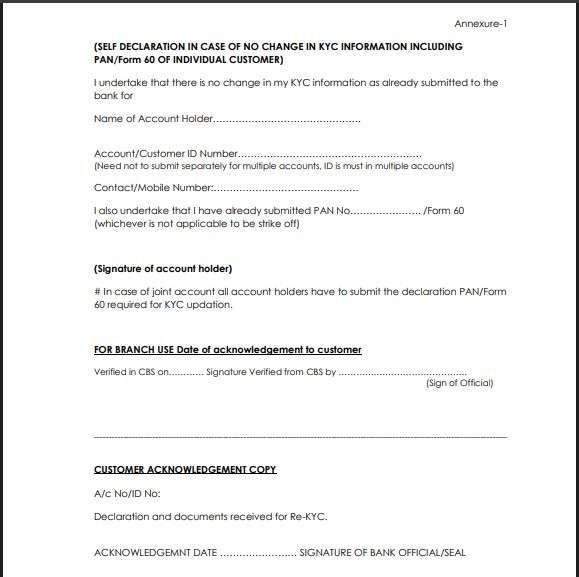
| Details to fill up | What to Enter | Example / Tip |
|---|---|---|
| Name of Account Holder | As per the passbook or other bank documents, make sure your aadhaar name matches with account records | “Anjali Mehra” |
| Account Number / Customer ID | Your main savings or current a/c number | “02430100012345” |
| Mobile Number | Registered mobile number | “9876543210” |
| PAN / Form 60 | Write PAN number or “Form 60 enclosed” | “ABCDE1234F” |
| Signature | As per bank records | Sign using blue ink |
| Date & Place | Current date and city | “11-Oct-2026 / Jaipur” |
| Acknowledment Copy | Fill in basic info or just leave it | not required |
Documents Needed: Your Xerox copies (photocopies) of Aadhaar, PAN only, if the bank specifically asks for additional forms, such as FATCA, you can download them via the UCO Bank website. If no PAN is available, you will need Form 60.
2. Fill Annexure-2 for Address Update (UCO KYC)
If you have shifted residence or want your ATM Card or other bank documents sent to a new address, fill in the UCO Bank Annexure-2 KYC PDF, and your KYC will update with your latest address. Here is what to fill –
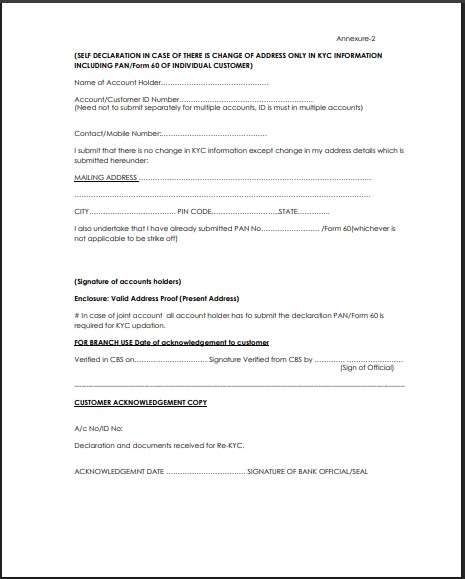
| Field | What to write using Black or Blue Ink Pen | Suggestions with examples |
|---|---|---|
| Name of Account Holder | Full name | “Ravi Kumar” |
| Account Number | Put down your active 14-digit account number | — |
| Customer ID | Your CIF number is printed on your passbook or cheque book | |
| New Communication / Mailing Address | Full new address in capital letters | “Flat 21-B, Green Residency, Pune – 411001” |
| City / State / PIN | Mention correctly | — |
| PAN / Form 60 | PAN number or Form 60 | — |
| Signature | Same as bank records | — |
What documents are required with this form only:
You have to attach one self-attested address proof of the new address — such as your aadhaar, Passport, Voter ID, Rent Agreement, or latest utility bill (within 2 months – Bijli bill, Water bill, Gas Bill or other). Also, your PAN scanned copy branch may ask.
3. Complete Annexure-3 for Full KYC Update (UCO Bank)
UCO Bank Annexure-3 is the main Re-KYC form used when there are any updates in your identity, contact, occupation, or financial profile. It has a 2-sheet long form. This form looks complex, but it’s straightforward if filled out section-wise. Let’s learn, where to start –
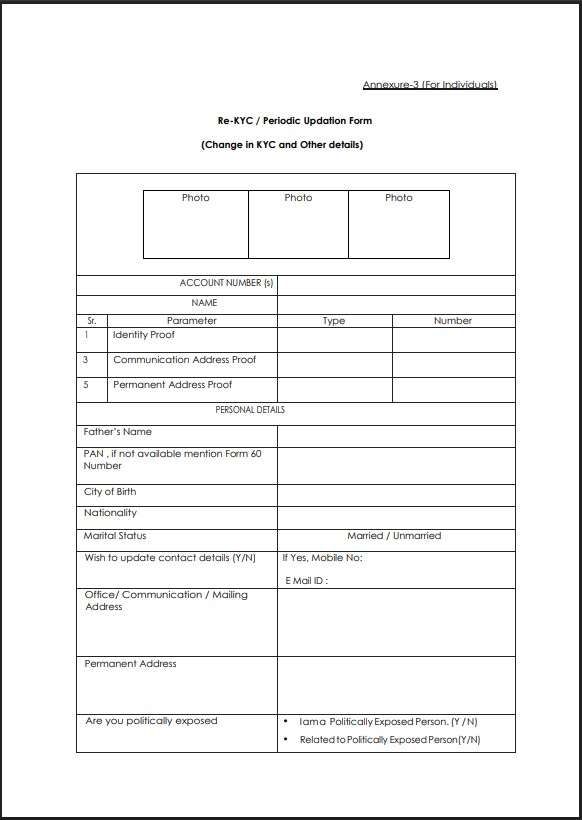
Section 1: Basic Details
| Field | What to Fill | Example |
|---|---|---|
| Account Number(s) | All active account numbers under your name, if single account number, put it | “02430100012345, 02430100056789” |
| Name | Full legal name | “Priya S. Nair” |
| Photographs | Paste one recent passport-size color photo and sign across it | — |
Section 2: Identity, Address, and Proofs
| Parameter | Type | Number | Document Required |
|---|---|---|---|
| Identity Proof | Aadhaar / Passport / PAN / Voter ID / DL | “XXXX-XXXX-1234” | Self-attested copy |
| Communication Address Proof | Aadhaar / Passport / Utility Bill | “Aadhaar ending 1234” | Self-attested copy |
| Permanent Address Proof | If different, mention separately | — | Proof document |
Tip: Use the same document for both address fields if your current and permanent addresses are identical.
Section 3: Personal Details
| Field | What to Fill | Example / Tip |
|---|---|---|
| Father’s Name | Full name | “Suresh Chand Nair” |
| PAN / Form 60 | Enter PAN number or tick Form 60 | “ABCDE1234F” |
| City of Birth | Place of birth | “Kochi” |
| Nationality | “Indian” or specify if other | — |
| Marital Status | Married / Unmarried | Tick married if not updated yet |
| Mobile Number & Email ID | Write only if updating | “9876501234 / priya.nair@email.com” |
| Office / Communication Address | New work or mailing address | Attach proof if new |
| Permanent Address | As per ID proof | — |
| Are you Politically Exposed? | Y / N | Choose “No” if not applicable |
| Related to Politically Exposed? | Y / N | — |
Section 4: Occupation and Financial Details
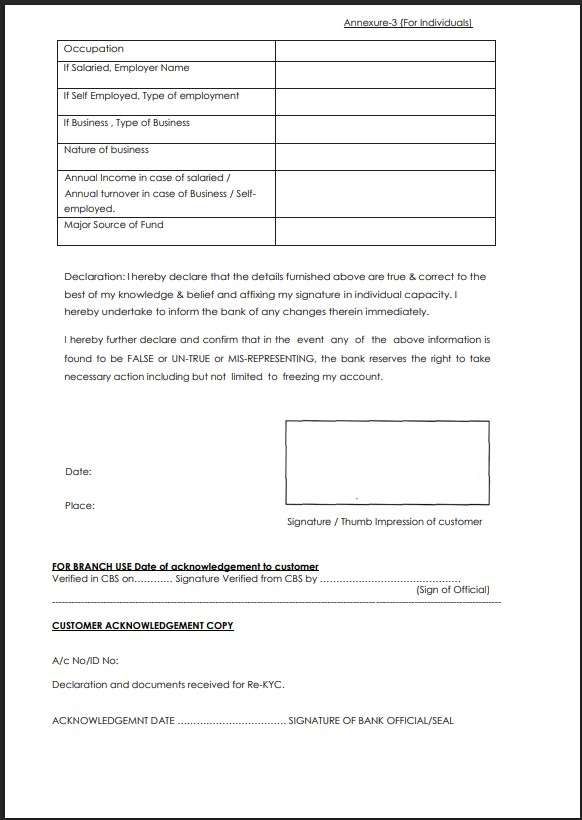
| Field | What to Fill | Example / Tip |
|---|---|---|
| Occupation Type | Salaried / Self-employed / Business / Student / Retired | Tick appropriate |
| Employer / Business Name | Company or trade name | “ABC Technologies Pvt. Ltd.” |
| Nature of Business / Profession | e.g., IT Services / Retail / Consultancy | — |
| Annual Income or Turnover | Approximate amount | “₹8,00,000 per year” |
| Major Source of Funds | Salary / Business / Pension / Rent, etc. | — |
Documents Required for UCO Bank KYC Forms
| Purpose | Accepted Documents |
|---|---|
| Identity Proof | You need 1 Scanned copy of – Aadhaar/Passport/PAN/Voter ID/Driving Licence |
| Address Proof | Aadhaar / Passport / Utility Bill / Rent Agreement – You can use aadhaar for both Proof. |
| PAN or Form 60 | PAN card copy, or you can use a duly filled Form 60 if no PAN card or your PAN has not received yet. |
| Occupation Proof | Salary slip, ITR, business registration, or professional ID |
| Photo | One color passport-size photo signed across |
Submit Your UCO Bank KYC Form (Email, Post, or Branch)
| Mode | Steps | Tip |
|---|---|---|
| By Email | Scan and email the signed form and documents to your branch email ID. you may need physical copy first, for signature then upload in email. | Keep file size under 2 MB. Subject line: “Re-KYC – [Your Name] – [Account No.]” |
| By Post / Courier | Send hard copies to your branch address. | Use A4 envelope; include self-attested photocopies. |
| In-Person Visit | Visit branch during working hours. | Carry originals for verification. |
UCO Bank Visiting Hours for KYC Submission
Before visiting your branch for KYC or Re-KYC submission, it helps to plan your timing for fast process.
UCO Bank branches are generally open from 10:00 AM to 4:00 PM, Monday to Friday.
- Closed: on the second and fourth Saturdays of each month and all national holidays.
- Lunch Break: typically between 1:00 PM and 2:00 PM — though staff often take lunch in rotation, visiting before or after this slot ensures faster service.
- You can visit at 11:00 AM and submit your form with documents, and the bank will take 2-3 working days to update it. You can call UCO customer care to track your progress.
- If you don’t have time to visit the branch, you can use the Email method. After submitting it takes 7 working days to update.
Frequently Asked Questions
How to check if my KYC is already updated in UCO Bank?
You can confirm by visiting your branch, UCO customer care helpline, or checking your account status in the UCO mBanking app — if active, KYC is valid.
Are business or current account holders required to file UCO Bank KYC separately?
Yes. Firms, companies, and trusts must use Annexure-4, with business registration documents, PAN, and authorised signatory details.
What is the difference between Form 60 and PAN?
PAN is a government-issued ID for taxpayers. Form 60 is a declaration used when PAN is not available. Most banks, for students, minors, and account types, they allow the use form 60.
Will my debit card stop working if KYC is not done?
Yes, once your account is frozen due to KYC expiry, your ATM, UPI, and online banking functions will also stop temporarily.
Can a senior citizen submit KYC through a family member?
Yes, if physically unfit. The family member can submit a signed authorisation letter and a copy of the senior’s ID proof. Or you can book doorstep banking, or you can use the Video KYC method for re-KYC.Which UCO Bank KYC form should I use if I’m confused?
Rule of thumb: if nothing changed, use Annexure-1. If only the address changed, Annexure-2. Any other change—mobile, PAN, income—Annexure-3 is compulsory. Wrong form causes delays.
Why does UCO Bank still accept email-based KYC when others don’t?
UCO allows email KYC to reduce branch crowding. But approval takes 5–7 working days, compared to 2–3 days for an in-person submission. Email works best for no-change cases.
What is the most common reason UCO Bank KYC stays pending?
Unclear scans or missing self-attestation. Nearly 50% pending cases happen because Aadhaar or PAN copies aren’t signed or the photo quality is poor. Always sign before scanning.
Can I submit KYC at any UCO branch if I’ve moved cities?
Mostly no. UCO prefers the home branch for retail accounts. Other branches may accept documents, but internal transfer can delay approval by 3–5 extra working days.
Is Annexure-1 really enough to unblock a frozen UCO account?
Yes, if details are unchanged. Annexure-1 usually restores services like UPI and ATM within 24–48 hours, provided your mobile number and PAN are already verified.
Why does UCO Bank ask for income details even for savings accounts?
Income decides RBI risk classification, not tax liability. Approximate figures are fine. Leaving income blank often triggers maker-checker rejection, even when documents are valid.
How strict is UCO Bank about Aadhaar-linked mobile numbers?
Very strict for e-KYC and SMS verification. If your mobile isn’t Aadhaar-linked, OTPs may fail and KYC remains pending without clear error—branch visit becomes mandatory.
Hope you liked the content. Explore smart options below 👇
🔥 Recommended