

When you open your HDFC Bank app to send a quick UPI at a store, you notice something strange. You clearly have a balance — ₹7,842 showing in your account — but the payment just does not go through. It looks like you have money, but the app blocks you from using it.
Let’s make it simple: in HDFC, “Amount on Hold” means the bank has kept a part of your money aside temporarily. It could be for a charge, a pending EMI, a system process, or just a security check.
Some people call it a lien, but technically, it’s not the same every time. A lien means the bank officially locks your available funds (like when you miss a credit card payment). A hold can also happen automatically — sometimes just because of a pending transaction.
How to Check the Hold in the HDFC App
Here’s the exact place you will find it, just using your phone –
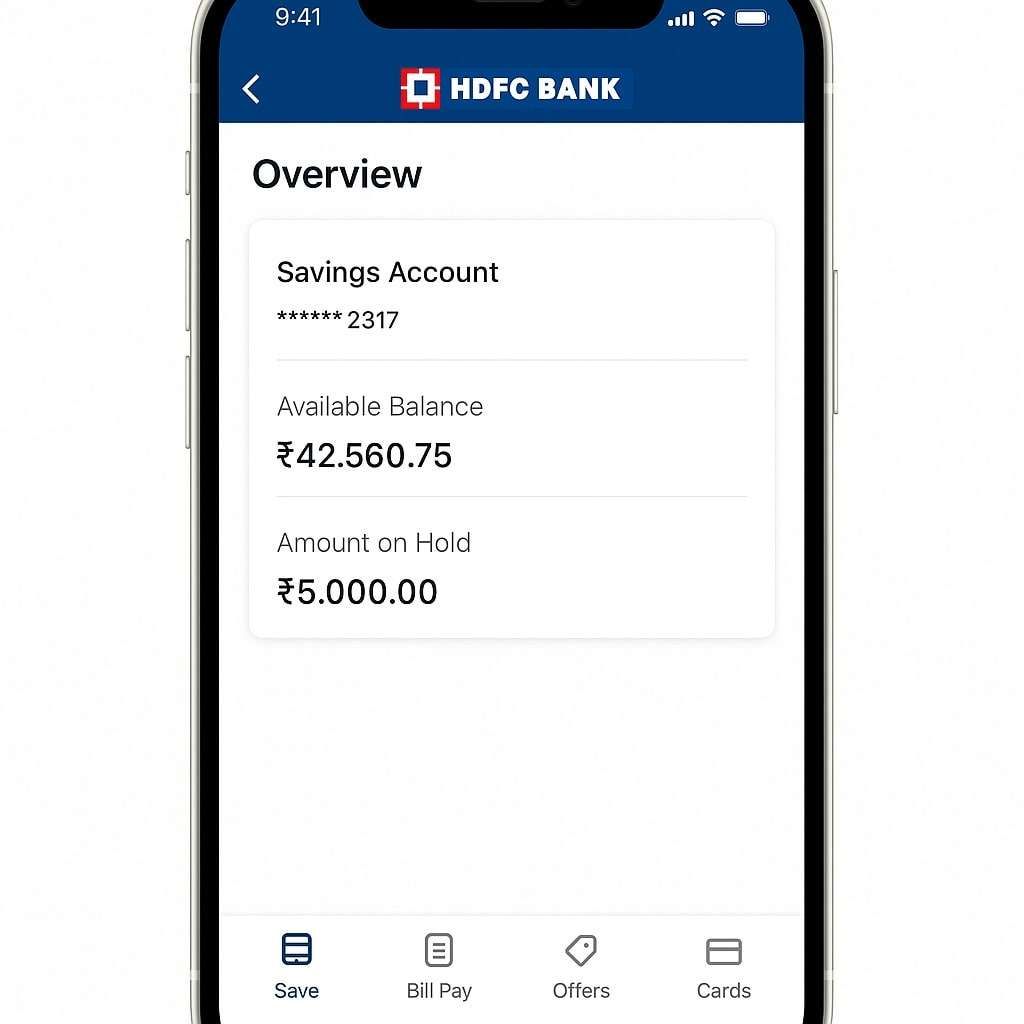
- Open your HDFC Mobile Banking app and log in using 4-digit mpin or Face ID.
- Tap on “Save” at the bottom.
- Choose your Savings or Salary Account.
- Tap on “Show Account Details”.
- You will see a line that says “Amount on Hold.”
That number is the exact amount you can not use right now — even if your total balance looks higher.
Why Does This Hold Happen
There’s no single reason. HDFC places holds for different cases depending on your situation — sometimes because of dues, sometimes just because the system needs to verify something.
Let’s split it into two types — Due Related Holds and Temporary Holds — so you can understand which one is happening to you.
1. Due Related Holds — When You Owe the Bank Something
These holds happen when there’s some charge, fee, or payment pending on your account. Here are the top real reasons HDFC does this:
- Late EMI or Loan Payment: If your EMI went late, even by a day, the system can auto-freeze that amount until your payment reflects. I have seen it happen many times: once the EMI clears, the hold drops automatically within a day.
- Credit Card or Debit Card EMI Dues: If you have a Credit card or an Active HDFC debit Card EMI, and you skip a payment, delay, or fail in the middle, the system can mark that amount on hold until you pay it.
- ECS / Auto-NACH Bounce: Suppose your auto-debit for EMI, SIP, or insurance fails due to a low or less balance, the bank instantly puts that amount on hold to recover it later.
- Negative Balance Adjustment: If your account went negative before and then received money, the bank first adjusts that pending amount by keeping it on hold.
- Debit Card Annual Fee or Maintenance: HDFC charges a yearly maintenance fee on debit cards. If that fee is pending, it can show up as a hold.
- Cheque Return or Stop Payment: When a cheque is in process or has been returned, the funds stay locked until clearance is completed.
- Unpaid Service Charges or Penalties: a small charge, such as ₹59 for SMS notify fee, is pending; the system puts that part on hold or puts a negative balance.
- Sweep-in FD or OD Account Adjustment: Temporary holds appear if your account is linked to a Fixed Deposit or Overdraft due to internal transfers.
- Regulatory or Compliance Hold: Rare, but if the system finds any doubtful transaction or a KYC mismatch, it triggers a hold amount. You have to visit the branch and do Re-KYC.
2. Temporary or System-Related Holds — When It’s Not Your Fault
These holds are automatic and usually clear within 24 to 48 hours without you doing anything.
- Pending UPI or Card Transaction: Sometimes, if you make a payment via a POS machine or send UPI and the transaction fails in the middle, that amount stays “on hold” until the system reverses it, but it takes time.
- Cheque Under Clearance: If you deposited a cheque, the amount shows on hold until it’s cleared — usually by the next working day.
- Refund Waiting: When a merchant refunds to you, (such as Amazon or IRCTC), that money sits in “on hold” status until done.
- ATM Cash Reversal: You tried to withdraw, but the cash did not come out, and your account got debited. You are again stuck in the middle, which always shows as “on hold” for a day or two before it reverses.
- Transaction Verification or Timeout: Sometimes HDFC’s backend flags a transaction for double verification, which can be issue for a hold; the amount appears locked.
- Internal Account Sync: During system maintenance, the bank can temporarily freeze processing balances for safety.
- Merchant Pre-Authorisation: For hotel bookings, travel sites, or petrol pumps, HDFC pre-blocks funds, which are reversed automatically when you complete your transaction with the merchant.
How to Release the Hold Amount
Automatic Release
If your EMI, bill, or card payment is now settled, there’s no need to contact anyone. The system typically releases the held amount within 24–48 hours. You’ll see your available balance go back to normal once the update syncs.
Manual Release (If Still Not Cleared)
But if you have waited for two days and the issue is still not solved, the action required –
- Open your Phone and call at 1800-2600, use only your account-linked mobile number.
- When the call connects, choose Option 3 (for Account and Deposit).
- Enter the last 4 digits of your debit card, customer ID, or account number. (anyone)
- Press 9 to talk directly to a bank executive.
- Tell them you have an “Amount on Hold” in your account — they will check and tell you the exact reason.
These are HDFC’s current helpline numbers (accessible across India):
- HDFC official Helpline (All over India): 1800 2600 or 1800 1600
- For customers abroad: +91 2261606160
If you call during a working day (Monday-Friday), it connects faster, and the staff can help immediately and solve your issue without delay or during any holiday.
Real Example from a Customer
One user shared that his salary account suddenly showed ₹1,500 on hold. He had missed his EMI auto-debit by just one day. He manually paid it that night, and within a few 24 hours the system released the hold automatically — even though the bank executive told him it might take up to three working days.
So, the system syncs faster than expected once the pending payment reflects.
If It Still Does not Get Fixed
If you have cleared everything and even confirmed with support, but the hold still stays for more than a few days, then go old-school or direct: visit your home branch.
At the branch counter, ask for your transaction log or system remark — it shows the reason for the hold. If it’s a system tag, they can manually remove it after internal verification.
Still not solved?
You can escalate your issue online:
- Visit HDFC’s official Nodal Officer page: https://www.hdfcbank.com/nodal-officers
- Or raise a complaint via RBI Sachet — India’s official platform for unresolved bank issues.
FAQs
My UPI keeps failing at shops even though the balance shows full — what should I do?
Try sending ₹1 first. If it fails, check “Amount on Hold” in the HDFC app. Even ₹100 on hold can block a ₹10 payment. First, reset your UPI PIN if the amount on hold is Zero and try to set it again using the ATM, or contact your HDFC customer care for any technical errors.
Can I withdraw cash if there’s an amount on hold?
No. ATM only lets you withdraw from your available balance, not your total. Wait till the hold clears — or call support if it’s stuck long. The hold amount does not work on credit, debit, or withdrawal online or offline.
Is “Amount on Hold” counted in my minimum balance for HDFC savings accounts?
Yes. HDFC counts the total balance, not the available balance. Even if ₹2,000 is on hold, it still counts toward the minimum balance, so you won’t be charged unless the total drops below the limits.
How long can HDFC legally keep my money on hold without explanation?
Usually, 24–48 hours for system holds. If it crosses 3 working days, the branch staff must explain the exact system remark. RBI norms require banks to disclose the reason on request.
Does “Amount on Hold” affect interest calculation on my savings account?
No. Interest is calculated on the end-of-day total balance. Even if ₹5,000 is blocked, HDFC still pays savings interest on that amount during the hold period.
Can a merchant or hotel hold money longer than expected in HDFC?
Yes. Pre-authorisation holds depend on merchant release, not HDFC. Hotels and fuel pumps may keep amounts blocked for 7–14 days unless they manually close the transaction.
Will closing my EMI or credit card immediately remove the hold?
Payment clears first, but the hold removal depends on backend sync. In most real cases, the hold drops within 12–36 hours, even though executives quote “up to three working days.”
What’s the fastest real-world way to confirm the exact reason for a hold?
Ask your Home OR nearest branch staff for the system narration or hold code. It shows the internal reason in seconds—much faster than guessing. Carry a debit card or customer ID for instant access.
Hope you liked the content. Explore smart options below 👇
