

🚀 Staff can log in using their Employee ID and a password. You can access CanDLE through:
| Access Method | Official Access |
|---|---|
| CanDLE Web Portal | Open CanDLE Login |
| Android Mobile App | Download Canarites App |
💡 CanDLE (Canara Digital Learning Experience by eLibrary) is the official internal e-learning platform of Canara Bank used for employee training, certifications, and digital learning programs.
📱 Recommended Setup
| Setup | Recommendation |
|---|---|
| Browser | Chrome, Firefox, Safari |
| Device | Desktop, Laptop, Mobile |
| Internet | 4G or Broadband |
| Best Experience | Google Chrome on Desktop/Laptop |
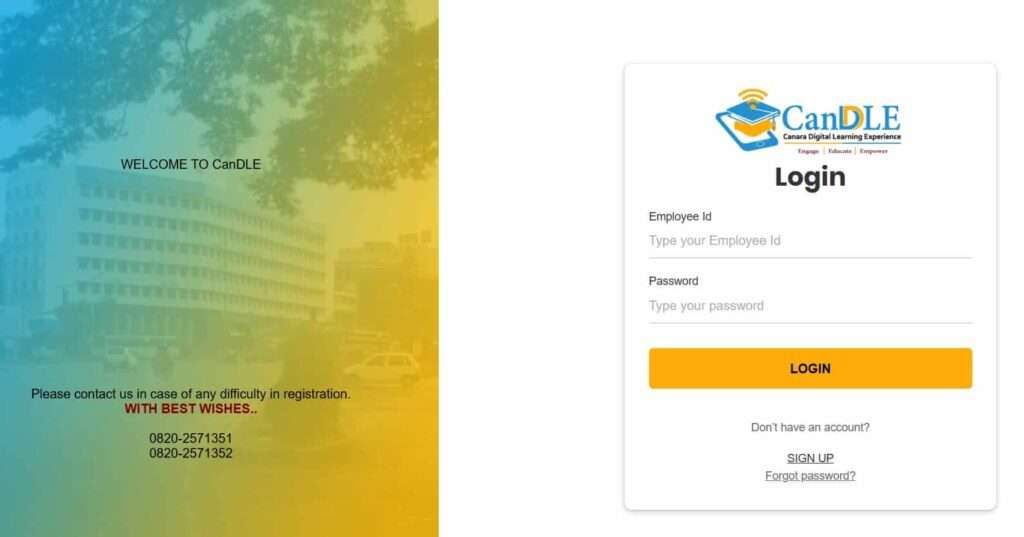
📌 How to Log In
📌 First-time user? Read below for account registration and password activation steps.
How to Register for CanDLE: New User Activation
New employees such as Probationary Officers (POs), Clerks, and Lateral Hires must first activate their CanDLE account before accessing mandatory training modules. Follow these 2026 registration steps:
- Go to www.canariteslearning.com
- Click on Login/Register
- Then click on Sign Up
- Enter your Employee or Instructor ID
- You will get an OTP on your registered mobile number
- Enter the OTP and set your new password.
- Keep the remember me point on for future easier login.
- After saving your profile, your Mandatory Course List will automatically populate within 24 hours.
Key Point: Most users don’t see a separate “Sign Up” page. Canara Bank follows a password reset model for first-time users.
Here’s what to do:
- On the login page, tap on the forget password button.
- Here, provide your linked mobile number and your employee ID.
- Tap on Send OTP and create a new password instantly.
💡 Pro Tip: If you are a new joiner and see “Employee ID not found,” your HRMS data may not be synced yet. The sync usually happens on Tuesday and Friday. Wait around 48 hours after receiving your appointment kit before registering again.
CanDLE Canara Bank OTP Not Received? 3 Quick Steps
This is one of the most common problems employees face. Here’s what to do:
Step 1: Check your mobile number in HRMS
Is it updated and correct? If not, update it via HRMS.
Step 2: Still no OTP?
- If the number is incorrect, update HRMS → Email: elearning@canarabank.com
- If the number is correct but still no OTP, then drop an Email: sms.support@canarabank.com
Step 3: Helpline numbers:
- 0820-2571351
- 0820-2571352
Tip For You: Try again after 5–10 minutes. OTPs sometimes get delayed during peak hours or network congestion.
What Content Is Available Inside CanDLE? (Dashboard)
Once logged in, you can access a dynamic dashboard with several key icons and content types:
1. Courses & Training Modules
- Role-based courses
- Promotion training
- Compliance courses (e.g., AML/KYC)
- Certifications with downloadable certificates
2. Video Lectures & Webinars
- Expert-led recorded sessions
- Step-by-step digital banking demos
- Leadership & ethics series
3. Audio Files
- Podcasts on soft skills
- Banking updates for on-the-go learning
4. Text & PDF Materials
- Internal bank manuals
- Study notes
- RBI circulars and procedural updates
5. Circulars Section
- Searchable archive of all Canara Bank circulars
- Filter by year, category, keyword
6. Assessments
- Multiple-choice quizzes after each module
- Real-time score & feedback
- Bookmark and resume feature
7. Discussion Forums
- Peer-to-peer discussions
- Ask mentors questions
- Participate in knowledge sharing
8. Canara Digital Library
- eBooks
- Industry publications
- Case studies and reports
9. Instructor-Led Training
- Add yourself to the waitlist for live sessions
- Notifications are sent when assigned
5 Expert Tips for Better Learning and Training
- Bookmark your progress: You can exit a course and resume later without losing your place.
- Searching Smartly: Leave the keyword field blank and click search to see all available content. Also, use terms like “primary” or “supplementary” for better results.
- Schedule assessments smartly: Avoid last-minute attempts. Many courses have internal deadlines.
- Explore beyond mandatory content: There are bonus materials under the library and discussion forums.
- Download your certificate: Upon course completion, you can print and download it to show progress.
How to Join Instructor-Led Training (ILT) on CanDLE
- Log in to the CanDLE Portal and open the My Trainings or ILT Calendar section.
- Find your assigned training session from the date and time shared in the email.
- Complete any required pre-learning modules before joining.
- Tap on Join Session or Launch to open the online class (Teams/Webex).
- Stay in the session properly, as attendance is tracked automatically.
- After the training ends, submit the feedback form from the dashboard.
- Once submitted, your digital certificate will be unlocked.
Seats are limited. If you’re waitlisted, you’ll receive alerts when a spot opens up.
Why Do Employees Use the CanDLE Portal?

The CanDLE Portal is mainly used by:
- Active Canara Bank employees across all branches and regions
- Bank instructors and external faculty members
- HRMS-verified staff with official employee or instructor IDs
1. Why Is It Important?
Banking rules and technology keep changing, so the portal helps staff stay updated through digital learning. Employees use it for:
- Skill development and banking courses
- Mandatory compliance training
- Bank circulars and internal updates
- Quizzes, tests, and assessments
- Discussion forums and collaborative learning
- Promotion preparation and skill refreshers
- Training support for new employees
It has become an important learning platform for daily banking operations and career growth.
2. When Should You Use It?
Here are a few scenarios when the platform is essential:
- During promotions or job role changes
- As a new joiner undergoing onboarding
- For compliance refreshers (KYC, digital fraud prevention)
- To gain certifications or prove learning completion
- When circulars or urgent updates are released
Frequently Asked Questions
How do I reset my Canara CANDLE password?
In case you forgot your password, you have to visit the official site, candle and tap on forgot password, it is required enter your employee ID and update your mobile number to set a new one.
What is the Employee ID in Canara Bank, and where can to find it?
It is a special staff-allocated identification number, it used by Internal systems like HRMS and Candle to access it. You can check your payslip, joining form, salary package PDF, and ask your HR team about your employee ID.
Why is Canara Bank asking employees to open CanDLE only in Chrome?
Because CanDLE works best on Chrome after recent upgrades. Branch users report fewer assessment errors on desktop Chrome compared to mobile app, especially during quizzes and certificate generation.
What is the new official CanDLE website link after the domain change?
Canara Bank recently shifted CanDLE to a secure .bank.in domain. Employees should use canariteslearning.canarabank.bank.in
to avoid login, OTP, and assessment issues.I’m a first-time user. Should I sign up or use Forgot Password?
Always use Forgot Password, not Sign Up. HR creates accounts centrally. Tip: many first-time login failures happen because employees try manual sign-up, which doesn’t work.
Why am I not receiving OTP while logging in to CanDLE?
Most OTP issues happen due to a mismatch between HRMS and CanDLE mobile numbers. Fact: updating HRMS fixes nearly 80% OTP problems reported at the branch level.
My mobile number is correct, but the OTP still doesn’t come. What’s next?
Email sms.support@canarabank.com with employee ID and screenshot. Tip: retry after 5–10 minutes and avoid peak hours, as SMS delays increase during heavy traffic.
Whom should I contact if CanDLE registration or login still fails?
Call the official helpdesk numbers 0820-2571351 or 0820-2571352. Real tip: calling during office hours resolves most issues faster than email follow-ups.
Hope you liked the content. Explore smart options below 👇
🔥 Recommended