

Access ESAF Net Banking using official links only. Use these direct options for login and new registration:
- Login Portal: ESAF Net Banking Login
- New User Registration: Register via ESAF Official Website
Tip: To access ESAF Netbanking, you need your 12-digit Customer ID. The Debit Card + PIN method is the most successful registration path. check below –
How to Register ESAF Netbanking (First Time)
- ESAF Small Finance Bank offers user-driven registration with 3 methods
- In real use, all methods may not work equally for every user
- Still, as per Reserve Bank of India guidelines, ESAF has made the process secure and accessible
- To start registration:
- Visit the official website: https://www.esaf.bank.in/
- Tap on Login (top menu)
- Select Personal Banking
- Click on New User Enrollment
- You will see multiple registration options
- The simplest and most reliable method is explained below 👇
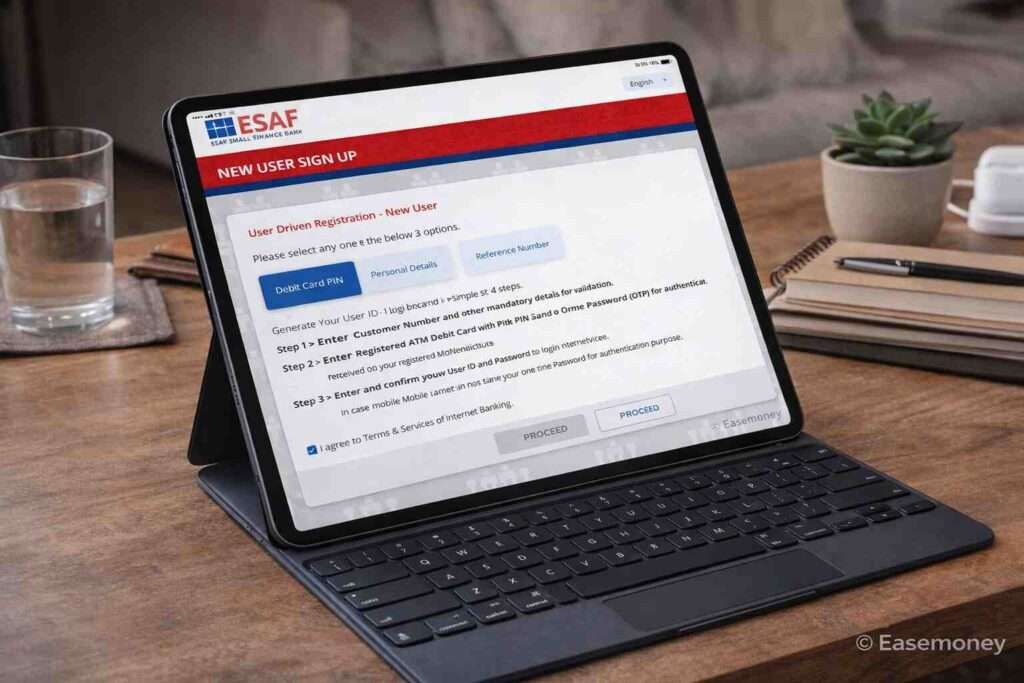
1. Method: Debit Card + PIN (Best Method)
- Select Register via Debit card option.
- In the customer details section –
- Enter your 12-digit customer number or ID
- Select your Date of birth (as per bank records only)
- Put your debit card full number
- Select your Debit card expiry month and year
- Fill out the captcha fully and tap on proceed.
- Enter your debit card OR ATM PIN. (the same pin you use for withdrawing cash)
- After PIN, you will receive an OTP on your account-linked mobile number or Email ID.
- Simply, enter the 6-digit mobile OTP and tap on continue
- In the User details section –
- Create a user ID as per your choice (must be strong, and it depends on the availability)
- Set a strong login password.
- Registration usually activates immediately or within a few hours.
- You will get an SMS instantly for activation, and you can access NetBanking anytime now.
Why this works best: It confirms identity, card ownership, and mobile number together.
Good to Know: ESAF does not use a transaction password. Every financial transaction is approved using the OTP sent to your registered mobile number. This reduces confusion for first-time digital users.
2. Method: Personal Details
In this method, the most important thing is that your Aadhaar linkage with the Account is mandatory; if not, you have to proceed with the other registration option. If linked, the process is really simple.
- You must match any 3 details from –
- DOB
- PAN
- Mother’s maiden name
- Mobile number
- Email ID
- After selecting any of the three, such as DOB, PAN, or your mobile number.
- Submit the customer ID, and fill in these 3 details correctly as per the bank records and aadhaar records.
- Enter your aadhaar number and enter your mobile OTP.
- Most importantly, your account-linked mobile number must be linked with your Aadhaar as well.
- After OTP confirmation, set your user ID and confirm it.
Real issue:
- Bank KYC data may be old
- Aadhaar data may be updated later
- Mother’s name spelling mismatch is very common
Even if Aadhaar is correct, the system checks bank records, not Aadhaar. This failed a lot due to a mismatch of information, so choose the debit card method if it does not work.
3. Method: Reference Number (Branch Assisted)
This is a basic branch token-based ESAF net banking option. However, a customer ID is still required for this method. The process is –
- Visit your home branch and from the help counter ask to generate a branch token or reference number for you. (You do not have atm card, and the application form is not required here)
- This branch token only works for 24 hour so, so once you got, open the NetBanking portal and register it.
- Simply enter it and put your mobile OTP.
- Done, set your details.
This method fixes backend data mismatch issues.
How to Login to ESAF Net Banking
Once you get the User ID and password, you can log in via the same portal –
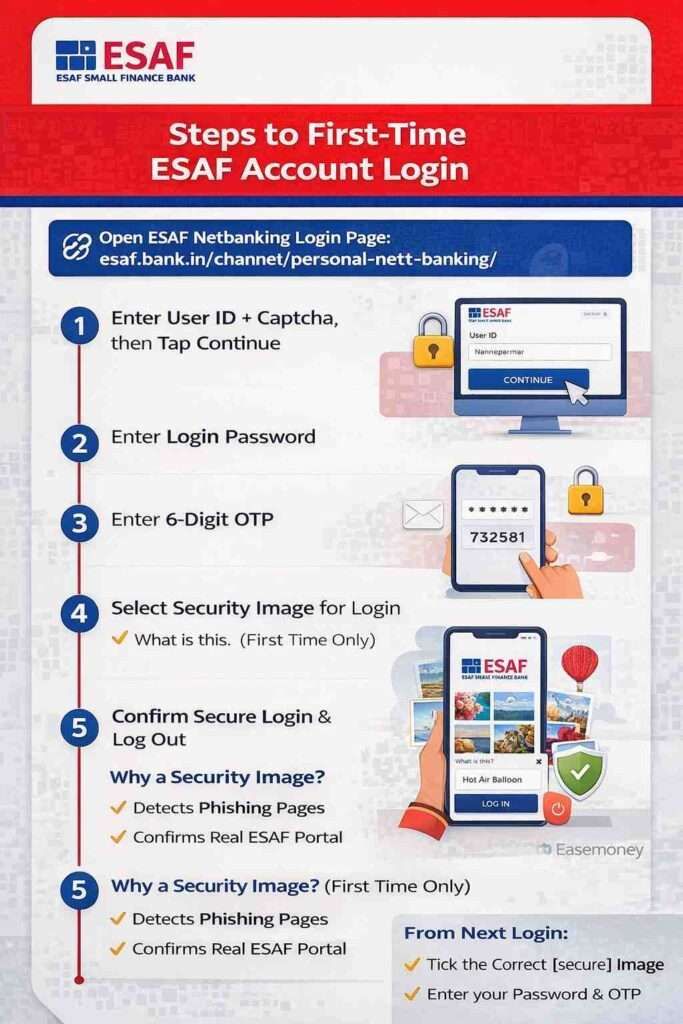
- Go to the netbanking login page – https://www.esaf.bank.in/channel/personal-net-banking/
- First, put your User ID + Captcha and tap on continue to log in
- Enter Login Password
- Enter 6-digit OTP
- Select one security image (e.g., travel, flowers, nature) and enter its name; this step only occurs the first time.
- Confirm and log out again.
That selected image becomes your secure login image.
Why this exists:
- Helps detect phishing pages
- Confirms you’re on the genuine ESAF portal
From next login onwards:
- You must tick the image
- Then enter the password
- OTP still applies
Forgot ESAF User ID – How to Recover It
If you forget your User ID, ESAF allows recovery using:
- Debit Card + PIN + OTP
- Personal Details + OTP
- Reference Number + OTP
Note – Your Customer ID is required in all cases. In simple terms, the process is identical as you do while activating the NetBanking.
How to Reset ESAF Net Banking Password
If you already have your User ID, the reset process is simple –
- Go to the login page and enter your USER ID and Captcha.
- Tap Forgot Password (Below in the password section)
- Choose verification method – there are three options to do that, including a branch visit.
- Verify via OTP
- Set a new login password
There is no transaction password to reset. Only the login password exists.
What You Must Have For ESAF Online Banking (First Time)
1. Documents You need
For first-time access, you need a few documents and details – Keep these ready:
- Active ESAF savings account
- 12-digit Customer ID (Must)
- Registered mobile number (OTP must come)
- PAN is linked to the account
- Aadhaar linked with the account
- Debit card (recommended)
Note- If your mobile + PAN + Aadhaar are linked, most users do not need to visit any branch. You can access Netbanking via mobile browser or desktop.
2. Browser and Device Reality (Real Experience)
From my real usage:
- ESAF netbanking works best on Chrome or Safari, both on mobile and PC
- A desktop or a laptop gives a smoother experience
- Old browsers often cause:
- Captcha errors
- OTP delay
- Page not loading
This is practical advice, not theory. Alternatively, you can download the ESAF Mobile app; the features are almost the same.
When You Must Visit a Branch (And When Not)
1. No Branch Visit Needed If:
- Mobile number linked
- PAN linked
- Aadhaar linked
- OTP comes properly
2. Branch Visit Needed If:
- Mobile number not registered
- Aadhaar not seeded
- PAN mismatch
- The personal details method keeps failing
Most “Invalid Information” errors happen because of old KYC data, not user mistakes.
ESAF Customer ID vs User ID
For first-time registration in ESAF Small Finance Bank net banking, you need your Customer ID, while for login you use a User ID—both are different.
1. What is Customer ID?
In ESAF, the customer ID is known as Customer Number, and it is 12 digits long. It is system-generated and linked to your accounts, such as loans, credit cards, FD, and your savings. It is must required to generate your User ID.
You can find at:
- In SMS or email received after online account opening
- On your bank statement
- In the welcome kit
- On the ATM card documents
- In the passbook
- Inside the mobile banking app (only after login)
- Your chequebook or physical statement (if you order)
- If no documents, you If no documents are available, you have to visit your home branch to retrieve.
Important truth for you: There is NO separate online option to “Forget Customer ID” if you are not already logged in to NetBanking or the mobile banking app.
2. What is a User ID?
In ESAF, your user ID is used as a username for netbanking login, and you create it yourself during registration. It can be anything you like (subject to availability), and after login, you can also change it. Also, if you forget your USER ID, you need your Customer ID to retrieve it online.
In simple words, Customer ID is for verification. User ID is for login. Both are different and not interchangeable.
How Netbanking Money Transfer Works in ESAF (Real Rules & Limits)
In ESAF Small Finance Bank, netbanking money transfer is simple to use but controlled with clear safety rules. The idea is fast banking, but with limits that protect customers from fraud.
1. How the transfer flow works
- First, you add a beneficiary (payee). After adding, an OTP comes to your registered mobile number.
- Once verified, the beneficiary is added, but you cannot send money immediately. ESAF applies a cooling period of 30 minutes to 4 hours.
- In many cases, new beneficiaries are restricted to about ₹50,000 for the first 24 hours. This is a security rule, not a technical issue.
2. Transfer limits you should know
- NEFT: Generally allowed up to ₹2 lakh per day for regular savings accounts.
- IMPS: Also commonly up to ₹2 lakh per day, instant and available 24×7.
- RTGS: Used for big transfers. No fixed upper limit, apart from your available balance and bank controls. Minimum is ₹2 lakh.
- UPI (BHIM ESAF or linked apps): Usually ₹1 lakh per day. In some accounts, it may be lower (around ₹40,000).
- Own ESAF accounts: No specific limit, only your available balance.
3. Important reality
Limits can change based on account type (savings or current), beneficiary status, and bank settings. Always check limits inside NetBanking or confirm with customer care for exact numbers.
About ESAF Netbanking Services And Features
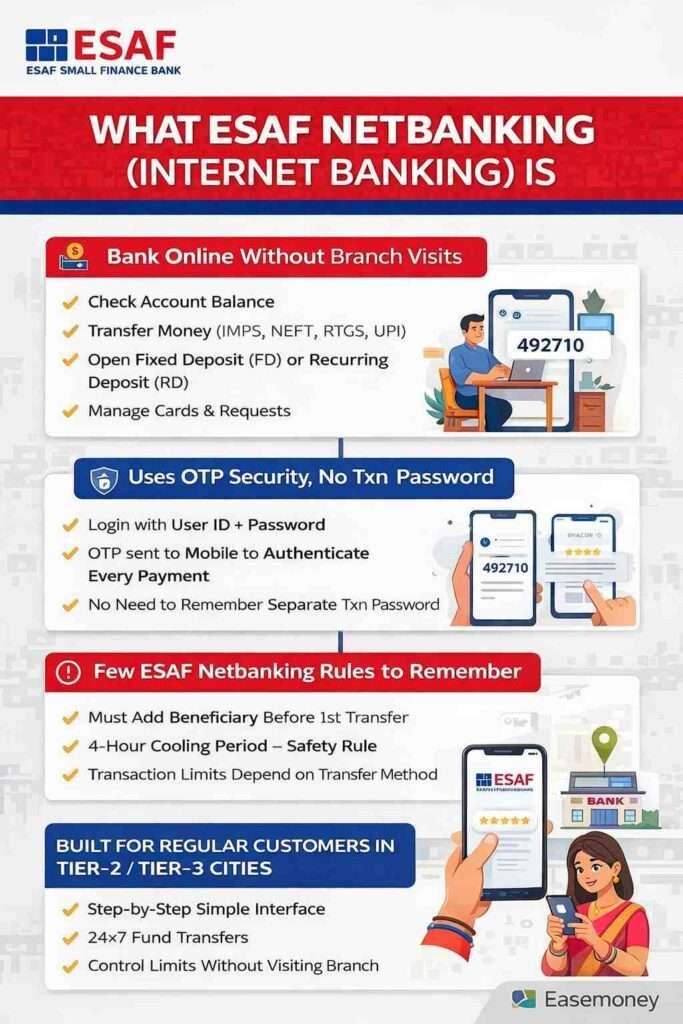
ESAF Internet Banking is a full-service internet banking platform. It is not a side service; it is designed as a primary banking channel. It works for individual savings accounts and corporate netbanking as well.
According to Yahoo News, they selected SugarCRM to Power Customer Relationship Management and Digital Banking for over 9 million Indian Customers.
The features you will access –
- Check balance and download statements
- Transfer money using IMPS, NEFT, RTGS and the clearing windows defined by RBI and NPCI
- You can manage your ESAF Credit card directly here.
- You can modify limits for cash deposit and, withdrawals, and fund transfers.
- Open FD and RD online
- Manage debit card and service requests
- Control transfer limits and beneficiaries
- Other service requests control, such as updating contact details, communication address, or seeding Aadhaar/PAN.
- You can access investment-related products: Insurance, Mutual funds, and Pension schemes such as NPS
- You can edit your profile, change your email, and user ID.
- You can activate or deactivate SMS Banking, Email statements, Debit cards and more.
- The ESAF dashboard also allows the Quick Pay facility for instant fund transfers without adding a beneficiary
In short, they have a wide range of services across financial transactions, enquiries, service requests, and value-added features, which you need.
Frequently Asked Questions
Why does ESAF netbanking show “Invalid Information” even when details are correct?
Most times, bank KYC data doesn’t match Aadhaar or PAN exactly. Small spelling or format differences cause failure. It’s a backend issue, not user error.
Is the ESAF Customer ID the same as the User ID for netbanking login?
No. Customer ID is a 12-digit bank number for verification. User ID is created by you for login. Both are separate and used differently.
Why can’t I transfer money immediately after adding a new beneficiary?
ESAF applies a mandatory cooling period. New beneficiaries are temporarily restricted to reduce fraud risk, even though OTP verification is already completed. However, you can use the quick pay option or UPI for immediate transfer.
Do I need to visit the branch for ESAF netbanking activation?
Only if the mobile number, PAN, or Aadhaar is not linked. If all three are mapped correctly, netbanking registration and reset usually work fully online.
Why does personal-details registration fail more than the debit card method?
The personal details option depends on old bank records. The debit card method verifies real ownership, so it succeeds more often without data-mismatch issues.
Why are transfer limits different for IMPS, NEFT, RTGS, and UPI in ESAF Small Finance Bank?
Each method follows RBI and bank-level risk rules. Limits also depend on account type, beneficiary status, and your self-set netbanking controls.
Hope you liked the content. Explore smart options below 👇
🔥 Recommended