

Where to Begin
If you want to make a money transfer using any of RTGS or NEFT via your Kotak Mahindra bank account, via a branch. The very first thing you will need is the RTGS/NEFT Application form.
Unlike net banking or mobile banking, where transactions are initiated digitally, the branch-based process requires a correctly filled-out details form plus a cheque leaf.
This single sheet works for both types of transfers — you can use it to transfer amounts ranging from Rs. 1,000 to Rs. 50 crores through the branch. However, there is no fixed upper limit; the minimum limit is Rs. 2 lakh for RTGS.
You can get the form in two ways:
- Download it online from Kotak’s website and print it.
- Ask for it directly at your nearest Kotak branch. (RTGS-enabled branch only) – The staff will always give you the latest version.
Both options are valid. Downloading helps if you want to fill it in advance, while picking it up at the branch is easier if you don’t want to bother with printing. If you make mistakes, extra forms are available on the spot.
The Layout of the Form
The Kotak RTGS/NEFT form usually comes in two styles, so don’t get confused.
- Side by side – Just like the BOB RTGS Form, it is also available in the branches’ customer copy and bank copy, left and right side formats.
- Top-to-bottom format – Just like normal private bank forms, everything is arranged vertically, starting from the top sender details, and the customer receipt in the end, with the bank seal.
Steps to Download the Kotak PDF Form For RTGS or NEFT
Here’s the simple process to download the form directly from Kotak’s official site:
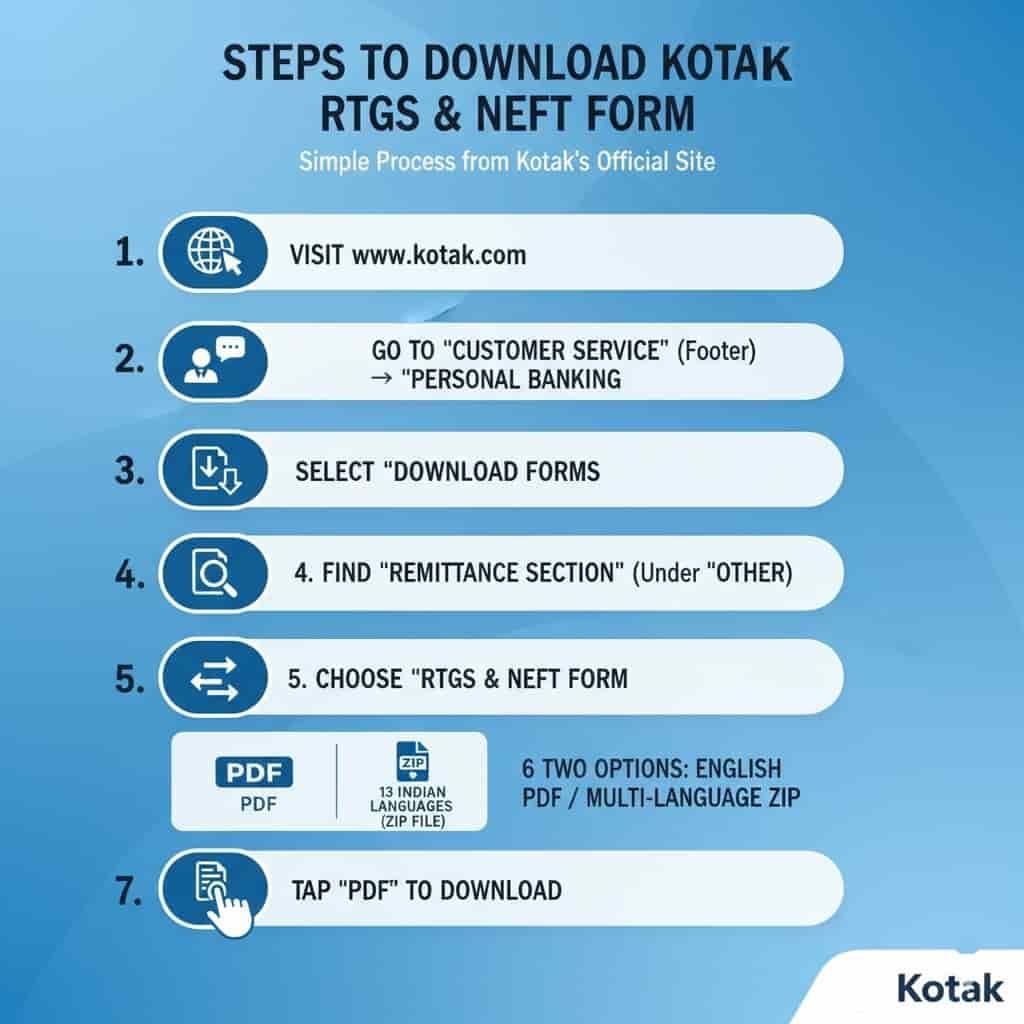
- First of all, just visit www.kotak.com using any web browser.
- Go to Customer Service (At footer section) → Tap on Personal Banking.
- Select Download Forms.
- Look for the Remittance section (found in the Other category).
- Choose RTGS & NEFT Form.
- You will see two options:
- A single English PDF
- A ZIP file having the form in 13 different Indian languages
- Tap on PDF to download it.
Here’s the direct link to the English PDF:
| Form Type | Language | Download Link |
|---|---|---|
| RTGS/NEFT Form | English | Download PDF |
If you wish to have this form in any language you like – Hindi, Marathi, Gujarati, Tamil- you can extract the ZIP file and select the required one.
Kotak RTGS Form – Editable and Fillable PDF Download
| Step | What to Do |
|---|---|
| 1. Download the Form | First, tap the link below to get the editable Kotak RTGS form. 👉 Download Kotak RTGS Form (Editable PDF) |
| 2. Open the File | Open the downloaded PDF on your computer or mobile phone. |
| 3. Fill in Your Details | Type your information directly in the form fields — name, account number, IFSC code, amount, and other details. |
| 4. Save Your Filled Form | Press Ctrl + P and choose “Save as PDF” to keep a copy with your details. |
| 5. Optional – Save from Viewer | If asked, select “Download with your changes” to include your filled details. |
| 6. Print & Submit | Once done, print the form and submit it to your nearest Kotak Mahindra Bank branch. |
How to do an RTGS transfer in Kotak Mahindra Bank?
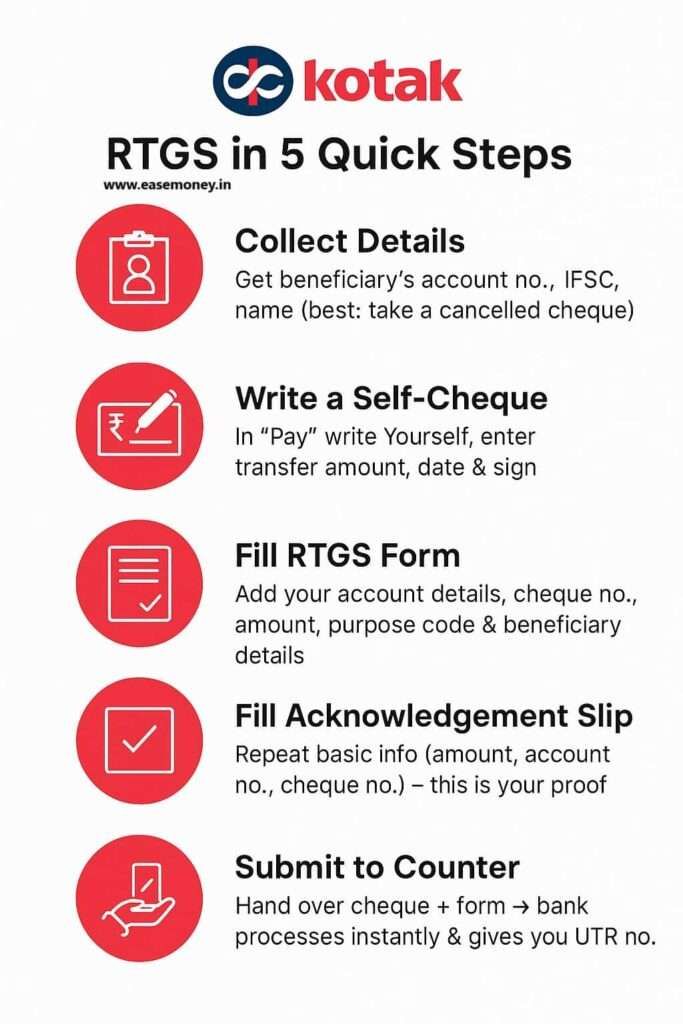
1. Collect Beneficiary Details
- Ask the person/party you want to pay for:
- Account holder name (exact spelling)
- Account number
- IFSC code
- Bank name + Branch address.
Best Tip – Simply ask for a cancelled cheque of the beneficiary account, which makes it simple for you to put the correct details without any doubt.
2. Fill Your Cheque First
Yes, you will need a cheque for this transaction; however, it is not mandatory, but it depends on the branch-to-branch and account type.
- Take a cheque leaf from your own Kotak account.
- In the Pay section: Write your own name or just put “yourself”
- In the Amount section: Write the amount you want to transfer, both in digits and words.
- Date: Write the same date when you want to make a transfer (same as on the application form).
- Signatures: Sign the front and back sides of the cheque.
- You may have to enter the account number and sign back to the cheque. (optional)
3. Fill the Kotak RTGS Application Form
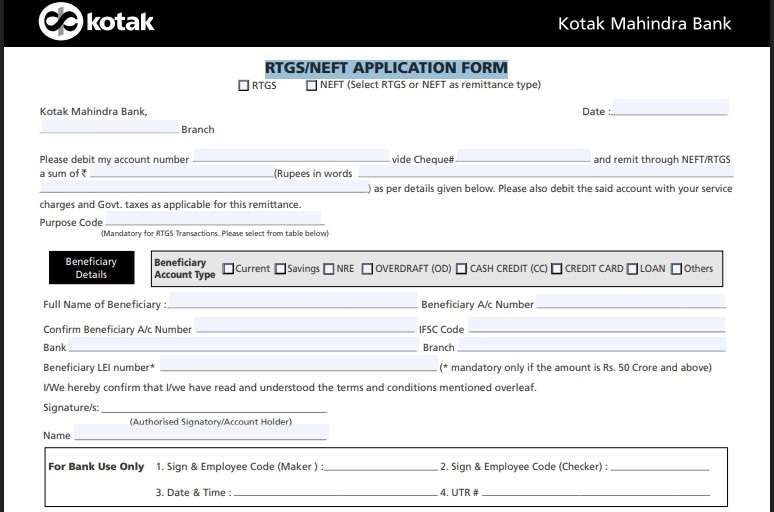
- First, use a blue or black pen and start with the branch name and date.
- Remittance Type – select and tick your type – RTGS (if more than ₹2 lakh) or NEFT.
- Your Account Number – same as on your self-writting cheque.
- Cheque Number – write the cheque number. (first 6 digits at bottom – 000012).
- Amount – same as cheque. Write in figures and words, and add “only” and “/-” at the end of it without a big space.
- Purpose Code – mandatory for RTGS. You will get the code list in the form below. If unsure, you can select CASH.
- Beneficiary details (The money receiver person or company information) –
- Tick the right account type (Savings, Current, NRE, Loan, etc.).
- Enter the full name of the beneficiary exactly as in their bank records.
- Enter their account number twice for confirmation.
- Add the IFSC code.
- Mention the bank name and branch.
- Sign – same as your bank and cheque leaf signature.
- Account holder name – Just put your name.
4. Fill the Customer Acknowledgement Slip (Bottom of Form)
- Basic Enter details same as above:
- Your Branch
- Date
- Amount
- Cheque number
- Beneficiary account number & bank name
- This part will be stamped and signed by bank staff and given back to you as proof. You can use it to track your payments.
5. Submission & Processing
- Submit the filled form + cheque at the branch counter.
- Bank official will:
- Verify details
- Sign & stamp form
- Issue the UTR (Unique Transaction Reference) number
- You may have to wait for the UTR number, it issued once the payment is processed. You can use it to track it.
How Long Does It Take for Kotak RTGS or NEFT?
- If you submit within the form clearing window timings:
- NEFT → Same day (but batch-wise, may take 2–3 hours)
- RTGS → Almost real-time (typically within 1 hour)
- If you submit after the cutoff time:
- Will be processed next working day.
- Example:
- If you drop the form at 11 AM (weekday) → Funds likely reach by the same afternoon (NEFT) or within 1 or 2 hours (RTGS).
- If you drop the form at 6 PM (after cutoff), → Funds move only on the next working day.
For Corporate and Current Accounts
If you are transferring money from a current account or a company account, the process has one extra step.
- The form needs authorised signatories exactly as per the account mandate.
- A company seal or stamp is also required on the form.
Best Time to Submit (Timeline)
The time you submit your form can affect when your money reaches the beneficiary.
| Time of Day | What Happens | Best Practice |
|---|---|---|
| 7:00 AM – 11:00 AM | Morning batches are usually fast. RTGS usually hits the account before lunch. NEFT goes in the first available cycle. | Safest and fastest window. |
| 11:00 AM – 1:30 PM | Still fine, but banks break for lunch around this time. Counters may slow down. | Submit before lunch if you can. |
| 2:00 PM – 4:30 PM | Processing resumes after lunch. Still same-day, but closer to cut-off. | Good, but don’t delay too much. |
| After 5:30 PM | Cut-off is over. Form is pending for the next working day. | Avoid late submission. |
Weekend notes: The Sundays, public holidays, and 2nd or 4th Saturdays, your branch will be closed as per RBI.
What are the basic charges for Kotak RTGS or NEFT
| Transfer Type | Amount (₹) | Charges (₹) | GST Extra |
|---|---|---|---|
| NEFT (Branch) | Up to 10,000 | 2 | Yes |
| 10,001 – 1,00,000 | 4 | Yes | |
| 1,00,001 – 2,00,000 | 14 | Yes | |
| Above 2,00,000 | 24 | Yes | |
| RTGS (Branch) | 2,00,001 – 5,00,000 | 20 | Yes |
| Above 5,00,000 | 40 | Yes | |
| NEFT/RTGS (Online) | Any amount | Free | No |
FAQs Related to Form
Is there a Kotak Bank RTGS in Excel?
You might not find an official Excel version for download. However, you can create a custom Excel template based on the PDF form for a bulk upload facility online for business account holders.
Can I get an editable Kotak RTGS form?
Yes, you can use the PDF editor to fill out the RTGS form; it can be accepted as a fillable, but it depends on your branch policies.
How can I increase the RTGS transfer limit in Kotak Bank?
If you want to transfer more than 10 lakh via RTGS in Kotak, you have to visit your RTGS-enabled branch with a cheque leaf and beneficiary details. You may be required to provide a photo ID for a request for a higher limit.
Can I submit the RTGS form Kotak online?
Not really, for online RTGS, no form is required; just add a beneficiary account number and wait for the cool period. After waiting for 24 hours for registration to be successful, you can transfer money directly using your mobile or PC.
Why do Kotak branches still prefer cheque-based RTGS for large transfers?
Because cheques act as a physical debit authorisation. For high-value RTGS above ₹10–₹15 lakh, branches rely on cheques to reduce fraud and ensure clear audit trails.
Can Kotak RTGS be done without a cheque at the branch?
Sometimes yes, but it depends on the branch policy. Many branches still insist on a cheque for first-time beneficiaries or large amounts. Carry one to avoid rejection.
What is the most common mistake customers make on the Kotak RTGS form?
Writing beneficiary details without verification. A wrong IFSC or account digit causes instant rejection. Tip: always copy details from a cancelled cheque, not messages.
How fast does Kotak RTGS actually credit in real life?
Usually within 30–60 minutes if submitted before the cut-off. Delays mostly happen near lunch hours or late afternoon when internal queues increase.
Why does Kotak ask for a purpose code in RTGS forms?
Purpose codes help banks meet RBI reporting rules. Even a generic option like “CASH” or “BUSINESS PAYMENT” is acceptable—leaving it blank can delay processing.
Does Kotak deduct RTGS charges from the transfer amount?
No. Charges and GST are debited separately. Keep an extra ₹100 buffer in your account so the RTGS doesn’t fail due to insufficient balance.