

Internet banking may look normal today, but for co-operative banks in India, it was not always allowed.
As per The PIB News, the Reserve Bank of India officially qualified cooperative and urban banks to offer internet banking only on 5 November 2015, and that too with strict conditions related to capital, audit, cyber security, and internal controls. Fun fact here, at the start, they only allow View-Only Facility, but other basic works are mostly branch-based.
Because of that rule, The Mehsana Urban Co-operative Bank Ltd. follows a controlled and verified process for net banking. It is not instant like private banks, but once activated, it works reliably. According to the Mehsana Urban Bank official website, they have a total of 58 branches in Gujarat and Maharashtra. All branches are connected through a Core Banking Solution (CBS). This means:
- Accounts are centrally connected
- Customers can access services across branches
- Digital channels are possible on top of branch operations
CBS availability at all branches is essential for:
- NEFTor RTGS or IMPS processing
- UPI integration
- Internet Banking
- Real-time balance updates
Without CBS, none of the digital services discussed later would be operational. Let’s learn how you can register, log in, and manage the Internet Banking correctly.
First-Time MUCB Net Banking Registration: How to Start
Net banking is not active by default. Every customer must register. The options are – when you open your account in Meshana Bank, ask for Netbanking service, but if you existing member and want to log into your account, you have to visit the branch first. Your home branch asks an internet banking application form to submit to activate your digital core banking.
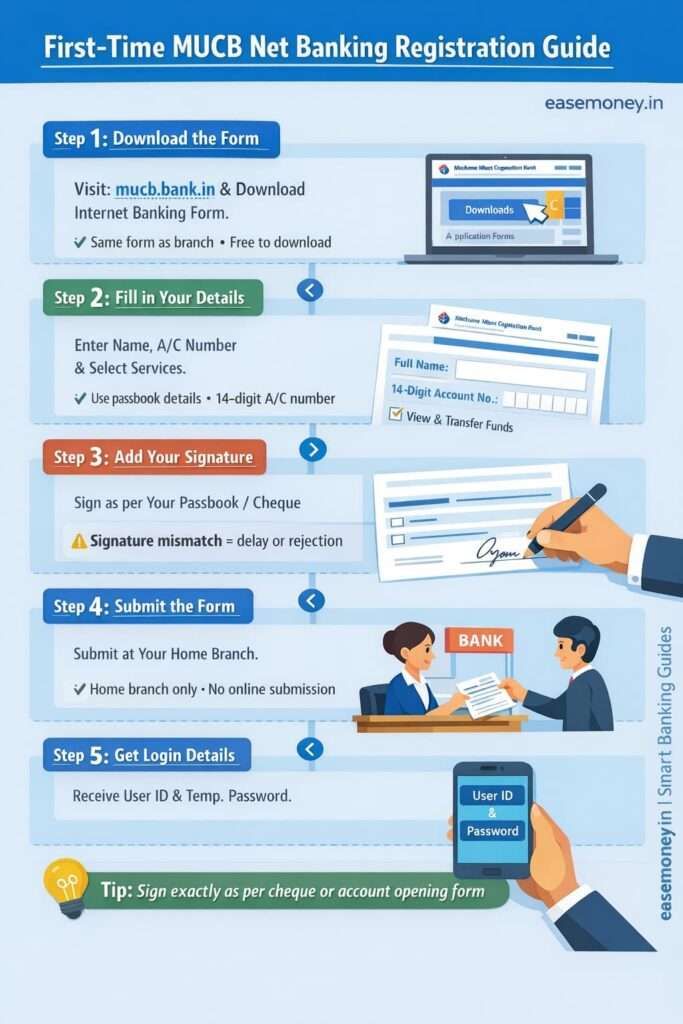
You can download the form here –
- Open the official website: https://mucb.bank.in/
- Scroll fully down to the footer
- Click on Downloads
- Go to the Resources section
- Click on Application Forms
- Select Internet Banking OR Net Banking Application Form
- Download and print the PDF on A4 Paper.
This is the same form you get at the branch. However, you can check the form to learn how to fill it up.
How to Fill the Mehsana Urban Net Banking Application Form
The filling process is quick and needs your bank record details only. If you carry your passbook, most of the information you already have. Don’t worry, this form is bilingual; you can ask at the branch and fill it out in your local language.
Here, what you have to fill up –
- First, enter your Name. (check your passbook, statement, or other bank documents)
- Your full 14-digit account number
- Tick what services you want – such as View and fund transfer, or just check balance.
- Tick on Link all my accounts that are linked with this customer ID. If you have more than one account, you can request via this or just skip it.
- By default, your transaction limit is set at 15 lakh for individuals and 1 crore for corporates. You can edit it and enter as you want, or just skip it.
- On the second page, enter your full name again
- Give your signature as you already do.
- Enter the date and your branch name.
Tip for you: Most delays happen because of a signature mismatch. Sign exactly like your cheque or account opening form.
Submitting the Form and Activation Time
Done, submit to the branch counter at your home branch. Now, the question is, how much Activation Time takes? – The direct answer is usually 1 to 5 working days. In most cases, it takes just 24 hours.
- No charges for registration
- No online submission option
- Verification is done by the branch + backend team
After approval, the bank gives you:
- User ID (or sometimes Customer ID)
- Temporary login password
Important point: In urban cooperative banks, User ID and Customer ID are not always the same. There is no fixed rule. Use whatever the bank gives you.
How to Login for the First Time (Step-by-Step)
The login process is now simple once you have the first-time login details. Your branch will tell you instantly, or sometimes, they send via email or mobile SMS. Remember, they only give you the temporary password. Here, what to do next –
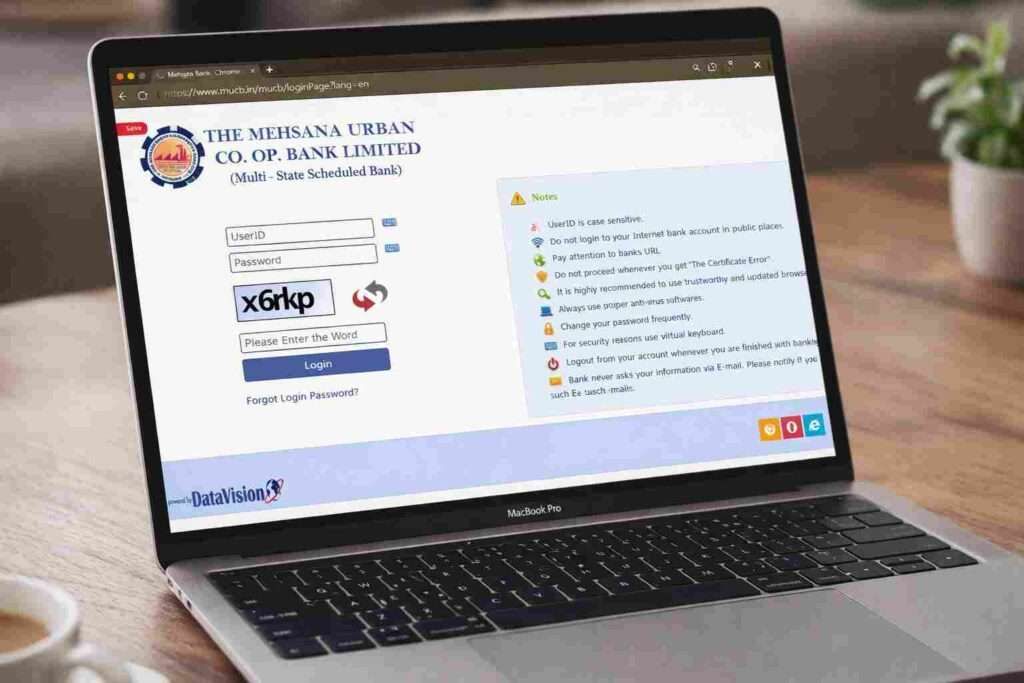
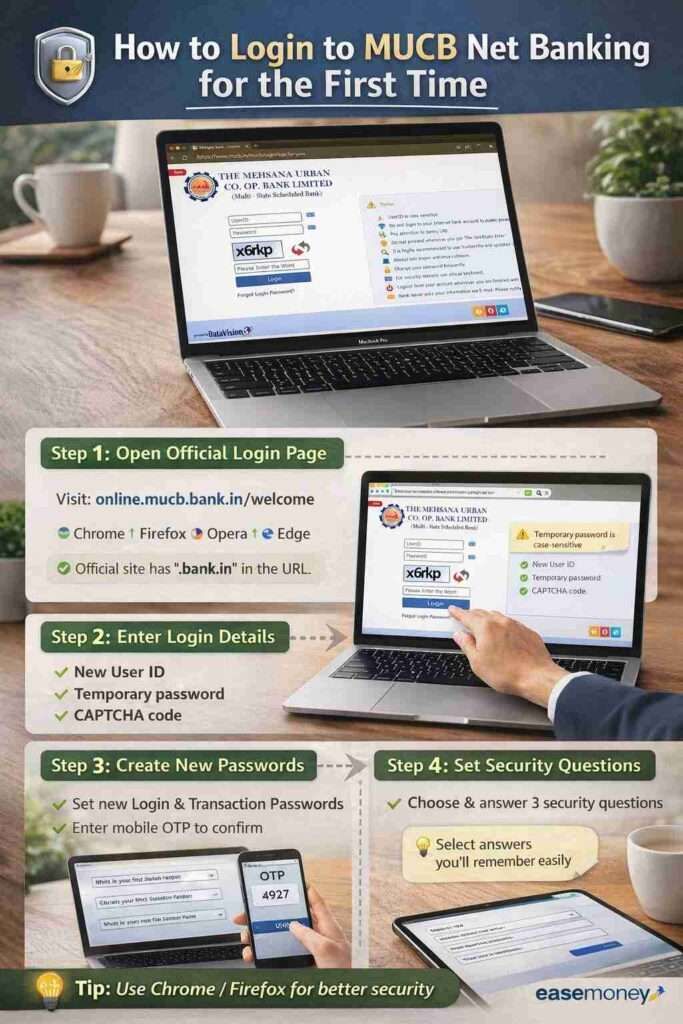
1 Step – the Open Login Page
Go to the browser. The bank rules say – use only Firefox, Chrome, Opera, and New win 11 Internet Explorer. Open the official site only – https://online.mucb.bank.in/welcome
As per RBI, if the bank website does not have the bank.In at last, it is not reliable, avoid that site. Tap on the login button, and make sure it appears in the pop-up window.
2 Step – Enter Given Details
Now, enter the new USER ID, temporary password, and the screen captcha. Tap on login.
3 Step – Create New Passwords
On first login, the system will ask you to create:
- New login password
- Transaction password (required for money transfer)
Both passwords are different. Do not keep them the same.
After entering it, you have to provide your mobile OTP to confirm it; it will only be sent to your account-linked mobile number.
4 Step – Set Security Questions
You must choose 3 security questions.
These are used when:
- You forgot your password
- You reset the login online
Choose answers that you will remember easily.
Done, now you can log in with your new USER ID and new strong login password. The transaction password will be required if you do any transfer through NetBanking.
What Net Banking Services Are Available in 2026
Once activated, Mehsana Urban Bank’s net banking allows real transactions, not just viewing. However, it usually depends on what options you select while filing the form. Unlike big commercial banks, this cooperative bank gives all the decent features for daily use.
Account Services
- Balance enquiry
- Full transaction history
Fund Transfer Services
- Own account transfer
- Transfer to another account in the same bank
- Transfer to other banks using:
- RTGS
- NEFT (24×7×365)
- IMPS (24×7×365)
Other Services
- Bill payments through Billdesk and SBIePay
- Cheque enquiry
- Stop payment of the cheque
Tip and quick question – Net banking charges: NIL to the customer, even your RTGS and NEFT are fully free, unlike branch-based, where charges apply.
Forgot Login Password? Two Correct Ways (Very Important)
Password reset is strict for safety reasons. There are two valid methods. As we already know, urban banks are mostly based on documentation and branch-based services, but this time, Mehsana Urban Co-operative Bank goes 1 step more toward digital banking, they allow forget passwords online directly, but tricky –
Method 1: Online Password Reset
Use this only if:
- Your account is active
- You remember your transaction password
- Account is linked to your mobile number
The steps for you:
- Go to the login page
- Click Forgot Login Password
- Enter your Customer ID
- Enter transaction password
- Verify the OTP sent to the registered mobile
- Set a new login password
If the transaction password is forgotten, this method will fail.
Method Number 2: Reset Through Branch (Most Reliable)
This method works in all cases. If you forget all passwords, your user ID, or your digital account is inactive and blocked. this option is for you –
Visit the branch and ask for the password reset form – or you can download it here – Download from official link:
https://mucb.bank.in/mucb/downloads/forms/ib/Reset%20Password%20MOBILE%20OR%20INTERNET%20BANKING.pdf
How to Fill the Reset Form
You can identify your account using your:
- Account number
- Net banking User ID OR Registered mobile number (anyone)
Tick what you want to reset:
- User ID
- Login password
- Transaction password
- Inactive account
- Blocked account
- Sign and submit at the branch.
The bank will reset and issue new temporary credentials. However, this is a slow process; it may take 24 hours sometimes. or sometimes, instant.
Useful Alternatives: UPI and WhatsApp Banking
As of 2026, the Mehsana Urban Co-operative Bank does not have a good mobile banking app yet. However, they offer a mix of features you can use, such as UPI, missed call banking and WhatsApp. If net banking feels heavy for daily use, the bank provides simple alternatives.
- UPI – You can use any regular UPI App, such as Google Pay or Paytm, and add a new bank as MUCB and connect, set a 4-digit PIN and be done. You can use it for basic transactions upto 1 lakh or more per day.
- Mehsana Urban WhatsApp Banking – simply save 09924693000 on your phone and access services such as Balance enquiry, mini statements, and Interest rate information. They also said they are upgrading and adding new features soon.
Which Option Should You Use?
- Big payments/cheque control → Net Banking
- Daily money transfer → UPI
- Quick balance check → WhatsApp Banking
Using all three together makes banking easier. Bonus, you can use 09266692668 to use the Missed Call Facility and get the balance.
Note – All of these digital features only work when your account is linked with your active mobile number.
FAQs
Does Mehsana Urban Co-operative Bank have a mobile app or APK?
No. As of 2026, The Mehsana Urban Co-operative Bank Ltd. does not offer any official mobile app or APK. Avoid third-party apps claiming otherwise, as they are unsafe and unofficial.
Can I download Mehsana Urban Bank net banking APK from Play Store?
No. Net banking works only through the official website browser login. Any APK on Play Store or websites claiming to be Mehsana Urban Bank app should be treated as fake or risky.
Is net banking safe to use for large transfers in this bank?
Yes. Net banking is RBI-permitted since 2015, uses transaction passwords and OTP checks. Large transfers via NEFT or RTGS are processed securely after branch-verified activation and backend controls.
Why does net banking activation take 1–5 days?
Because cooperative banks follow manual verification. Branch staff verify signature, account status, and mobile number before enabling access. This reduces fraud risk, even though it feels slower than private banks.
What if I forget both MUCB login and transaction passwords?
Then online reset won’t work. Download the Reset Password form, fill account details, tick what you want reset, and submit at branch. This is the fastest and safest solution.