

To access PNB UNIV, employees should use their PF Number as the User ID. You can access the platform through the PNB UNIV app or the internal PNB banking network.
Full web access may require the bank’s internal CBS network.
| Access Method | Official Access |
|---|---|
| Web Portal | Open PNB Knowledge Centre |
| Android App | Download from Google Play |
| iPhone / iOS App | Download from Apple App Store |
🚀 PNB UNIV is the official digital learning platform of Punjab National Bank designed for employee training, banking updates, compliance learning, and internal skill development.
📱 How to Download the PNB UNIV App
⚠️ Low-Bandwidth / APK Mirror: If Google Play is not working or installation fails, the app is also officially available on the Indus Appstore in APK format.
Many users report occasional app crashes. In such cases, the web version is usually more stable and reliable for training access.
📌 Read below for first-time registration steps, login setup, and how to navigate the PNB UNIV dashboard.
PNB UNIV: Steps for First-Time Registration
To access the courses and log in for the first time, you have to set a password. Follow these simple steps –
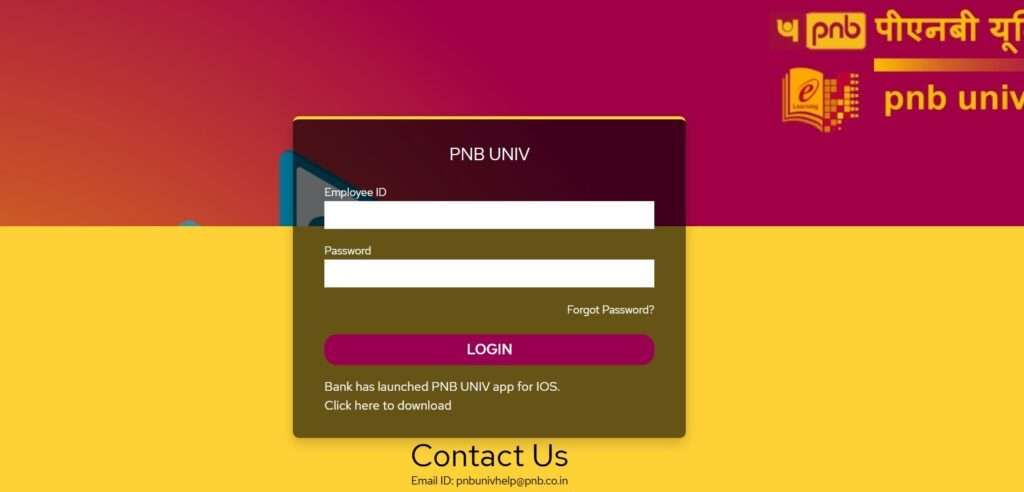
- First, open the PNB UNIV web portal or mobile app.
- In the Header menu, tap on the login button.
- Here, tap on Reset password.
- On the recovery section, enter your employee ID.
- Your linked mobile number. (If no mobile number is registered, please update your number via the PNB Parivar App.)
- Fill up the captcha value and tap on Generate OTP.
- Now, set a new password and activate your account.
1. What If OTP Does Not Arrive?
Sometimes OTPs get delayed due to server or network issues. Try these quick fixes:
| Problem | Quick Solution |
|---|---|
| Wrong mobile number | Check if your bank-registered number is active |
| Poor network | Move to a better signal area |
| DND enabled | Disable SMS blocking/DND settings |
| App crashing | Reinstall the app or use web portal |
| Login or technical issue | Contact HR or PNB UNIV Helpdesk |
Helpdesk Details:
- Email: pnbunivhelp@pnb.co.in
- Phone: 0129-2414472
For login errors, app bugs, or Employee ID issues, send an email with screenshot details.
💡 2026 Quick Fix: If the OTP fails repeatedly, try the “USSD Method” by dialing
*99#from your registered SIM to verify if your mobile banking channel is active.
How to log in PNB UNIV app
Once registration is complete and you have your newly generated password:
- Launch your app and go to the login page on the app.
- Enter your Employee ID in the username field.
- Type your password correctly and fill out the captcha code.
- Click Login to access your dashboard.
- Once logged in, click “Sync Profile” to pull your current designation and branch details from the HRMS database.
- Navigate to the “Mandatory” tab to begin your first module immediately.
Where to Find Your Employee ID
Your Employee ID is required for login and registration. It is printed on:
- First of all, check your Appointment or Joining Letter that was issued upon your joining.
- Salary Slip from the monthly payroll.
- Your ID Card: check below your name.
- PNB Parivar HRMS Portal under your profile details.
Note: The platform is mainly designed for PNB branch staff, managers, officers, and new employees during training or probation period.
After login, the dashboard becomes your main learning area. Courses are divided into:
- Not Started
- Ongoing Courses
- Completed Courses
- You can also download certificates after course completion.
The dashboard shows both mandatory training assigned by PNB and optional courses for improving banking knowledge and skills.
Top 7 Features of PNB UNIV
- AI-Powered Course Library: Access 100+ banking and digital finance courses.
- Smart Learning Dashboard: Track completed and pending courses easily.
- Advanced Assessment Engine: Give quizzes and get instant feedback.
- Omni-Channel Resume: Continue learning from mobile or desktop anytime.
- Automated Compliance Alerts: Receive notifications for mandatory training.
- Instant Digital Certification: Download certificates after course completion.
- Virtual Classroom Integration: Attend live online training and webinars remotely.
PNB UNIV helps employees stay updated without attending physical training sessions.
How to Attempt Quizzes Correctly
- Access Path: Log in and select the Test/Quiz tab. On mobile, ensure you have a stable 5G or internal Wi-Fi connection.
- Use “Mark for Review”: Flag uncertain answers to revisit later. This ensures you don’t waste time on a single tough question.
- Time Management: Monitor the countdown timer. The system auto-submits when time expires, so save your progress every 5 minutes.
- Auto-Resume Feature: If your session disconnects or the app crashes, simply log back in; UNIV auto-saves your progress at the last answered question.
Pro-Tip: Always wait for the “Successfully Submitted” confirmation screen before closing the app. If you exit too quickly, the score might not sync with your HRMS transcript, forcing a re-attempt.
PNB UNIV vs. PNB Knowledge Centre: Key Differences
Many employees think both are the same, but here’s the real difference:
| Feature | PNB UNIV | PNB Knowledge Centre |
|---|---|---|
| Purpose | E-learning platform for training and assessments | Repository of policies, circulars, and manuals |
| Content Type | Videos, quizzes, certifications | Read-only documents |
| Mode | Interactive, web + mobile app | Web-based only |
| Who Uses It | Employees for learning and compliance | Employees for quick reference |
So, PNB UNIV is for active learning, while the Knowledge Centre is for information reference. Both complement each other.
Frequently Asked Questions
Where can I download the PNB UNIV App for my iPhone?
To download for iOS devices, you have to first visit the official website of PNB UNIV, tap on the login button, and then you will get the iOS version. Simply tap the Get button to install it.
Is there any penalty for not completing courses on PNB UNIV?
Few courses and programs are designed as Mandatory training, which is linked to employee performance and compliance audits. Non-completion can affect your appraisal score.
How often does PNB UNIV update new courses for staff?
Courses are added regularly, especially after policy or product changes. Branch feedback says new compliance modules usually appear within 7–10 days of circular release. Tip: check dashboard every Monday morning.
Can employees pause a course and continue later without losing progress?
Yes. UNIV auto-saves slide and video progress. Idea: always exit using the “Back” button, not app close, to avoid rare sync issues reported on low network.
Does completing optional courses give any real benefit?
Yes. Optional courses improve product knowledge and help during audits. Branch managers note employees completing 3–4 optional modules yearly perform better in inspections and internal interviews.
Are UNIV certificates accepted during internal audits?
Yes. Downloaded PDF certificates are valid audit proof. Tip: keep certificates saved locally or emailed to yourself, as auditors may ask for last 12 months training records.
What is the best time to attempt UNIV quizzes?
Early morning or late evening works best. Data from branches shows fewer server delays outside office hours. Idea: avoid peak times between 2 PM–4 PM on working days.
Can an employee access UNIV during branch working hours?
Yes, but priority is customer service. Branch practice suggests using lunch breaks or post-hours. Managers also allow UNIV access during training-designated hours when assigned officially.
What common mistake causes course completion not to register?
Skipping slides. UNIV requires 100% content view. Tip: let each slide load fully, even if familiar, otherwise assessment unlock button may not appear.
Who should employees contact for UNIV issues first?
Start with branch training coordinator or manager. They fix most issues faster than helpdesk. Idea: escalate to UNIV support only if problem remains unresolved for 48 hours.
Hope you liked the content. Explore smart options below 👇
🔥 Recommended