

1. Open SBI Email Statement PDF
To unlock the e-statement that was received via email, the SBI sets a password as your last five digits of your registered mobile number and date of birth (DOB) in DDMMYY format registered with the Bank.
For Example: If your mobile is XXXXX12345 and DOB is 16 September 1982, then password will be: 12345160982 (last 5 digits + DDMMYY format).”
Tips to Avoid Password Issues
- Use Adobe Acrobat Reader, Google PDF Viewer, or similar apps to open it.
- Check your passbook for DOB/mobile number accuracy
- Don’t include any spaces or symbols while entering the password.
If password doesn’t work, check whether your statement is from Email or YONO — both use different formats
2. Open SBI Statement from YONO App
If you received your SBI statement via YONO, you will notice the email title mentions “YONO” — that’s how you know it’s sent through the app.
Now, here’s how to download it manually from the YONO app in case you did not get the mail or just want a new copy.
- Download and open the YONO SBI app.
- Enter your 6-digit MPIN to log in
- Go to Accounts (homepage section)
- Tap on your Savings A/C option
- Tap Transactions in the menu
- Tap Filter to choose the month you want, such as 1, 3, 6 or mini statement just for 10 days.
- Tap the Download or Email icon to get the PDF.
- Enter the password to open it.
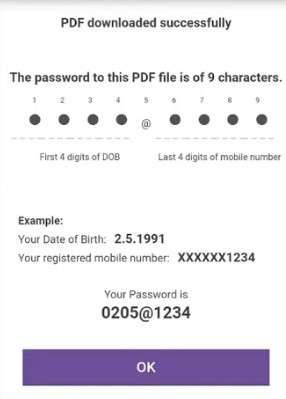
To open the statement downloaded PDF from YONO, use DOB (DDMM) + @ + last 4 digits of your mobile number.
Example: DOB 14 May 2000 + mobile ending XXXX 3210 → 1405@3210
A Few Tips:
- Your DOB is in DDMM format (not DDMMYYYY)
- You use the last 4 digits of your registered mobile number
- There are no spaces or letters.
Enter the format exactly — incorrect digits or format can cause errors.
Where to Find Your SBI Statement in Email or App
Depending on your selected method, locate your statement:
1. If Received by Email
- Search your inbox or spam folder for emails from the SBI e-statement
- Open the email and download the PDF attachment
- Check for instructions about the password at the bottom of the email
2. If Downloaded from YONO
- Go to Accounts > Transactions > Filter by Date
- Tap Download or Email PDF
How to Register for SBI e-Statement Online
In case you are not getting any emails from SBI, including statements, so, you have to activate it. Follow the steps:
1. Using SBI Online
- Go to the SBI Online Login Portal via Google.
- Log in with your username, password, captcha, and Mobile OTP.
- Navigate to My Accounts/Profile
- Select the e-statement in the left side menu, and tap on enable.
- Update your new email ID in the Profile menu.
- Enter the mobile OTP to activate it.
2. Using the YONO SBI App
- Log in with your 6-digit MPIN or face unlock.
- Go to Menu (left corner) > Service Request > Profile Update.
- Enter a new email ID.
- Verify with mobile OTP, and you’re done!
Fix SBI Statement PDF Not Opening Issues
- Wrong password error – Please, Double-check DOB format and mobile digits. Also, verify where the PDF comes from (Yono or monthly Email from the SBI official).
- Download file not found – please re-download and select a blank folder on your device to find easily.
- Statement missing data – Try downloading from YONO instead
- File not opening on mobile – Use a laptop or Adobe Reader app on PC. Remember to always update your PDF software first, then open the PDF for safety and avoid damaging the file.
- Mismatch in DOB or Mobile Number – Visit the branch or use SBI phone banking to update records
How to verify your SBI statement is genuine (security check)
Before opening any PDF, confirm it is actually from SBI:
- Check sender email domain (should be official SBI domain)
- Avoid opening unknown attachments claiming to be statements
- SBI never asks for OTP or password over email
If anything looks suspicious, do not open the file — contact SBI immediately.
1. When Should You Request a Physical SBI Statement?
If you need a printed copy for a visa, loan, or legal purposes:
- Call SBI Phone Banking: 1800 1234
- Request a duplicate physical statement
- Charges: ₹44 + GST (as of July 2025)
Or, visit your home branch and request in person.
2. What to do if a Technical issue is found?
You can complain online at contactcentre@sbi.co.in. Also, attached a screenshot of the issue.
- You can call the Toll-free number: 1800 1234 OR 1800 2100
- SBI WhatsApp Banking: save 9022690226 and send hi for help.
3. What to Do If Your Mobile Number or DOB Is Incorrect
If the password doesn’t work because your mobile or DOB isn’t correct:
- Visit your nearest SBI Branch
- Request a profile update for mobile or date of birth
- Carry your Aadhaar, PAN, and Passbook
- You can also call 1800 1234 for remote assistance
Frequently Asked Questions
How to open an SBI account statement PDF without a password?
You have to go to SBI Online, log in using your username and password, go to Account > Account Statement, choose dates, tap View as a PDF and tap on Download to open without of password.
What is the password for the SBI credit card statement?
To open the SBI Card statement, the password is DOB in DDMMYYYY + the last 4 digits of a credit card. Check the full steps to open the SBI Card Statement PDF.
How to disable SBI e-statement?
Simply, log in to SBI Online using your username and password,> e-Statement > Tap Disable > Remove email ID. If it doesn’t work, visit a branch for support.
How can I get my SBI account statement for last month?
Just log in to SBI Internet Banking or YONO, go to your account, select the month, and download the PDF — no branch visit needed.
Why does SBI use different passwords for email and YONO statements?
SBI uses separate systems for email and app statements. Email follows last 5 digits + DOB format, while YONO uses a different structure for added security and access control.
Hope you liked the content. Explore smart options below 👇
🔥 Recommended