

TRTR in a bank statement usually stands for Transfer Transaction. It appears when money is transferred between bank accounts through services like UPI, NEFT, IMPS, RTGS, or internal banking transfers.
Important: TRTR is not a bank charge, penalty, or hidden deduction. It is simply a banking code used to identify transfer-related entries in statements or passbooks.
| Statement Entry | Meaning |
|---|---|
| TRTR Debit | Money transferred out of your account |
| TRTR Credit | Money received into your account |
📌 Where TRTR Commonly Appears
- UPI transfers (PhonePe, Google Pay, Paytm, BHIM)
- NEFT or IMPS bank transfers
- Online net banking transactions
- Transfers between your own bank accounts
- Auto-sweep or linked account transfers
💡 Good to Know: Many Indian banks use short transaction codes like TRTR, BYCLG, ACH, ECS, or POS to make statements compact and easier for banking systems to process.
Public sector banks especially use abbreviated transaction narration instead of full descriptions.
📄 RBI Banking Rule: Banks are required to provide account statements and transaction details to customers regularly in digital or physical format.
⚠ See an Unknown TRTR Entry?
- Check your UPI history and SMS alerts first
- Verify if any auto-payment or linked account transfer happened
- Review the exact amount and transaction date carefully
- If still suspicious, contact your bank immediately
Bottom Line: TRTR simply means a transfer transaction took place — it does not indicate any fraud or bank fee by itself.
Where You See “TRTR” in Bank Statements
TRTR is most commonly visible in:
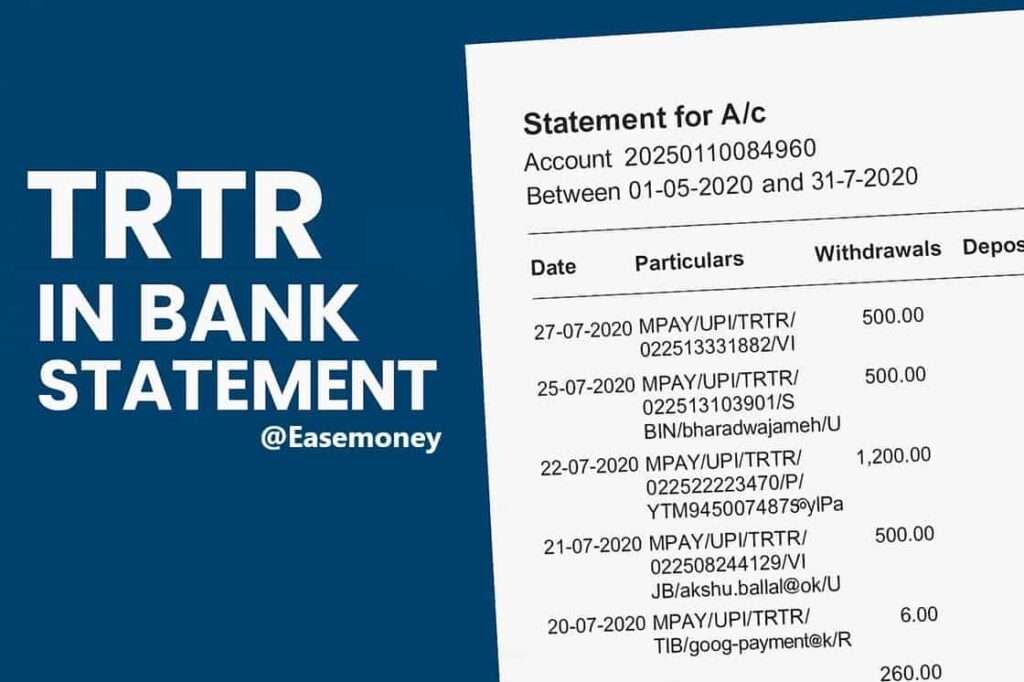
- Mini statements from ATMs (ATM receipt)
- Passbook updates at bank branches
- SMS Banking and WhatsApp Banking received 5 or 10 last transactions (also known as mini statements)
- Online banking statements in PDF format
- SMS alerts from banks for transactions
Most Private banks like HDFC or ICICI often show more detailed tags such as UPI/IMPS/NEFT, but India govt-owned banks frequently shorten them to TRTR.
Likewise, they used short codes for other transactions such as – BSBD WDL TXN CHG, DCARDFEE, and more.
Example of Entries in Real Statements
Let’s simply decode an actual statement snippet from UCO Bank to understand deeply how it works –
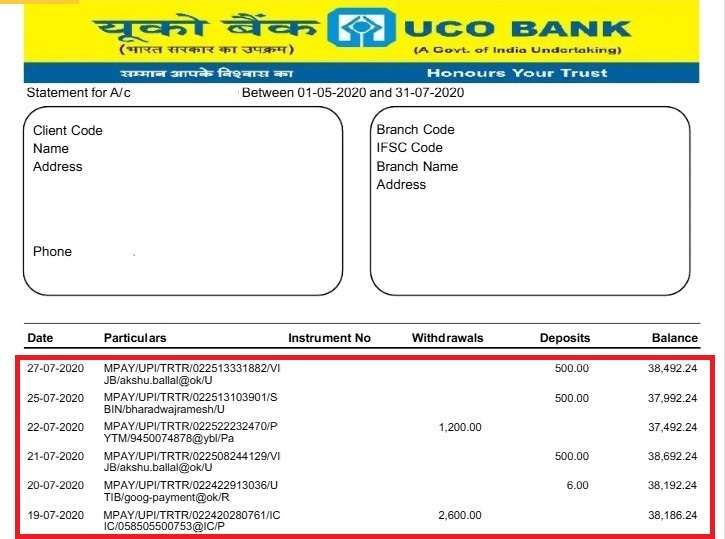
For Example, this Transaction - 27-07-2020 | MPAY/UPI/TRTR/022513331882/VI JB/akshu.ballal@ok/U | 500.00 | 38,492.24
- First entry: Debit of ₹500 via UPI to “akshu.ballal@ok”.
- Second entry: Debit of ₹500 to “Bharadwajramesh”.
- Third entry: Debit of ₹6 through Google Pay (UTIB = Axis Bank tag).
All three carry this code to show they were transfer transactions.
Which Banks Commonly Use TRTR
Different banks follow different coding styles as per the requirements –
- UCO Bank → Regularly prints “MPAY/UPI/TRTR/…” in mini-statements.
- PNB (Punjab National Bank) → Shows “TRTR/ACTCDEP/…” for deposits or credits.
- Canara Bank, Indian Bank, Union Bank → Frequently use this short code in physical statement copies, E-statements, and passbooks.
- SBI → Often uses TRF (Transfer) as an alternative, but TRTR still appears in some UPI-linked records.
So, if you are an account holder in a government bank, you are more likely to encounter TRTR in your statements.
How does it create confusion among customers?
TRTR codes can confuse people when:
- They assume TRTR indicates charges.
- They see only limited text in a mini statement without context and explanations.
- They don’t recognise UPI IDs or reference numbers.
- They mistake TRTR entries for unauthorised debits.
This is why it’s important to match the amount, date, and reference ID with your transaction history before worrying.
Expert Tips to Understand TRTR Transactions Clearly
- Always double-check the sign of the transaction, what it is telling you:
- Minus (–) or entry in Withdrawals = Money out.
- Plus (+) or entry in Deposits = Money in.
- Match the transaction reference ID with the UPI app or bank SMS.
- If still unclear, download a detailed statement instead of a mini statement.
- Cross-check with notifications from UPI apps like Google Pay, PhonePe, Paytm.
- Contact the branch only if the reference ID doesn’t match any transaction you performed.
How ACTCDEP in PNB Statements works
PNB customers often see entries like:

TRTR/ACTCDEP/91621595606/FIC
Let me explain for you –
- TRTR → Transfer Transaction.
- ACTCDEP → Account Deposit (credit entry).
- FIC → Financial Inclusion Channel (often branch or system code).
In simple words, it means money was credited into your account as a deposit, not withdrawn. It could be a cheque clearing, cash deposit, or inward fund transfer.
Frequently Asked Questions
What does DRC Host TRTR mean on my bank statement?
DRC Host TRTR usually tells you a debit transfer processed by the bank’s host system, which simply means your funds have been deducted during a transaction.
Why do banks use TRTR in transaction descriptions?
To save the time of customers, it helps customers quickly recognise digital fund movements without reading long transaction notes.
Is TRTR a bank charge or penalty deducted from my account?
No. TRTR is not a charge. It only means Transfer Transaction. If money moved via UPI, NEFT, IMPS, or internal transfer, banks tag it as TRTR for classification.
Why does TRTR appear even for small amounts like ₹10 or ₹50?
Banks tag all transfer sizes, even ₹1 or ₹10, as TRTR. The amount doesn’t matter. Tip: always match the date and reference number with your UPI or SMS alert.
How do I know whether TRTR is a debit or a credit?
Check the column position or sign. If TRTR appears under withdrawals or with “–”, money went out. If under deposits or “+”, money came into your account.
Which banks most commonly use the TRTR code?
TRTR is most common in government banks like PNB, Canara Bank, UCO Bank, Union Bank, and Indian Bank. Private banks usually display longer descriptions like UPI or IMPS.
When should I worry about a TRTR entry?
Only if the amount, date, or reference ID doesn’t match any action you took. In that case, contact your bank within 3 working days for faster trace and resolution.
Can TRTR appear for failed or reversed transactions?
Yes. Sometimes TRTR appears first as a debit, then again as a credit if reversed. Tip: look for the same amount, same date, opposite entry—that confirms a reversal.
What does TRTR/ACTCDEP mean in PNB statements?
It means Transfer Transaction – Account Credit Deposit. In simple words, money was credited into your PNB account, usually via cheque clearing, branch deposit, or inward transfer.
Hope you liked the content. Explore smart options below 👇
🔥 Recommended