

You can update your Bharat Gas address online through the official BPCL portal without visiting the distributor office. The process usually takes only a few minutes if your mobile number is already linked with the LPG connection.
📌 Online Address Update Steps
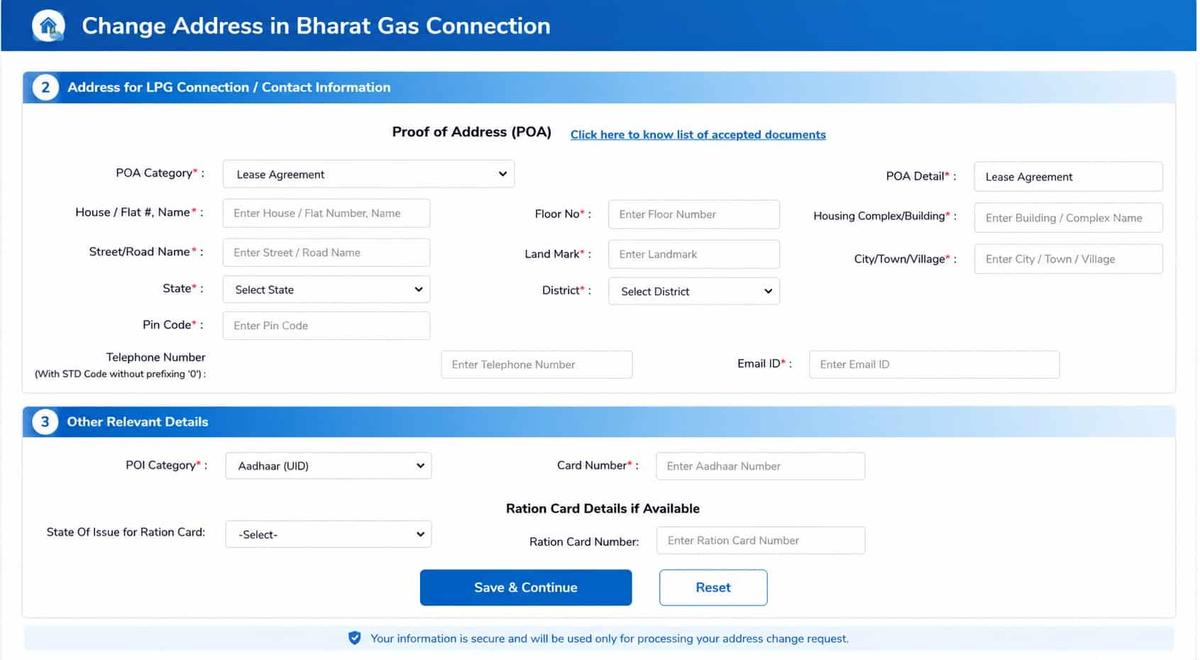
Bharat Gas online portal for KYC and address change
📱 Mobile App Shortcut: You can also use the Hello BPCL App for a faster mobile experience. Open the app → Login → Profile → Update KYC.
⚠️ Important: If you are shifting to another city or changing distributor, the process usually cannot be completed fully online. You may need to visit your current Bharat Gas distributor physically for transfer formalities.
📖 Read below: Offline distributor transfer method, required documents, address proof list, and city-to-city Bharat Gas transfer process.
Offline Method: Change Address via Visiting Local Distributor
- Visit your current Bharat Gas distributor and inform them about the address change request.
- Use the Bharat Gas Distributor Locator to find the correct office if needed.
- Fill out the address change application form at the distributor office.
- Submit your Proof of Address (POA) and Gas Subscription Voucher (SV) copy along with the form.
1. If you’re moving within the same city:
- You don’t need to return your cylinder or regulator.
- The distributor will issue a Transfer Advice (TA) valid for 3 months.
- Submit this TA to your new local distributor to update your records.
- Same-city transfers are usually completed within same working day.
2. If you’re moving to another city:
- Surrender your LPG cylinder and regulator to the current distributor.
- The distributor will issue a Termination Voucher (TV) and refund the security deposit amount.
- After shifting to the new city, visit the local Bharat Gas distributor with your TV documents.
- Submit the transfer request for activation at your new address.
- Inter-city transfers usually take around 3–5 working days to complete.
📌 Additional Insight: If your new house already has a PNG gas connection, you may need to surrender your Bharat Gas LPG connection instead of simply changing the address, as both active connections are generally not allowed together under recent government guidelines.
What documents are accepted as proof of address?
When a proposal for an address change is made, Bharat Petroleum requires one to provide an official, government-approved, valid proof of address (POA) as per their database.
Bharat Gas accepts a wide range of documents, including:
- Aadhaar Card (UID)
- Voter ID
- Passport
- Driving License
- Rent/Lease Agreement
- Ration Card
- Electricity/Water/Telephone Bill
- House Registration Document
- LIC Policy
- Bank/Credit Card/Post Office Statement
- File Allotment or Possession Letter
- Self-declaration by a Gazetted Officer
Tip: If you are a tenant, your rental agreement and an Aadhaar card showing your current mobile number are usually enough.
Common Bharat Gas Address Change Problems and Solutions
- Pending refill booking: Address change may not work if a cylinder booking is active. Wait for delivery completion or ask the distributor to cancel the booking.
- Missing Subscription Voucher (SV): Download the e-SV from the eBharatGas portal. Digital copies are valid.
- Mobile number not linked: Update your number using Aadhaar eKYC through the HelloBPCL app. Read this – How to Change Mobile Number in eBharatGas.
- Moving to another city: Surrender the cylinder and regulator first to get the Transfer/Termination Voucher (TV).
- LPG subsidy stopped: Re-link your Aadhaar and bank account with the new distributor using PAHAL Form 2.
- Forced stove or insurance purchase: Buying extra products is optional. If pressured, call LPG Helpline 1906 or BPCL support immediately.
Bharat Gas Address Change Processing Time
The address update time depends on whether you apply online, offline, or shift to another city.
1. Expected Processing Time
- Online request: Usually completed within 3–5 working days after document verification.
- Offline distributor visit: Simple updates may take around 30 minutes to 2 hours.
- Same city transfer: Normally takes 3–7 working days.
- New city transfer: May take 7–15 working days, including connection transfer and cylinder activation.
2. Reasons for Delay
- Incorrect or mismatched address documents
- Pending verification approval
- Delay from local distributor office
- Missing SMS/email confirmation after verification
Most users receive verification updates through SMS or email within 2–3 working days.
Who Can Apply for an LPG Address Change?
- The registered consumer can directly request the address update.
- If the consumer is unavailable, a family member can apply with authorisation and valid ID proof of the main connection holder.
- Tenants or renters can also update the address by submitting:
- Valid rent agreement
- Recent electricity or water bill (last 3 months)
- Consumer number and LPG details
- Owner-related address proof, if required by the distributor
Why is updating your Bharat Gas address important?
Keeping your address current isn’t just about convenience. It affects:
- Cylinder delivery – Your distributor uses the registered address for all deliveries.
- Safety compliance – The records must reflect the correct household for safety inspections.
- KYC and subsidy processing – Address mismatches can lead to delays in receiving LPG subsidies.
- Proof for other services – Your LPG Subscription Voucher (SV) is often accepted as proof of residence for other government and banking services.
Frequently Asked Questions
Can tenants update their Bharat Gas address?
If you live on rent and the online portal is not accepting the rent-related documents, you have to visit your distributor’s office to submit your rent agreement and last month’s electricity bill.
Do I lose my consumer number after moving?
If your address is changed in the same city, then the consumer number remains the same, but A new consumer number will be issued when you swift to a new city.
Is the online address change on the Bharat Gas portal reliable in practice?
Yes, for most users. Online KYC updates usually complete in 3–5 working days. Clear documents within size limits reduce rejection. Complex cases still require distributor intervention.
Why does Bharat Gas insist on updating the address after shifting houses?
Because delivery, safety inspection, and subsidy mapping depend on the registered address. Even a small mismatch can stop delivery or delay subsidy credit, especially after a city or distributor change.
What is the most common reason Bharat Gas address updates get rejected?
Document mismatch. Address on POA not matching entered details is the top issue. Tip: copy-paste address exactly as per the Aadhaar or the rent agreement, including the PIN code.
Do I need to surrender my cylinder if I move within the same city?
No. For same-city moves, the distributor issues a Transfer Advice (TA). Cylinder and regulator stay with you, and the update usually reflects within 24 hours.
What happens to my consumer number if I move to another city?
Your old consumer number is closed. You’ll receive a Termination Voucher (TV) and refund. A new consumer number is issued at the new city distributor after re-registration.
Can tenants update their Bharat Gas address without the owner’s presence?
Yes. A rent agreement plus a recent utility bill usually works. If the online upload fails, an offline distributor visit clears it faster, especially for rented or shared accommodations.
Why is an address update important even if the booking is working fine?
Because booking may work temporarily, but delivery routing and safety audits use address records. Many users face sudden delivery stoppage months later due to an outdated address.
Hope you liked the content. Explore smart options below 👇
🔥 Recommended