

You can update your Bharat Gas linked mobile number online within a few minutes using the official eBharatGas portal. This is the fastest method if you already have any one of these details available — LPG ID, consumer number, or old linked mobile number.
📱 Online Mobile Number Update Steps
• Registered mobile number
• 17-digit LPG ID
• Using State, District & Consumer Number
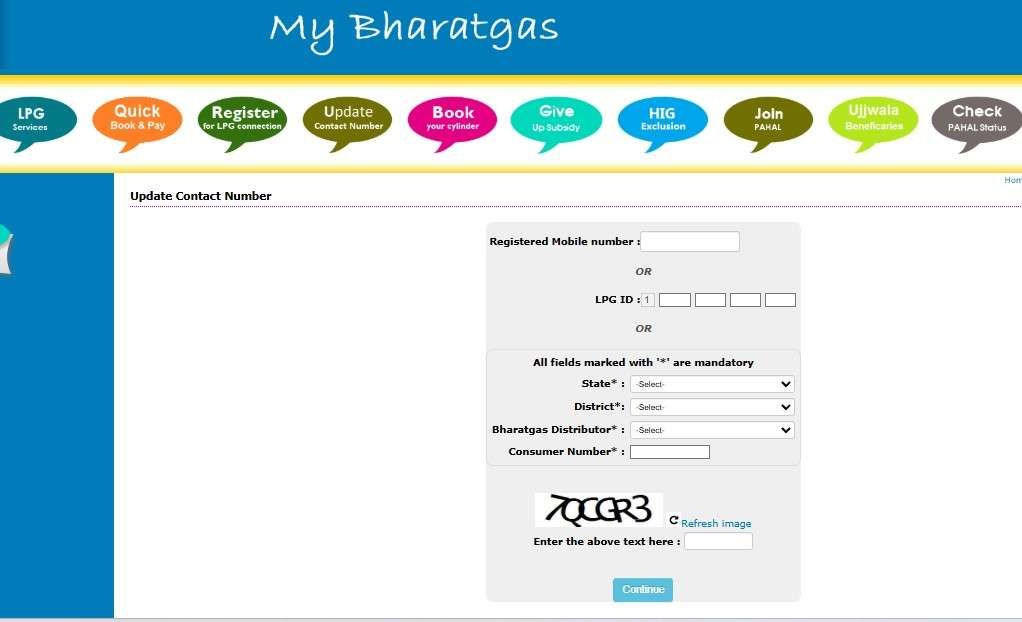
eBharatGas portal mobile number update page
💡 Quick Tip: Keep your LPG ID or Consumer Number ready before starting. It helps complete the verification process much faster.
⚠️ Expert Insight: Updating your number only in Bharat Gas may not be enough for LPG subsidy credit. Your active mobile number should also match with your Aadhaar and bank account records to avoid DBT subsidy issues.
📖 Read below: What to do if your old mobile number is inactive, or how to update number through your BharatGas distributor office.
Update via Distributor Office (Offline Method)
- Go to your BharatGas distributor’s office.
- Carry these documents:
- Aadhaar card copy
- BharatGas passbook
- Your old mobile number details
- New mobile number to be linked
- You need to request that to help desk update your number
- They will ask for your aadhaar copy and Passbook to verify and update the new number in the system by KYC.
- The staff will update your details and confirm.
- You will receive confirmation after the update is completed.
How Much Time Does Bharat Gas Mobile Number Update Take?
- Online or Hello BPCL app: Usually updated instantly or within 1 hour. In some cases, it may take up to 24 hours for SMS and IVRS services to start working.
- Distributor office update: Manual updates through the gas agency usually take 1–2 working days after document verification.
How to Check the Update Status
- You may receive an SMS confirmation on the new mobile number.
- You can also call the Bharat Gas IVRS numbers 7715012345 or 7718012345 from the new number to check whether the system recognizes your account.
What are the Documents Required
1. For Online Update
Usually, no document upload is required. You mainly need:
- Consumer Number and Distributor Name
- 17-digit LPG ID
- Access to registered mobile number or email
- Subscription Voucher (SV) details for verification
2. For Offline Update at Distributor Office
- Carry these documents while visiting the gas agency:
- Two passport-size photos (recommended for KYC updates)
- Filled mobile number update form
- Aadhaar Card, PAN Card, or Voter ID copy
- Gas passbook or Subscription Voucher (SV) copy
Common Problems & Solutions
- OTP not received: Check network signal, disable DND blocking, or use email/SV verification option.
- “LPG ID Not Found” error: Verify the 17-digit LPG ID from your gas passbook or Subscription Voucher (SV).
- Hello BPCL app not working: Update the app, clear cache, or contact support if the issue continues.
- “Number Already Registered” message: The number may already be linked to another LPG connection. Visit the distributor for manual correction.
- Portal not loading or captcha issue: Refresh the captcha, clear browser cookies, or try Chrome/Firefox browser.
If online methods fail, use the BPCL SmartLine (All India Toll-Free) at 1800-22-4344 or visit your local distributor with your passbook and Aadhaar.
What If You Don’t Have Access to Your Old Bharat Gas Mobile Number?
Many users lose access to their old registered number because of SIM loss, deactivation, or number change. You can still update your mobile number easily.
- Online method: Use your Subscription Voucher (SV) number from the gas passbook for verification instead of OTP.
- Offline method: Visit your Bharat Gas distributor with Aadhaar card, ID proof, and gas passbook to submit the request manually.
Benefits of an Updated Number (Subsidy & Safety Alerts)
It requires you to use the latest and active mobile number with your Bharat Gas distributor. Your registered mobile number is the bridge between you and BharatGas. Without it:
- You won’t receive booking confirmations.
- Subsidy credit alerts won’t reach you.
- Online Booking via Amazon, Paytm, Phonepe will not work.
- OTP-based services (like online booking or address change) won’t work.
- The distributor can’t call you if there’s a delivery issue.
In short, keeping it updated is essential for smooth service.
Frequently Asked Questions
How to check the LPG ID for Bharat Gas?
To find out your ID, simply visit the eBharatGas portal, tap on LPG Services, select Find 17-digit LPG ID. Here, provide your consumer number, distributor name, fill out the captcha and view your Full LPG ID on screen.
How to check the eBharatGas mobile number change status?
First of all, log in to ebharatgas.com, go to Update Contact Number, and recheck your details. If the new number appears, it’s updated; if not, visit your distributor to register a complaint instantly.
How to know Bharat Gas consumer number?
Your consumer number is printed on your BharatGas passbook, invoices, or delivery slips. You can also ask at your local Bharat Gas distributor.
Can I change my BharatGas mobile number without the old number?
Yes, it is possible. You have to verify your account using your SV number from the passbook on the eBharatGas website. Moreover, update it offline at your distributor’s office.
How to update Bharat Gas-linked mobile number using WhatsApp?
Simply, send Hi to 1800 22 4344 and enter OTP to register account, select existing customer facilities, select Update mobile number, enter OTP of new mobile number, done.
Why is updating the mobile number in eBharatGas so critical?
Because every service depends on it. Booking confirmations, subsidy alerts, OTP verification, and delivery calls all go to the registered number. One outdated SIM can silently block everything.
Is the online eBharatGas mobile number update actually faster than offline?
Yes. Online updates usually reflect within 1 hour, sometimes up to 24 hours. Distributor updates often take longer due to manual KYC queues and staff workload.
What is the most common reason mobile number updates fail online?
OTP issues. Either the new SIM has no SMS plan or users wait too little between retries. Tip: wait 5–10 minutes or use the SV number instead.
Can I update my Bharat Gas mobile number without access to the old SIM?
Yes. Use your Subscription Voucher (SV) number from the passbook for verification online. Offline, Aadhaar plus a passbook is enough to prove ownership.
How long should I wait before assuming the update didn’t work?
Give it 24 hours. If the new number still doesn’t show on the portal, revisit “Update Contact Number” or contact the distributor with your request reference.
Why do distributors sometimes refuse mobile number changes?
Mostly due to incomplete documents. Distributors need proof that you’re the consumer. Carry Aadhaar + passbook—this clears 90% of refusals instantly.
Read – Book an LPG cylinder through SMS
Hope you liked the content. Explore smart options below 👇
🔥 Recommended