

The easiest way to update your Indane Gas mobile number is through the IndianOil ONE App. The app works on both Android and iPhone and allows you to update your LPG-linked mobile number directly from profile settings.
👉 Download the official app below:
- Android: IndianOil ONE App – Play Store
- iPhone / iOS: IndianOil ONE App – App Store
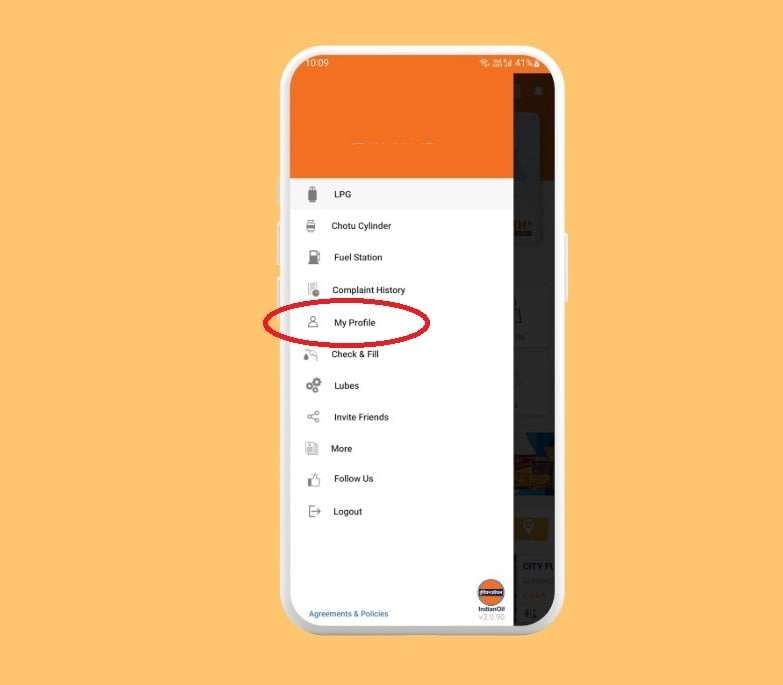
📲 Steps to Change Mobile Number in Indane App
- Open the IndianOil ONE App
- Log in using:
- Registered mobile number
- Password
- Captcha code
- Tap the Menu ☰ option from the top-left corner
- Open My Profile → Edit Profile
- Remove the old mobile number and enter the new number
- Complete verification using:
- OTP sent to the old mobile number
- OTP sent to the new mobile number
- Enter both OTPs and confirm the request
📋 Quick Features
| Feature | Details |
|---|---|
| Verification Required | OTP on old and new mobile number |
| Who Can Request? | Consumer or family member |
| Final Approval | Usually verified in the consumer’s name |
| Distributor Verification | May require Aadhaar confirmation |
💡 Editor’s Note: After updating your mobile number, Indane systems may take 24–48 hours to sync with IVR, SMS, and WhatsApp booking servers.
If cylinder booking fails immediately after updating the number, wait some time before trying again.
🔒 Important: In some cases, the mobile number updates in the app but the local distributor system still shows the old number temporarily.
If LPG subsidy or booking alerts stop working, contact your distributor and request a database refresh or mobile number sync.
⚡ Alternative Methods: If the app method does not work, you can also update your mobile number using the Indane IVRS service or by visiting your distributor office.
Check below: Indane IVRS number update method, offline distributor process, and Indane web portal steps.
1. Update via Indane One Web Portal
This is the official digital method to update your Indane Gas mobile number, and in most cases it works instantly. You mainly need your consumer number/passbook, old registered mobile number, and OTP verification.
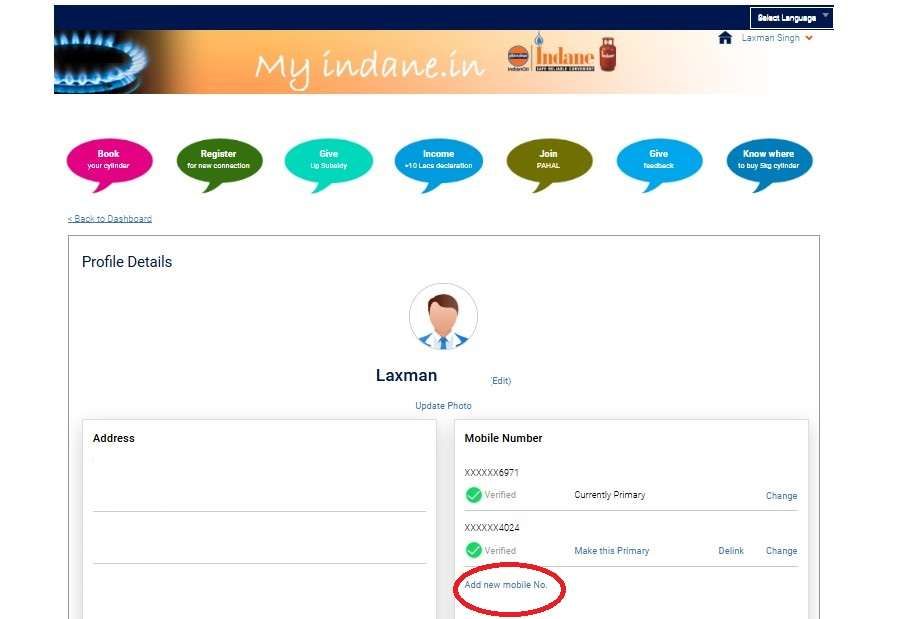
- First of all, you have to visit the official website of Indian Oil: https://cx.indianoil.in/webcenter/portal/Customer
- If you have already registered, enter your mobile number and password to log in.
- If using first time → select Sign Up and provide:
- Mobile Number
- Full Name (as per passbook)
- Email ID
- Captcha → then set a password.
- After logging in, tap on LPG in the menu and go to Profile Dashboard.
- Here, you will get the “Edit” button just below your profile picture and name.
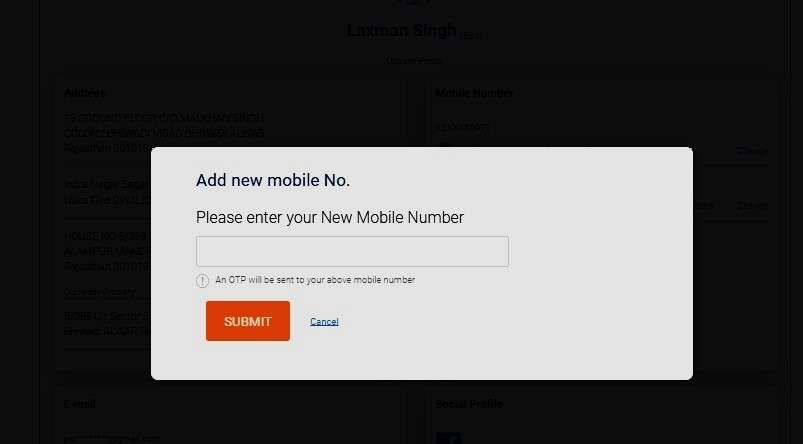
- Under the Telephone section, tap on Add new mobile number.
- Enter your latest number and tap on Submit to receive a 6-digit OTP on your new SIM.
- Set your latest number as your primary.
- Optional, but now you can Unlink your old number if not required.
Tip: You must have an active old mobile number to change it; if not, please ask your distributor.
2. How to change number through Indane IVRS line
- You have to dial the IndianOil LPG official number – 7718955555 from your current linked mobile number.
- Choose the option related to Change of Registered Mobile Number.
- Press 4 to Change of personal registration number.
- Now, enter your new mobile number and provide OTP to complete the verification.
- Update complete.
Expert Tip: The Indane IVRS line is often busy or drops calls between 10 AM and 5 PM due to high 2026 traffic. For an instant, “no-wait” update, use SMS method or the IndianOil One App instead.
BONUS: If old number lost, call 7718955555 from your 📞 new mobile number (Non-linked). Choose the mobile registration option, then enter your 16-digit LPG ID (printed on your passbook) and the last 4 digits of your Aadhaar number through the dial pad. In most cases, the new number gets updated within 1–2 hours.
3. Update Indane Mobile Number via SMS Method
- Open the SMS app on your new mobile number 📩
- Type the message in this format:
IOC[space][STD Code+Distributor Telephone Number][space][Your Consumer Number] - Example: IOC 01122223333 123456
- Send this SMS to 👉 7718955555
- Wait for verification and confirmation SMS from Indane Gas
- Once approved, your new mobile number will be linked with your LPG account ✅
💡 Make sure:
- You enter the full STD code + distributor phone number together
- Your consumer number is correct
- The SMS is sent from the new mobile number you want to register
4. Visit your local Indane distributor (In-Person visits)
If you don’t have access to your old number or OTP fails, visit your distributor:
- Go to your nearest Indane agency.
- Provide:
- Your Consumer Number
- Copy of Aadhaar Card
- KYC details (address/ID proof)
- Fill out the Mobile Number Change Request Form. (if required)
- Submit and verify with your new number.
- Number updated within 24 hours.
Troubleshooting: Common Problems & Solutions
| Issue | Likely Cause | Solution |
|---|---|---|
| OTP not received | Network issue | Retry after 10–15 mins, ensure SIM has network |
| Lost old number | Cannot verify | Visit distributor with Aadhaar & KYC |
| SMS format error | Wrong input | Double-check spacing in SMS format |
| Wrong password at login | Account locked | Use the “Forgot Password” option on the Indane One Portal |
| Bookings failing | Old default number issue | Set your latest number as the Default only in your profile |
Tips for Easy Number Update
- Keep your old number active until the change is successful.
- Always note your Consumer Number before visiting the agency.
- The distributor method is the only solution if you have lost your old number.
- Use the portal/app if both numbers are working for a faster update.
- When visiting a distributor, carry an Aadhaar copy—it speeds up approval.
- Subsidy alerts may fail if your number is inactive.
- Number update requests are usually processed within 24 hours.
- Check for confirmation SMS/email before booking again.
Why Indane Gas Needs Your Latest Mobile Number
Your mobile number is an LPG booking method for bill payment apps, such as Paytm, Flipkart Pay, and Phonepe. So, it requires using the latest number for any work related to your indian gas account.
Updating your mobile number simply means replacing or adding a new number to your Indane Gas consumer account. Once updated:
- You can log in to the Indane One Portal/App.
- Book cylinders through SMS, IVRS, or mobile app.
- Receive delivery notifications and subsidy credits.
- Add multiple numbers, but keep one as primary for every time booking and logging the Indane One App.
- OTP-based verification works properly.
When Should You Update Your Number?
- When you buy a new SIM card.
- If your old number is lost or inactive.
- When you want to add a family member’s number.
- Immediately after switching phones or porting to another operator.
Frequently Asked Questions
Can I change my Indane Gas number without my old mobile number?
Yes, but you have to visit your indane local distributor to register a complaint and request for updated new number via OTP.
How many mobile numbers can I register in Indane Gas?
You can add upto 5 mobile and telephone numbers in your Indane profile, but only one number can be set as the default for login, bookings, and notifications.
How long does it actually take for an Indian mobile number update to reflect?
Online updates usually reflect within 1–2 hours, but subsidy and WhatsApp services may take up to 24 hours. Tip: wait for a confirmation SMS before booking a cylinder.
Can I update my Indane number if my old SIM is permanently lost?
Yes. This is common. Visit your local Indane distributor with Aadhaar and a passbook. Branches update numbers offline within 24 hours, no OTP from old SIM required.
Why does Indane ask for OTP on both old and new numbers in the app?
It’s a fraud-prevention step. Dual OTP ensures ownership continuity. If the old number OTP fails even once, stop retrying—branch update is faster and avoids account lock.
Does changing the mobile number affect the LPG subsidy credit?
No subsidy loss, but alerts may stop temporarily. Subsidy is linked to bank + Aadhaar, not phone number. Still, update early to avoid missing DBT SMS confirmations.
Which method do distributors themselves recommend for a quick number change?
Distributors prefer offline Aadhaar-based updates when customers face OTP issues. It bypasses app glitches and IVRS failures and works even during portal maintenance hours.
Why do bookings fail even after updating the mobile number successfully?
Most failures happen when the old number remains set as the default. Always recheck profile → primary number. This single step fixes nearly 70% booking complaints.
Is the IVRS or SMS number update reliable in rural areas?
Yes, but only if the network is stable. IVRS (77189 55555) works best in the evenings. For repeated failures, distributor update remains the 100% guaranteed method.
Hope you liked the content. Explore smart options below 👇
🔥 Recommended