

Indane Gas refill booking is now very simple — customers can book LPG cylinders within seconds using their registered mobile number through missed call or WhatsApp service.
| Booking Method | How It Works | Best For |
|---|---|---|
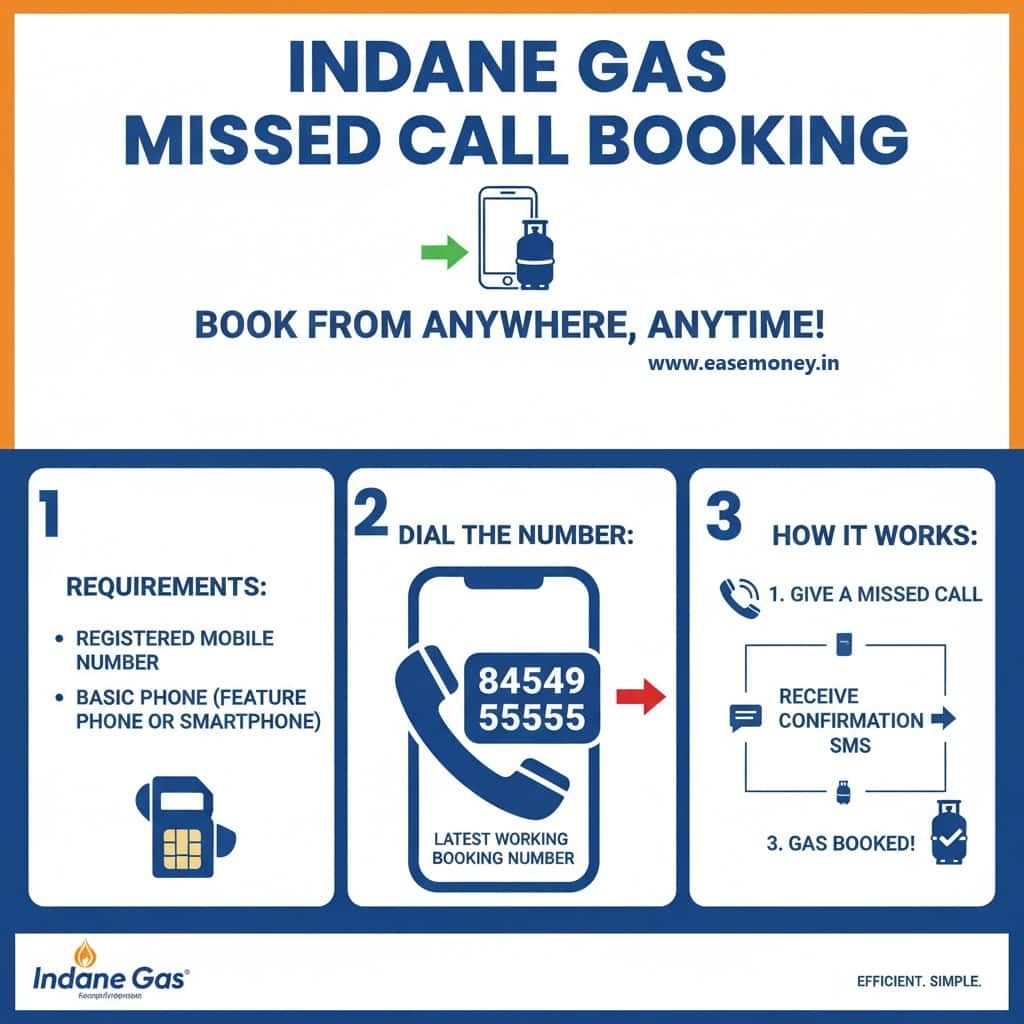
| 📞 Missed Call Booking | Call 84549 55555 → call disconnects automatically → booking confirmation SMS arrives | Fastest method without internet |
| 💬 WhatsApp Booking | Send REFILL to 75888 88824 → follow menu instructions → confirm booking | Booking, payment, and tracking together |
- Delivery Time: LPG delivery usually takes around 1–7 days depending on city, distributor load, and seasonal demand
- Payment Options: Cash on delivery, UPI, card payment, or payment link through SMS/WhatsApp
- Registered Number Required: Booking works properly only from the mobile number linked with your LPG account
💡 Expert Insight: If delivery is delayed beyond 48 hours, use WhatsApp booking and type STATUS.
Many customers find WhatsApp tracking more accurate than the IVRS system because it often shows updated delivery movement information.
⚠ 2026 LPG Booking Rule: Many areas now follow refill gap restrictions before allowing the next cylinder booking.
- Urban areas: Usually around 25 days
- Rural areas: Can extend up to 45 days
If the system shows “Booking Not Eligible”, this waiting period is commonly the reason.
📄 Good to Know: Missed call booking works even on keypad phones and does not require mobile data or smartphone apps.
However, WhatsApp and app-based booking provide better tracking, payment history, and complaint support.
Check below: How to book Indane Gas through the mobile app, online portal, and IVRS system with step-by-step setup.
1. Book via IndianOil One App (Online)
If you want more flexible features, you can go with the IndianOil One Mobile App. It is the flagship digital platform for Indane LPG customers. Available on Android and iOS, it brings together all essential features, from booking to payment and delivery tracking.
Step 1: Login or Register
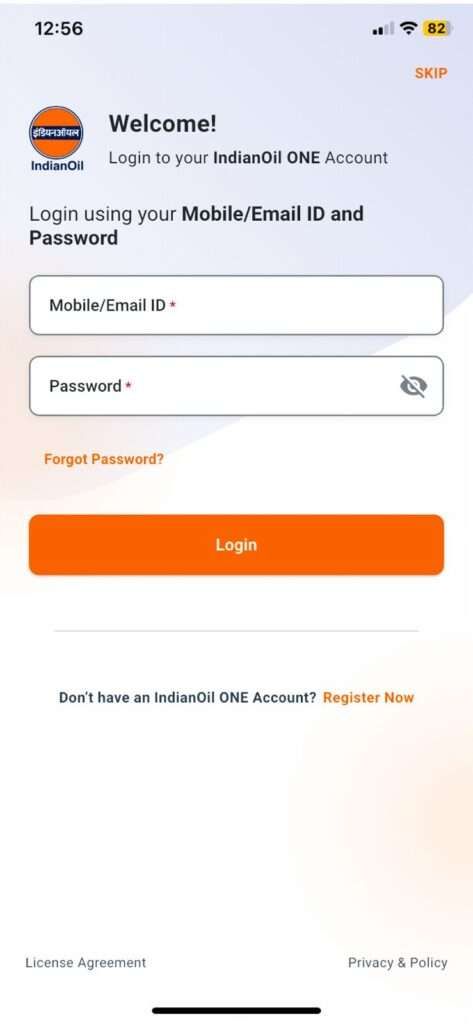
- First of all, download or update your IndianOil One app.
- Log in with your mobile number & password.
- If using the app first time, simply tap on register now button.
- Add basic information such as your first & Last name, mobile, email, captcha,
- Verify via OTP, and set a password.
Step 2: Book a Cylinder
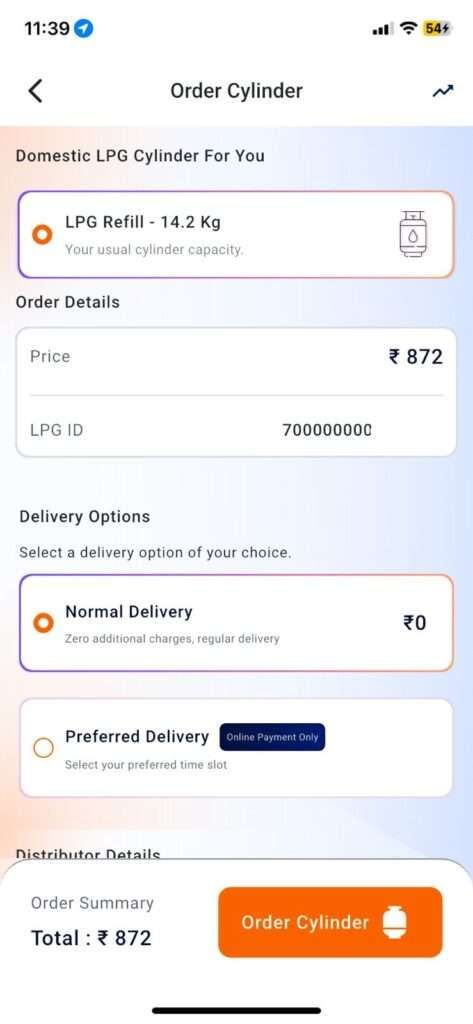
- On the home screen, tap Refill Order.
- Check the current LPG price displayed before booking.
- Select Cylinder Type (usually 14.2 kg domestic LPG).
Step 3: Choose Delivery Option
- Normal Delivery – Standard option, no extra charge.
- Preferred Delivery – Choose weekday & time slot.
Step 4: Change Distributor
One of the latest features allows you to switch distributors instantly within the app:
- Tap Change Distributor.
- See a list of nearby distributors (within ~5 km).
- Select one and continue booking.
This is useful if your usual distributor is slow, or if you’ve moved within the same area.
Step 5: Make Payment
- You can now pay digitally using the app.
- The app gives you multiple Payment gateway options: Razorpay, CCAvenue. Select anyone but trusted.
- You can easily pay via QR Scanner or UPI ID
- You can use your credit cards, rewards and your pay later.
- Once successful, you will receive:
- SMS confirmation
- E-Invoice with DAC number (3–6 characters long).
Step 6: Track and Manage Delivery
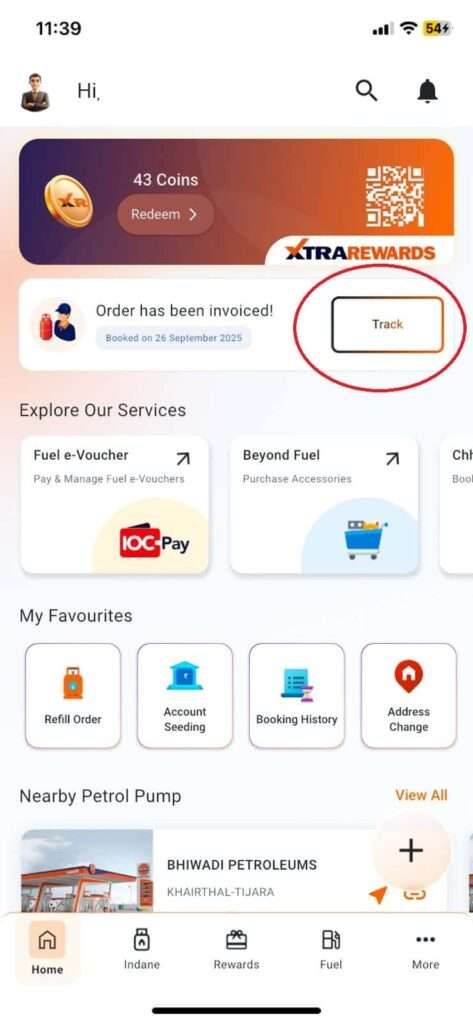
- In the app, go to Track Order.
- You will see:
- Booking status
- Delivery person’s name, mobile number, and location
- Option to download invoice PDF
- If the order is invoiced, a banner appears on the home screen: “Order has been invoiced”.
- Delivery usually occurs within the distributor’s committed timeframe.
Step 7: How to cancel your LPG booking
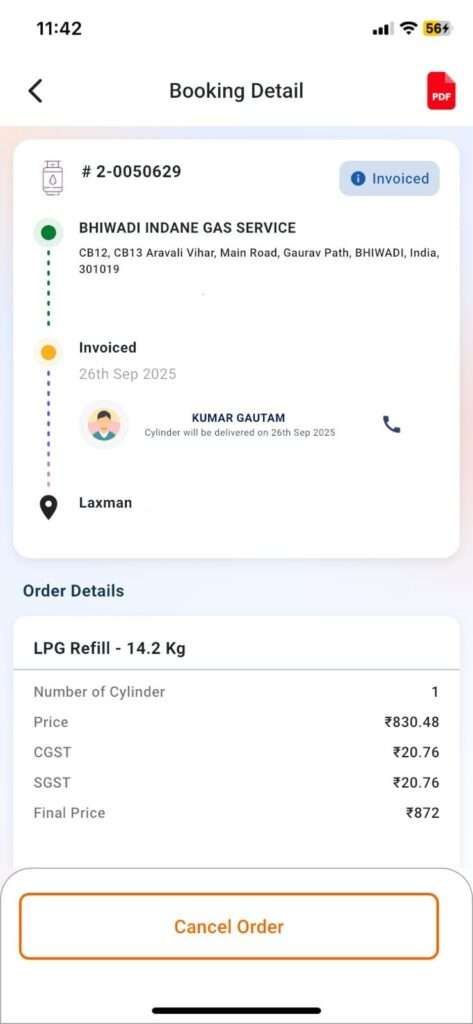
- Tap More Details for the request for Cancel Booking.
- If invoiced, cancellation may not work directly.
- In such cases, call your distributor (contact shown in app).
- Provide a valid reason (wrong booking, address change, duplicate order, etc.).
- Once approved, you will receive a Cancellation Request SMS.
- Processing usually takes up to 4 hours.
2. Indane Web Portal Booking (Use Chrome)
In case you are using a laptop or PC, you can use this portal. The CX portal works almost the same as the app. It also works on mobile Browsers.
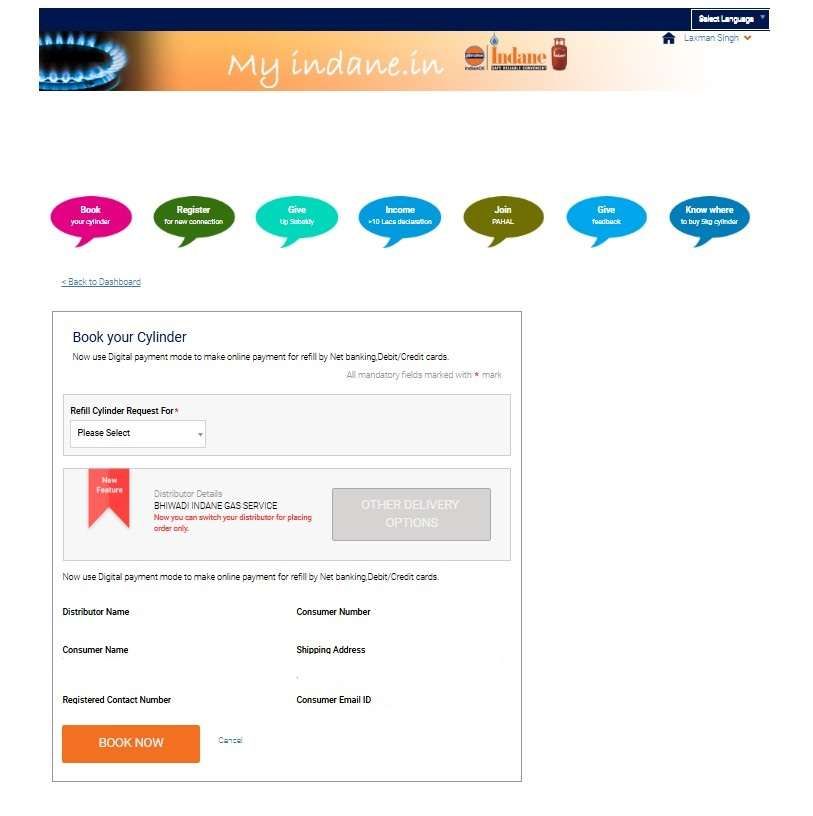
- Visit https://cx.indianoil.in/webcenter/portal/Customer
- In the header, tap on login, and enter the same details for login as the mobile app.
- After logging in, tap on Book Cylinder
- Choose your refill cylinder type, such as Xtralite Cylinder, 5KG cylinder, and 14.2 KG LPG.
- Check the address and Other delivery options, then tap on Book Now.
- Online payment is optional; however, you can pay using UPI or other modes.
- Your booking is done, you will get a booking and estimated delivery SMS within 30 30-minute window.
3. Booking Options for Non-Smartphone Users (No Login Required)
For customers without internet or smartphone access, Indane offers simple offline booking methods:
1. Indane Gas IVRS Number – (77189 55555)
You can use IVRS technology for booking. Only use your phone and make a call.
- You can select English, Hindi, and your local language, detected by your SIM. It works 24/7; however, you can use it in the evening for next-day delivery in tier 2 or metro cities.
- If your number is registered, the system auto-detects your LPG ID.
- The IVR will ask you for a booking or refill, press 1, and other options have different digits.
- If not registered:
- Enter 16-digit LPG ID (on invoice or subscription voucher).
- Verify with the last 4 digits of Aadhaar or Subscription Number.
- Mobile number gets registered instantly.
Guide to update number: Change Indane Gas Mobile Number
2. Through SMS Booking (77189 55555)
- You can use SMS booking, but you have to register first. The process is –
- Send <16 Digit ConsumerID><space>Aadhaar Last 4 Digits> at the 77189 55555.
- Once registered, you will get an instant reply.
- Simply send REFILL to 77189 55555 for future bookings.
- If the SMS code does not work, you can try SV Last 4 Digits instead of aadhaar.
- You can find SV on the Gas passbook.
Update Your Delivery Address
The registered delivery address decides where your refill will be sent.
- If you shift house within the same locality, you can update your address with the existing distributor.
- If you move to a different distributor’s area, you must transfer your connection officially.
- Without a correct address, delivery will fail, even if you have booked successfully online.
Steps to Change Address in Indane Gas
- Through the IndianOil One app → Profile → Update Address
- On CX Portal (cx.indianoil.in)
- At the distributor’s office with proof
Documents required: Aadhaar card, electricity bill, rental agreement, or other valid address proof.
Full guide: Indane Gas Address Change Process
Schedule Preferred Delivery Time
In 2026, you don’t have to wait all day for the delivery man. Indane allows you to pick a specific time slot, though a small “Convenience Fee” applies.
1. How to set your time slot:
- Open App/Web: Log in to the IndianOil One app or the CX portal.
- Select Refill: Go to the ‘Book Refill’ section.
- Preferred Time: Look for the “Preferred Delivery” toggle before finalising the booking.
- Pick Slot: Choose from the available windows:
- Weekdays: 8:00 AM to 6:00 PM (Slots vary by distributor).
- Weekends: Saturday slots are available in most urban areas.
2. Charges for Preferred Time Delivery
- Weekdays:
- ₹50 for deliveries before 8 AM or between 6 PM – 8 PM
- ₹25 for deliveries during regular daytime hours (8 AM – 6 PM)
- Weekends:
- ₹25 for deliveries between 8 AM – 6 PM
These charges are applied in addition to the regular refill cost. If you don’t choose this scheme, delivery will happen in the normal route schedule at no extra charge.
Availability: This feature depends entirely on your local distributor. If they have limited staff, the “Preferred Time” option may not show up in your app.
Frequently Asked Questions
What is the latest Indane Gas booking number?
The universal IVRS number for Indane gas booking is 77189 55555. For missed call booking, dial 84549 55555 from your registered mobile. You can save in your contact list for anytime booking.
What if I miss my delivery after ordering?
If you miss it, the distributor usually visits again at your address for delivery. You can also call your distributor directly to reschedule a convenient time. You will contact details in your Indian One App.
How does Online Payment work in Indane Gas LPG?
When you make an online payment while ordering a cylinder, you will get 2 SMS, 1 for confirmation Text and 1 for the Invoice generated with the DAC number. You have to show the DAC number to the delivery boy to complete the process.
Can I have multiple mobile numbers linked?
Yes, you can add multiple numbers, but you have to select a default number per consumer for refilling and managing the Indane LPG account.
Which Indane LPG booking method works fastest in real life?
Missed call booking is still the fastest. Dial 84549 55555 from your registered number—no login, no internet. Booking confirmation SMS usually arrives within 30 seconds.
Is the IndianOil One app worth using over IVRS or missed call?
Yes, for regular users. The app shows live delivery status, invoice (DAC number), distributor contact, and allows payment, cancellation, or distributor change—features IVRS cannot offer.
Why do some Indian WhatsApp bookings fail even after sending “Hi”?
Mostly due to a mobile number mismatch. WhatsApp must use the same registered LPG number. Tip: update your number first, then retry after 10 minutes for a smooth chatbot response.
Can I cancel an Indane LPG booking after it’s invoiced?
Usually no. Once invoiced, cancellation shifts to the distributor level. Call the distributor directly within 4 hours; late requests are generally declined to avoid logistics loss.
How reliable is Preferred Time LPG Delivery in practice?
It works well in cities. Paying ₹25–₹50 lets you choose time slots. Tip: select weekday mornings for highest success; evening slots fill up fastest.
Does online payment really speed up Indane LPG delivery?
Often yes. Prepaid orders are prioritised in many areas. You receive a DAC number (3–6 characters), which confirms invoicing and reduces delivery delays caused by cash handling.
Hope you liked the content. Explore smart options below 👇
🔥 Recommended