

The latest Bharat Gas booking IVR numbers are 7718012345 and 7715012345. These numbers work only from your registered mobile number because the system automatically detects your LPG consumer account.
📞 Bharat Gas IVR Booking Process
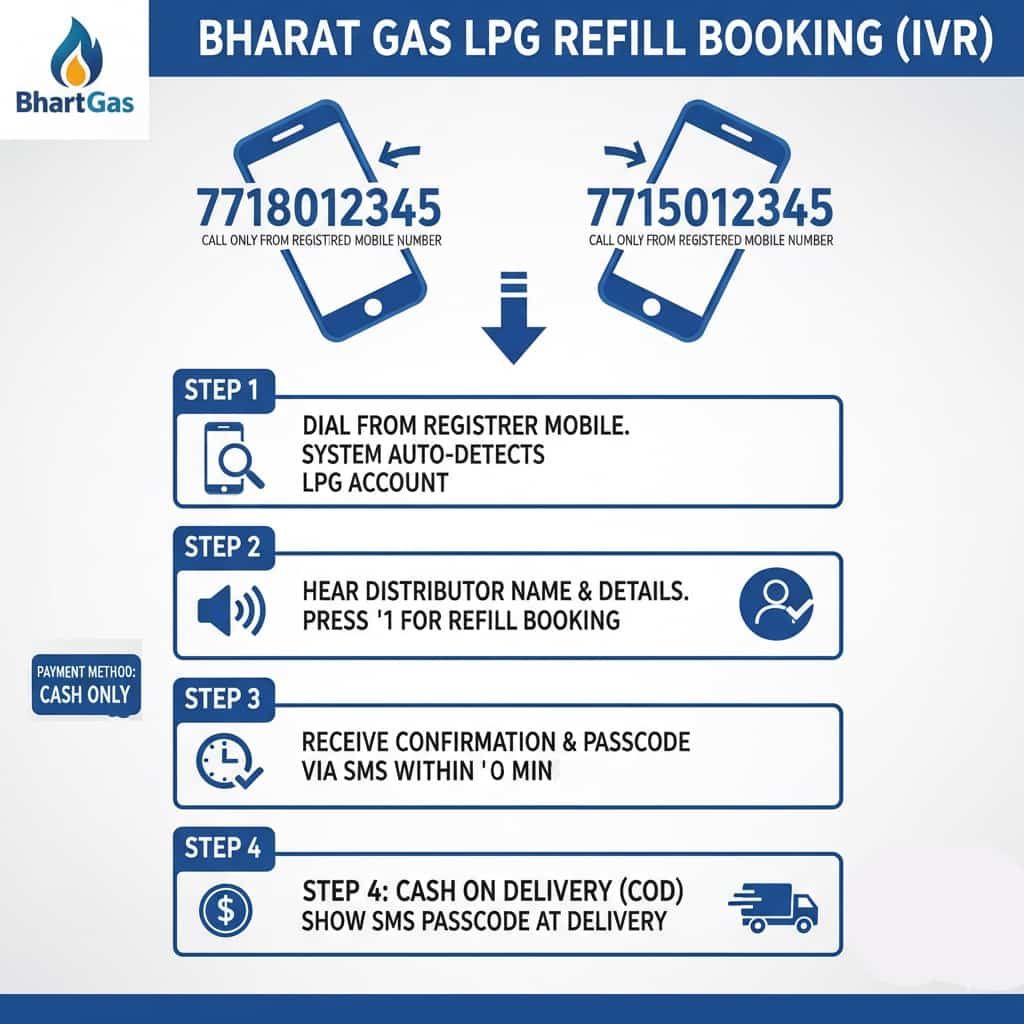
- Call 7718012345 or 7715012345 from your registered mobile number
- The IVR system automatically detects your Bharat Gas account details
- Your distributor name and customer information are announced during the call
- Press 1 for refill booking
- Booking confirmation and DAC code are sent through SMS within a few minutes
| Service | Details |
|---|---|
| LPG ID Length | 17 Digits |
| Expected Delivery | 1–3 Days (Urban) • 3–5 Days (Rural) |
| Works On | Registered mobile number only |
| Payment Mode | Mostly Cash on Delivery (COD) |
💡 Quick Tip: You can also give a missed call to 7710955555 from your registered number to receive booking-related updates through SMS.
🛡️ Safety Reminder: Keep your mobile phone nearby during cylinder delivery. Delivery staff may ask for the DAC or OTP code received on your registered number before handing over the cylinder.
If the SMS is delayed, you can usually resend or check the booking status using the Hello BPCL App.
💡 Editor’s Note: Bharat Gas follows refill lock-in periods in many areas.
- Urban areas: Refill booking may unlock after around 25 days
- Rural areas: Waiting period may extend further depending on distributor policy
If the booking system shows “Not Eligible”, the refill waiting period is usually the reason.
⚡ Many users now prefer WhatsApp or app-based booking because it is often faster than IVR during busy hours.
Check below: Bharat Gas WhatsApp booking, SMS booking, Hello BPCL App, and online refill booking methods.
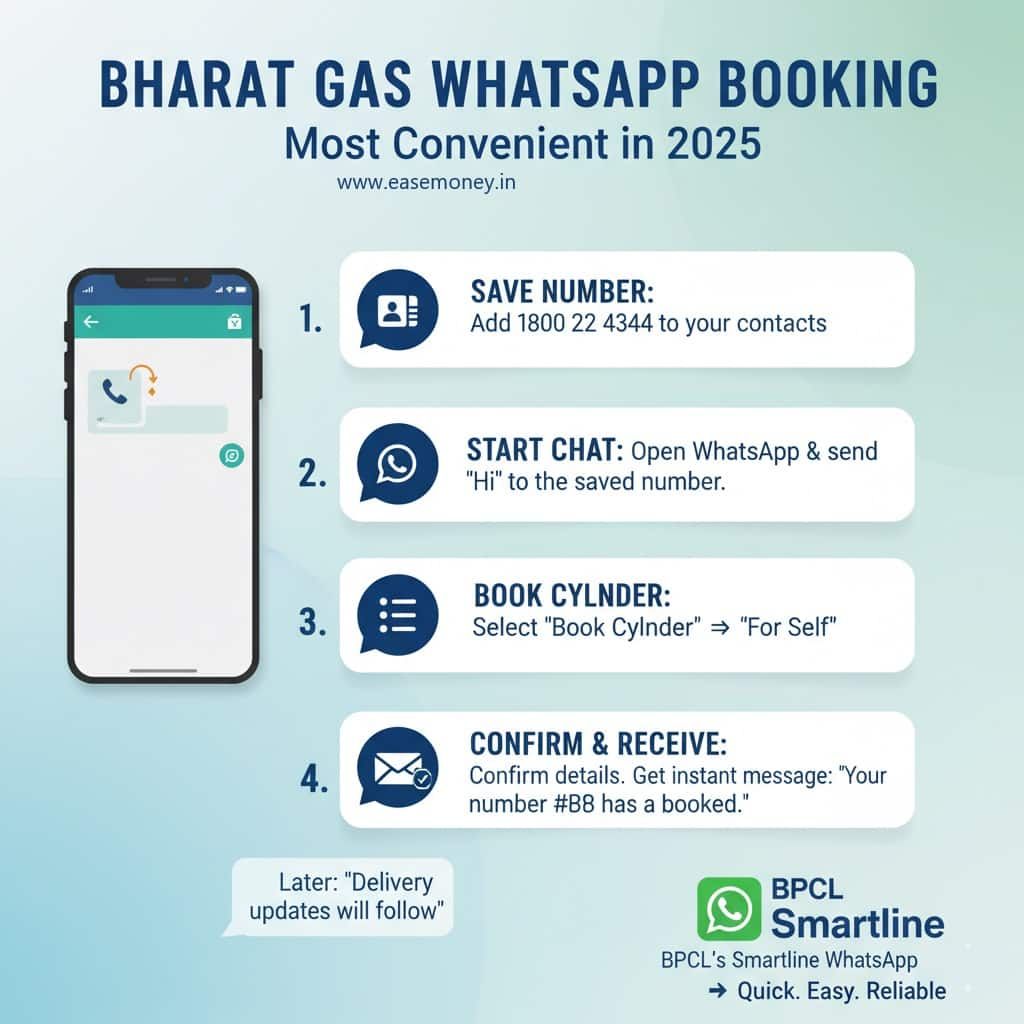
1. Bharat Gas WhatsApp Booking: Book Instantly via 1800224344
Steps to Book via WhatsApp:
- First, open your phone dialer and save this number 1800 22 4344.
- Open WhatsApp and send “Hi” from your registered mobile number.
- The menu will open, tap on Book Cylinder.
- You can choose: self-booking, for others, and more.
- Select for self and continue.
- Tap on confirm, and you will get instant Order Information with delivery timing.
- The reply will say: “Your order number ### has been booked” and will later share delivery updates.
- It means your order is now booked. You can also pay via WhatsApp using your UPI ID or debit card.
- If you don’t pay online, it will count as cash on delivery.
Note: if you select booking for others, then you have to provide the other user’s Bharat LPG-linked mobile number and OTP to fetch the account for booking.
💡 Pro Tip: You don’t just use this for booking. If you send “STATUS”, you can track your delivery in real-time. If you send “SUBSIDY”, it will show you the date and amount of your last bank transfer. It’s much faster than calling the helpline!
(a). Additional Features:
- Check delivery status
- Contact distributor
- Raise a complaint
- Cancel a booking
(b). How to Cancel a Booking After ordering:
- From the WhatsApp menu, tap Contact Distributor.
- Make a call directly from the chat.
- Request cancellation of your booking.
- Once the distributor confirms, your booking will be cancelled.
Note: It will not work after 4 hours of booking.
2. How to Use Bharat Gas SMS Booking: The HelloSMS Service
This is a reliable booking method for keypad phones and users without internet access 📩.
- First, make sure your mobile number is registered with Bharat Gas
- Open your SMS app and type “LPG”
- Send it to 👉 7715012345 or 7718012345
- Your refill booking will be processed instantly
- You will receive SMS updates about booking status, cash memo, and delivery details directly on your phone.
3. UPI Apps: How to Use PhonePe, Paytm, or Amazon Pay
This is a fast digital option for urban users. In daily life, you must have an active UPI App on your phone, such as BHIM, Paytm, Phonepe, Google Pay, and more. Just use it for booking, but the Cash on delivery does not work here.
Steps:
- Open your Third-party UPI apps or BHIM App.
- Search in the list of products for Cylinder
- Select distributor as Bharat Gas
- Enter your 17-digit LPG ID or registered mobile number (anyone).
- First, check your latest refill price (it changes from time to time)
- Simply, you can pay via your bank UPI PIN or just select another mode, such as cashback, Debit/Credit Card, Net Banking, or Wallet
- Receive SMS confirmation & delivery within 2–4 days
4. Hello BPCL Mobile App (LPG section)
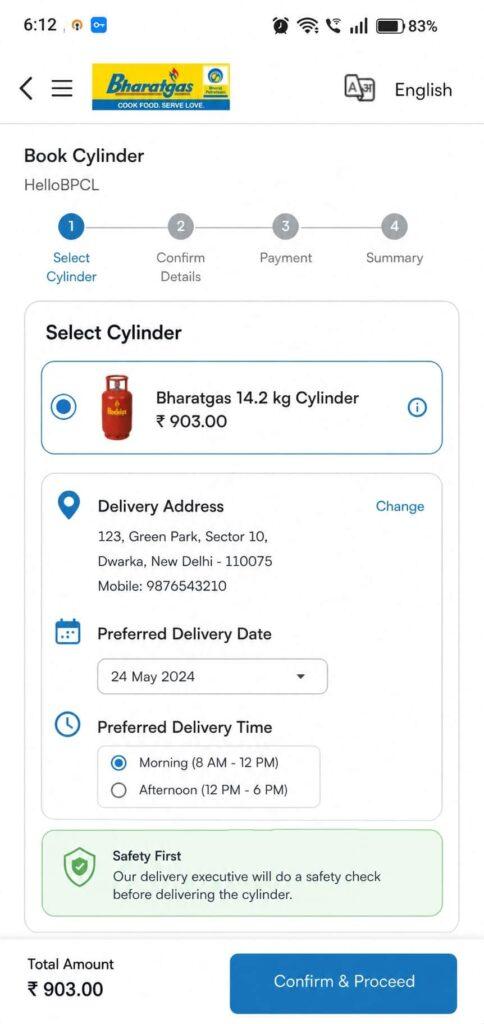
Hello BPCL is your daily app for all Bharat Petroleum products, it works for LPG as well. You can use it for book cylinders, track status, update details, track service requests and much more. If you have a Bharat Gas connection, simply download this app for normal usage.
- Open the Hello BPCL on your phone
- Select your preferred language
- Enter your mobile number and verify with a 6-digit OTP
- Set a 4-digit MPIN for secure login
- Access the Personal or Commercial dashboard
- Tap Book Cylinder on the personal dashboard
- View the latest LPG price instantly
- Confirm or update the delivery address
- Choose payment: Cash on Delivery or Online
- Track delivery status in real time
- Check booking history anytime
- Update profile details easily.
5. Official Ebharatgas Web Portal: Online Booking Without an App
For users comfortable with the web portal, You have to use the chrome or any good web browser to access the Portal –
- Open your phone’s Chrome or any other web browser app and search for my.ebharatgas.com.
- On the header menu, tap on Quick Book & Pay Facility.
- Enter LPG ID after 1 number, or just put your registered Mobile Number
- Enter random captcha → Tap Continue
- Confirm your name & distributor details → Tap on booking for refill.
- Read and Tick Terms & Conditions → Select Payment Mode (Online or COD)
- After confirming, you will get a reference number & Text SMS.
Booking to Delivery Timeline: How Long Does Bharat Gas Take?
| Step | Action | What Happens | Proof You Receive |
|---|---|---|---|
| 1 | Place Booking | Request via WhatsApp, SMS, IVRS, website, UPI app, or distributor | SMS/WhatsApp with Booking Reference Number |
| 2 | Cash Memo | Bill is generated for your order | SMS with Cash Memo Number & Amount |
| 3 | Cylinder Dispatch | The delivery boy takes a cylinder from the distributor | SMS/WhatsApp update: “Cylinder Out for Delivery” |
| 4 | Delivery at Home | Cylinder arrives at your doorstep | Show Booking SMS/WhatsApp message to the delivery person |
| 5 | Payment | Pay via UPI link, card, or cash on delivery | Digital receipt or delivery slip |
| 6 | Delivery Confirmation | Status closed in the BPCL system | Final SMS: “Cylinder Delivered on your date” |
Understanding LPG ID & How to Find It Online
Your LPG ID is a 17-digit unique number linked to your connection. It’s needed for online booking, such as UPI third-party apps and portal, subsidy credit, login first time at the website, and Aadhaar linkage.
To get your LPG ID, check the steps –
- Visit the official Bharat Gas site and tap on Find LPG ID in the account section.
- Enter Distributor Name + Full Consumer Number (find on your LPG passbook)
- If you don’t know the distributor → use another option, select the State → City → District option.
- Get your full 17-digit LPG ID.
Frequently Asked Questions
How quickly is the Bharat LPG cylinder delivered after booking?
If you are from metro or tier 2 cities, your delivery happens within 1-3 working days; for other rural areas, it may take 5 days, depending on distributor availability and location, with SMS updates at every stage.
Do I need an LPG ID to book a cylinder?
Yes, the 17-digit LPG ID is required for managing an account, but it is optional for booking; most online methods just ask for your mobile number and OTP.
Why does Bharat Gas offer so many booking methods instead of one?
Because Bharat Gas serves urban, semi-urban, and rural users together. Smartphone users prefer WhatsApp or UPI, while many households still depend on IVRS or SMS due to weak internet.
Why does Bharat Gas IVRS booking work only from a registered mobile number?
The system auto-fetches your consumer profile and distributor using the registered number. Calling from any other SIM won’t work, even if you know the LPG ID.
Which booking method is fastest for next-day delivery?
IVRS and WhatsApp bookings placed before evening usually get priority for next-day dispatch. UPI or portal bookings may take longer due to payment verification cycles.
Is WhatsApp booking safe for senior citizens?
Yes, because it uses OTP verification and limited options. No banking details are shared unless you choose online payment. Many distributors now guide elderly customers to WhatsApp booking.
Why do some bookings show “Cash Memo Generated” but delivery is delayed?
Cash memo means billing is done, not delivery. Delays happen due to distributor stock, delivery route planning, or holidays. Usually resolves within 24–48 hours.
What is the most common mistake customers make while booking online?
Entering a wrong LPG ID or old mobile number. This causes booking failure or wrong distributor mapping. Tip: always verify details once on the Bharat Gas portal.
Can I book a cylinder if my mobile number is not updated?
Only offline. Digital methods require a registered mobile number. Visit your distributor once to update the number—after that, all online booking options start working smoothly.
What’s the smartest backup if digital booking fails suddenly?
Use IVRS missed-call booking or visit the distributor office. These methods bypass app or server issues and are reliable during outages or peak booking days.
Hope you liked the content. Explore smart options below 👇
🔥 Recommended