

Central Bank of India customers can recover their CIF Number online using the official “Forgot CIF” option available inside the Cent Ezee Net Banking portal.
This method works without logging in and only requires your account number and registered mobile number for OTP verification.
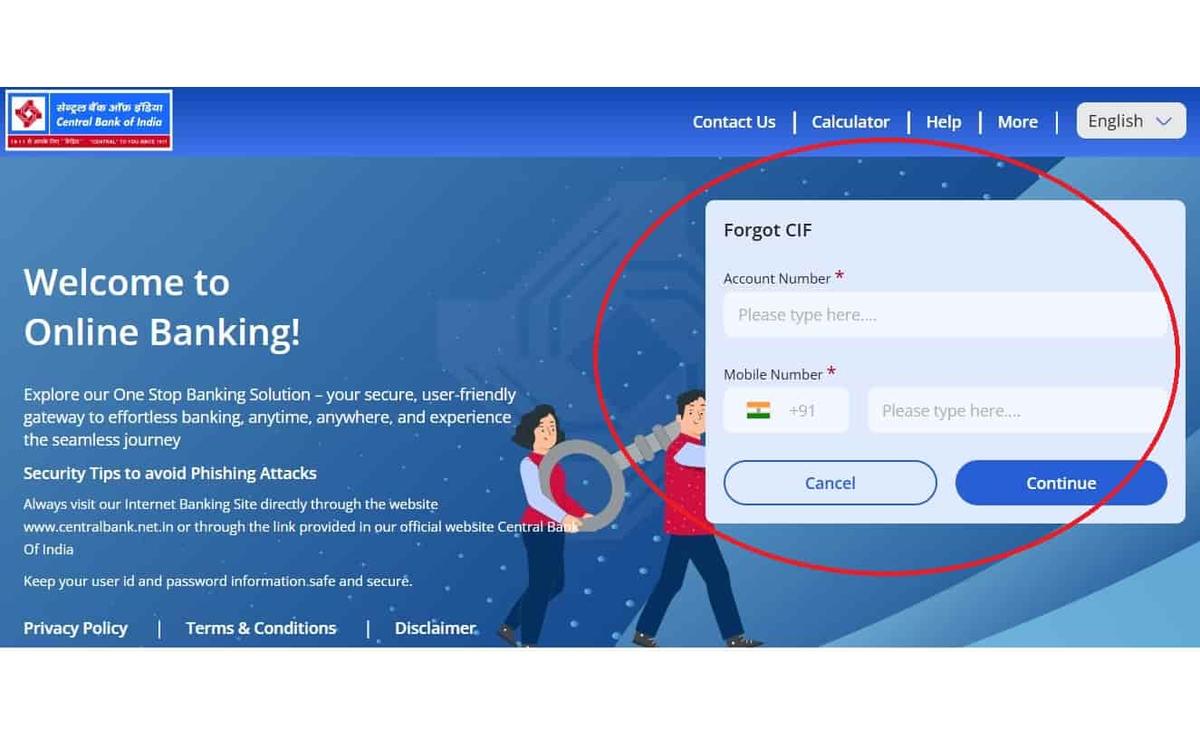
📌 Steps to Find CIF Number Online
- Visit the official website: Central Bank of India
- Tap on Internet Banking from the homepage
- Select Personal Banking and choose Cent Ezee
- Click on Proceed to open the login page
- Under the login form, tap “Trouble Logging In?”
- Select the “Forgot CIF” option
- Enter:
- Full Account Number
- Registered Mobile Number
- Verify the OTP sent to your mobile number
- Your CIF Number will appear on the screen instantly
💡 Tip: This method works smoothly on both mobile and desktop browsers like Chrome, Edge, and Firefox.
📌 Quick Insight: You can also request the bank to send your CIF Number through SMS or email after verification.
⚠ Important: If your account is old, inactive, or the mobile number is not updated, the “Forgot CIF” option may not work properly.
Check Below: Central Bank Mobile Banking App • Central Bank WhatsApp Banking • Branch Visit Method
1. Find CIF via Central Bank Mobile App
The old Cent app did not support CIF retrieval. Now, Cent eeZ lets users find their CIF number directly from the app.
Follow these steps to find your CIF number:
- Download the Cent eeZ app from the Google Play Store or Apple App Store
- Open the app and select your preferred language
- Tap on Login and choose “Forget CIF”
- Enter your registered mobile number and full account number
- Verify the OTP sent to your mobile number
- Your CIF number will appear on the screen — save it for future use
2. Find Cent NetBanking (If Logged In)
If you are already using netbanking and have a login ID And Password, so, it’s just 3 clicks away from your CIF number. Follow the process here –
- Enter your login info, such as your User ID and Password
- Go to Dashboard > Profile Settings
- Select Set Preferred User ID
- Your CIF number will be shown there, note it out.
Alternatively, you can check your banking physical documents –
- Welcome Letter/Kit (from account opening)
- ATM card packet
- Cheque book (first page or slip)
- Passbook (usually the first page)
- Credit Card Kit: If you are looking for CIF for the Central bank credit card, please check the paper you received with the attached card. (Optional)
3. Get CIF Number from Central Bank Customer Support
If you recently opened your account and haven’t received account details or internet banking credentials, try these direct support methods.
1. Central Bank WhatsApp Banking
You can also get your CIF number through Central Bank WhatsApp Banking. For safety, always open the WhatsApp chat from the bank’s official website instead of using random numbers shared online.
- Visit the official website of Central Bank of India
- Tap the green WhatsApp icon on the website or save 7900123123.
- It will open the bank’s verified WhatsApp account automatically
- Select your language
- Choose Existing Customer
- Connect with the customer support executive
- The executive may ask for:
- Your full name
- Last 4 digits of your account number
- Date of birth
- After verification, they may share your CIF number or guide you further.
⚠️ Important: Never share OTP, debit card PIN, or internet banking password, Official bank staff will never ask for these details, and Support is usually available Monday to Saturday during banking hours.
2. Central Bank Customer Care Helpline
- You have to dial 1800 3030 (Central bank 24/7 toll-free number) from your registered SIM.
- The IVR will ask you to select the option to talk to a customer care executive. (Press 7 or 8 number, it depends on the menu, listen carefully)
- Once the call is connected with the bank executive, They will ask you basic verification information like:
- Your Full Name
- Your Mother’s Name
- The last 4 digits of your bank account number
- Once they verify that your answers match the account, they will read out your CIF number on the call.
Pro Tip: Keep a pen and paper handy to write it down immediately.
Important Safety
- Always double-check the customer’s care number from the passbook and official website while calling.
- Only call from a registered mobile number
- All calls are recorded for safety and audit.
- Don’t tell your full account number, OTP, ATM PIN, or sensitive information.
3. Visit Your Local Branch
If all fails and you lose documents, then simply walk into your home branch or any nearby Central Bank of India branch with:
- A valid photo ID proof (Aadhaar, PAN)
- Ask for help retrieving your Customer ID (CIF)
- After identity verification, they’ll give it to you instantly
This is the most foolproof method, especially for users who have lost access to digital banking.
How Many Digits Are in a Central Bank CIF Number?
For the Central Bank of India, CIF numbers typically consist of 11 digits; however, in some cases, they may be 10 or 12 digits, depending on the individual’s eligibility and the date the account was opened.
Why does the bank offer CIF?
According to the press release of Central Bank, the bank serves over 50 lakh customers. Handling such a vast user base would be impossible without CIF numbers.
The Customer Information File (CIF) number, also known as Customer ID, is a unique and auto-generated code assigned to every customer of the bank. Think of it as your bank identity number. It stores all your account details—savings, loans, KYC documents—under one ID.
💡 Fun Fact: Even if you have multiple accounts in Central Bank (say savings + FD + deposit account + credit card account), they all link to the same CIF number or customer ID.
Frequently Asked Questions
What is the difference between a CIF and a Customer ID in the Central Bank?
In the central bank case, they are the same thing. “Customer ID” and “CIF” are used interchangeably in the Bank system.
Is my CIF number printed on the CBI Bank monthly statement?
Unfortunately, due to safety, the Cent Bank email statements don’t show CIF numbers. Request a physical statement to get it printed.
Can I get CIF via SMS?
For now, there is no direct SMS method to retrieve your CIF, however, you can use the Cent eeZ app to get your CIF via SMS.
Why does the branch sometimes ask extra questions before sharing the CIF?
At branches, staff verify CIF carefully to prevent misuse. They may cross-check older records, signatures, or dormant status, especially if the account hasn’t been used actively in recent months.
Never. A CIF is permanently unique to one individual. Even identical names, joint accounts, or family members will always have separate CIFs in the Central Bank of India systems.
What’s the safest way to store CIF after retrieving it once?
Write it in your passbook margin or store it in an offline personal notebook. Avoid screenshots or cloud notes, as CIF combined with other data can enable social-engineering fraud.
Can branch staff see my entire financial history using Central Bank CIF?
Branch staff can view linked products like savings, FD, loans, and KYC status. They cannot see unrelated banks or private transactions beyond Central Bank’s internal records.
Why does CIF retrieval fail for inactive or dormant accounts?
For security reasons, digital CIF tools may block dormant accounts. Branch reactivation through KYC is required first, after which CIF retrieval works normally through app, portal, or staff assistance.
Does changing the mobile number affect CIF retrieval later in the Central Bank of India?
Yes, it can. If your registered mobile number isn’t updated, OTP-based CIF retrieval may fail. Branch staff usually update the number first, then help you retrieve the CIF safely.
Why do some old Central Bank passbooks not show CIF clearly?
Older passbooks printed before full CBS upgrades often missed CIF fields. Branches now manually print CIF during passbook updates, which is why updating an old passbook usually reveals the missing number.
Hope you liked the content. Explore smart options below 👇
🔥 Recommended