

Forgot your Indian Bank CIF number? You can retrieve it online using the official “Know Your CIF” feature available on the INDSmart portal — no net banking login required.
👉 You only need your account number and registered mobile number.
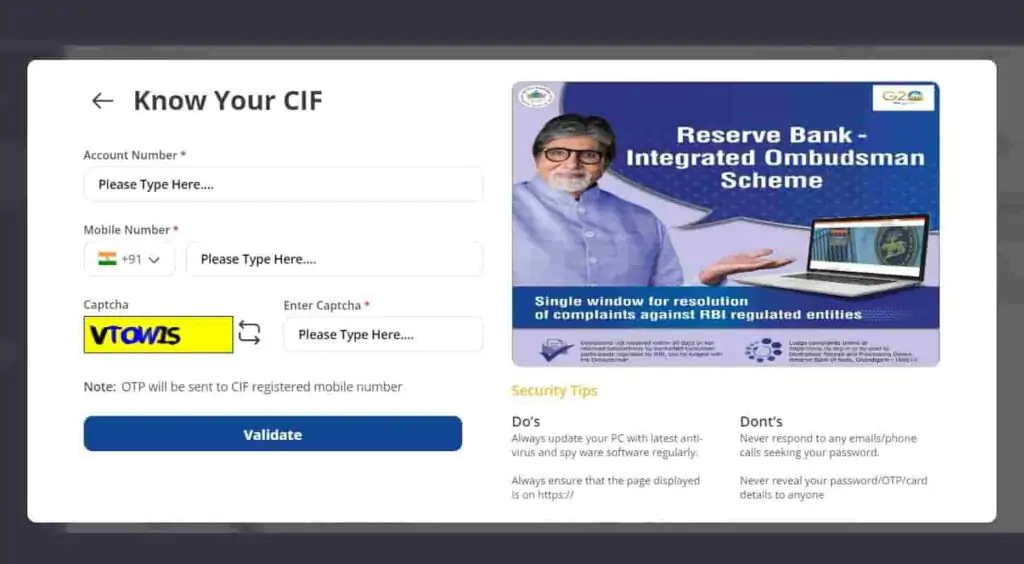
💻 Get CIF Through Indian Bank INDSmart Portal
- Open the official Indian Bank INDSmart Portal
- Tap on “INDSmart Login”
- Select “Register New User”
- Choose “Know Your CIF”
- Enter your:
- Indian Bank account number
- Registered mobile number
- Complete captcha verification and tap Validate
- Enter the OTP received on your mobile number
- Your CIF number will appear on the screen after successful verification
⚠️ Important: Use only the latest INDSmart portal for CIF recovery. Older Indian Bank net banking pages may not support this feature properly.
💻 Already Using INDSmart? Log in and open Profile Settings → Edit Details to check your CIF number directly.
You may also find the CIF printed in the header section of your account statement.
📄 Other Places Where CIF Is Available
| Document | Where CIF Is Available |
|---|---|
| Passbook | Front page or customer details section |
| Cheque Book | Sometimes printed on the first page |
| Welcome Kit | Account opening documents |
| Statement PDF | Top or header section |
💡 Helpful Tip: Indian Bank servers may respond slowly during busy hours. Avoid refreshing repeatedly while the page is loading.
Many users report smoother access through Chrome on Android and Safari on iPhone.
Check below: If the portal is not working, you can also use the Indian Bank mobile app or contact customer care for CIF recovery support.
1. Find via Indian Bank IndSMART Mobile App
In 2024–2025, Indian Bank officially replaced the old IndOASIS app with the new IndSMART Mobile Banking App.
The new app is faster, more secure, and available on both Android and iPhone. It also allows users to retrieve their Customer ID directly from the app.
- Simply, go to the Play Store or App Store and install the Latest IndSmart App.
- Open a New indian mobile banking app and accept the terms.
- Tap on the register for the first-time user.
- Select the “Forget CIF” option.
- Enter your account number and registered mobile number.
- Enter the 6-digit OTP you receive on your phone.
- Your Customer ID will be shown on-screen. Copy or write it for future use.
Already Logged In? Find CIF Inside the App
If you already use the IndSMART app, finding your (Cust ID) is even easier:
- Open the app and log in using MPIN or fingerprint
- Tap on “Account Details” below your balance
- Select your account number
- Tap “View More”
- Your CIF will appear as:
- Primary CIF, or
- Customer ID
2. Indian Bank mPassbook Statement
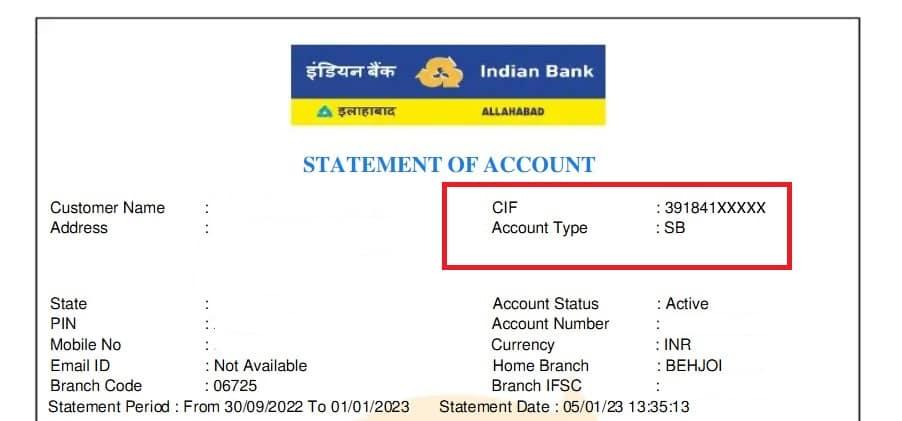
Indian Bank has removed the separate mPassbook app, but the feature is still available inside the new IndSMART app. Your digital passbook PDF also contains your CIF number.
Follow these steps to find it:
- Open the IndSMART App and log in
- Tap on “mPassbook” below your account balance
- Select your bank account and statement month
- Tap the Download PDF icon.
- Open the downloaded statement PDF.
- The PDF password is your full bank account number.
- Once opened:
- Scroll to the top section of the statement
- Your CIF number is usually printed below the bank logo or customer details
Tip: If the PDF does not open, make sure you entered the complete account number without spaces.
3. Lost Passbook? Retrieve Your Indian Bank CIF Number Offline
1. Indian Bank Customer Helpline
If you lost your documents and want direct help from the bank, you can contact Indian Bank customer support.
- National Toll-Free Number: 18001700
- Availability: 24/7 IVR support
- Best Time to Talk to Executive: 9 AM to 6 PM on working days
- Keep These Details Ready for Verification:
- Last few digits of your account number
- Mother’s name
- Date of birth or PAN details
Once verification is completed, the bank representative will provide your CIF number or guide you on the secure retrieval process.
2. Visit the Nearest Indian Bank Branch
If none of the online methods work, simply visit your nearest Indian Bank branch for direct help.
Carry these documents with you:
- PAN card, Aadhaar card, or any government-issued ID proof
- Your account number (if remembered) or debit card
- Supporting documents like Driving License or Passport
- Indian Bank passbook (if available)
After verification, the bank staff will help you retrieve your CIF number securely.
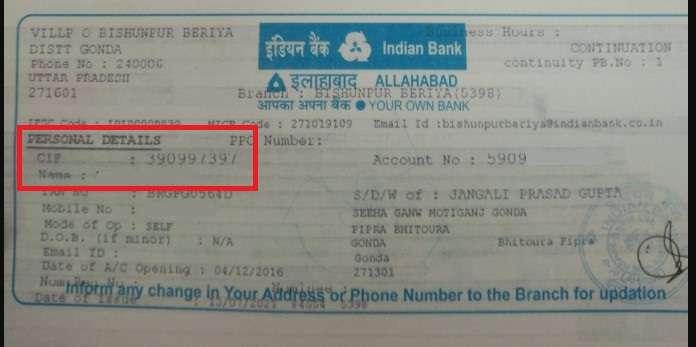
Pro Tip: If your passbook is lost or the CIF number is not printed properly, request a new passbook. Indian Bank usually prints the CIF automatically in newly issued passbooks.
Understanding Your CIF Number
CIF stands for Customer Information File. It’s also known as a customer ID, which is a unique number assigned to each customer, not each account.
It’s not the same as an account number — instead, it ties together all your relationships with the bank.
Let’s say you have a savings account, a fixed deposit, and a credit card with Indian Bank — all these are tied together using your single CIF number.
1. How Many Digits Are in a Indian Bank CIF?
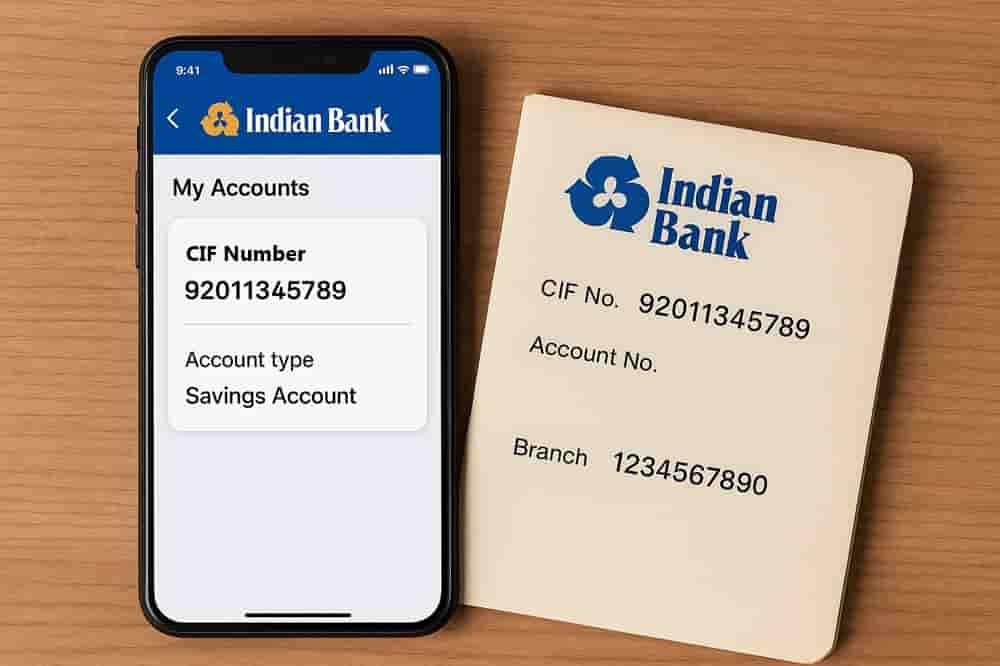
In most cases, an Indian Bank CIF number contains 11 digits, for example: 92011345789. However, some customers may have a CIF number between 6 and 12 digits due to older banking systems or account creation policies followed at the time.
2. Why Does Indian Bank Use CIF?
Allahabad Bank merged with Indian Bank on April 1, 2020, making it the seventh-largest public sector bank in India with a Revenue of ₹71,225 crore (~US$8.4 billion) in 2025, and the bank serves more than 100 million customers across the country and NRI.
Now, with over 100 million accounts to manage, the bank must keep track of each customer’s data in an organised way and ensure easy banking. This is where CIF comes in. It stores all your data, such as KYC, transactions, services used, and communication history.
3. New CIF After Allahabad Bank Merger?
After the 2020 merger of Allahabad Bank with Indian Bank:
- Most customers retained their original CIF
- In some cases, a new Customer ID was issued when systems were integrated
If your login doesn’t work or you see a mismatch, contact your branch to confirm your current CIF.
Frequently Asked Questions
Can I get the Indian Bank CIF number via SMS directly?
No, for now, there is no direct SMS banking method to recover your CIF via SMS. But you can view or receive it via SMS through net banking.
Where Else Can You Find Your Indian Bank CIF offline without visiting the branch?
Check your old passbook, usually printed on the first page, near the account info and a Stamp from the bank. Furthermore, try a chequebook, a Welcome letter, a credit card kit, and any older physical duplicate statement copies you have.
Is the Indian Bank CIF number the same for savings and FD accounts?
Yes. One CIF links all your relationships with Indian Bank, including savings, fixed deposits, loans, and other services. Your credit card or any personal loan also comes in it to track it.
Can two joint account holders have different CIF numbers?
Yes. Each joint holder has their own CIF. The account is linked to multiple CIFs, but one primary CIF is usually marked for operations.
Does the CIF number change if I change my branch or city?
No. Your CIF remains the same even if you transfer your account to another branch or relocate to a different city.
Is CIF required for pension or government benefit accounts?
Yes. Pension, DBT, and government scheme accounts are also linked to CIF for identity verification and benefit tracking.
What happens to CIF after closing all accounts in the Indian Bank?
Your CIF stays in the bank’s records but becomes inactive. If you open a new account later, the same CIF may be reactivated.
Can CIF be blocked or frozen by the Indian bank?
Yes. CIF can be restricted if KYC is incomplete, documents expire, or suspicious activity is detected. Updating KYC usually restores access.
Is CIF required to activate Indian Bank debit card?
In many cases, yes. CIF is used during net banking or mobile banking registration, which is required for debit card PIN generation.
Can CIF be misused if someone else knows it?
On its own, CIF is not enough for fraud. But combined with account details or OTP access, it can be risky. Keep it confidential.
Hope you liked the content. Explore smart options below 👇
🔥 Recommended